

Introduction
Welcome
Welcome to the CINX API Documentation site
CINX is a platform product from Harrison Publishing House (HPH) serving the construction industry in North America.
The CINX API provides access to building material information, construction project information, and material transactions exchanged with product vendors.
The API requires a user to have a valid CINX account with an API subscription.
HPH will be pleased to work with any developer seeking to utilize the API. Please email us at: support@cinx.com
REST API
CINX REST API General Information
JSON formatted response
{
  "start_time": 1411574224.8083,
  "response": {
    "status_code": 200,
    "message": "OK",
    "record_count": 1,
    "server_response_time": 0,
    "total_elapsed_time": 0.02492094039917,
    "total_count": 0
  },
  "rows": []
}
XML formatted response
<cinx_api>
  <start_time>1414436492.2267</start_time>
  <response>
    <status_code>200</status_code>
    <message>OK</message>
    <record_count>2</record_count>
    <server_response_time>0</server_response_time>
    <total_elapsed_time>0.013047933578491</total_elapsed_time>
    <total_count>0</total_count>
  </response>
  <rows>
    <row>
    </row>
  </rows>
</cinx_api>
The CINX platform offers programmatic access to read and write data using REST web services and standard HTTP methods/verbs.
Authentication & Headers
HTTP Basic Authentication over HTTPS is used to control access to CINX platform resources.
With each API call, you’ll need to set request headers, including a CINX user’s email and password.
Account Authorization
CINX accounts are subscription based and have expiration dates. Accounts with expired subscriptions will not have access to CINX data.
API Server Paths
The production server is: https://api.cinx.com
The development server is: https://api.dev.cinx.biz
API Version
The CINX API is versioned. This documentation supports version 2.0 and higher. The API version will be added to the API server path and become part of the base URL.
API Token
The CINX API uses an API Token when submitting web service requests. The CINX API Token is retrieved from the subscription authorization API response. A company that has a CINX account must also be configured to permit API access before the API token will be returned in the authorization API response. The API token is valid for the duration of a company’s CINX subscription. The API token will be added to the base URL following the API Version number.
API Base URL
The CINX API Base URL is constructed from the components shown below:
- https://api.cinx.com/2.0/{api_token_value}/sub/
- https://api.dev.cinx.biz/2.0/{api_token_value}/sub/
API Response Formatting – Standard/JSON
All CINX API responses use a standardized format. By default, a JSON formatted response is provided. Please see below if you prefer XML.
The response object will contain meta data about the server’s response to the request.
The rows array will contain the query results.
API Response Formatting – XML
To receive an XML response, please add the following parameter to the URL: format=xml
Result Rows - Paging
For many HTTP GET requests you can use URL parameters to define the number of rows returned in the response. Valid input parameters are:
offset={number}
limit={number}
Documentation Notes
API Documentation Web Site Formating Notes
API URL References
The API calls documented on this site will contain two URL sections to assist in the construction of properly formatted URLs to be submitted to CINX.
URL PATTERN: This section defines the elements of the URL. Portions of the URL that will require variables to be inserted will be shown in curly braces.
URL SAMPLES: Each API call definition page will also contain at least one sample. The sample will be fully formatted.
THE SAMPLES WILL NOT DISPLAY A RESPONSE IF CLICKED. The samples are provided only for formatting verification purposes.
Developer Resources
Additional API Resources for Developers
Demo Site
A simple demo site has been created to demonstrate the implementation of commonly used API calls. The URL for the demo site is: https://www.dev.cinx.biz/cinxjs/
Javascript Library
A Javascript library has been created to support the implementation of the API. The library is hosted on Github and can be accessed via this URL: https://github.com/cinx-api/js-library
Email Support
Email questions to support@cinx.com
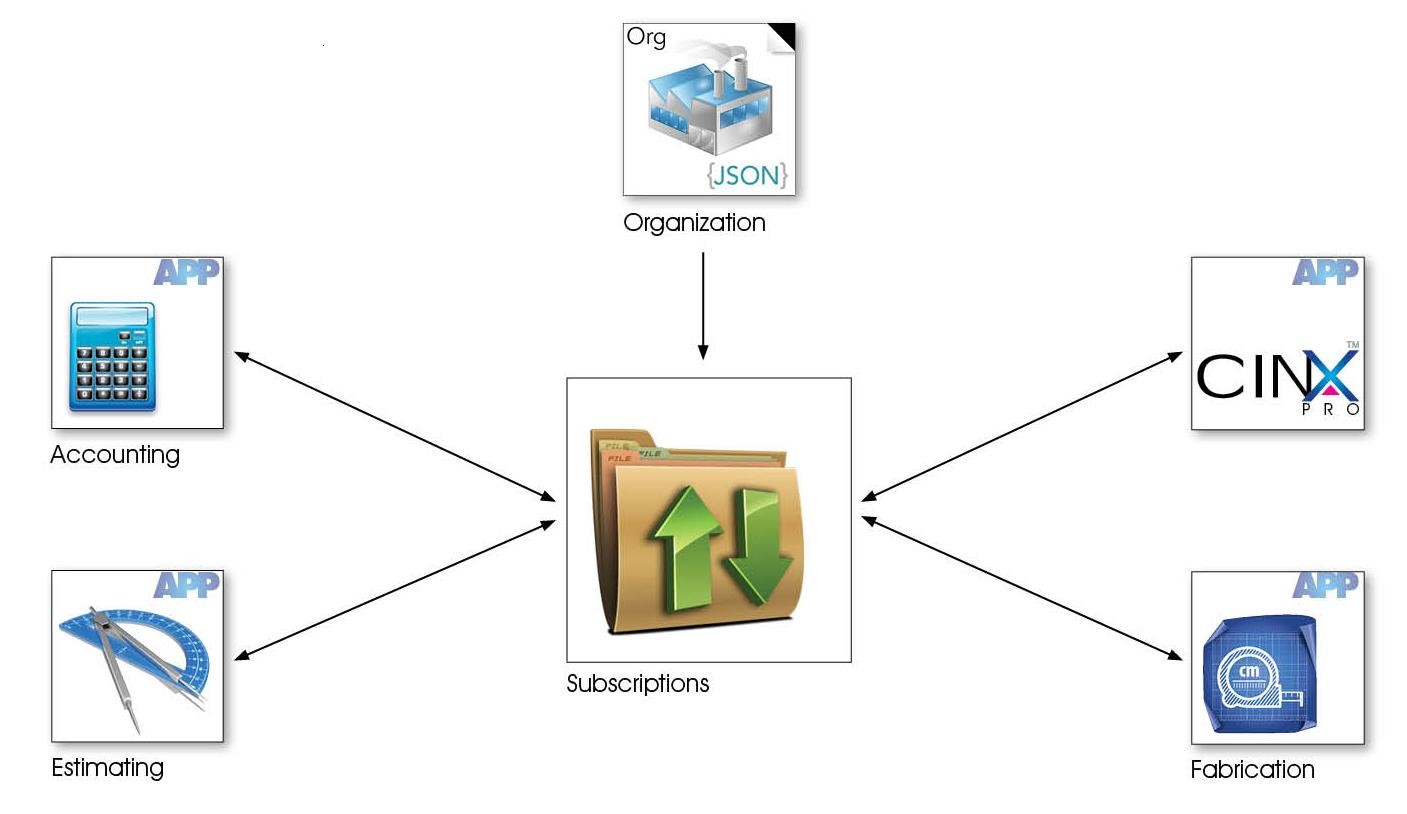
App/Sub Model
CINX Application/Subscription Model Introduction
A CINX customer (organization) has the opportunity to subscribe to different applications available on the platform. An application can be a grouping of pages and functionality on the CINX web site or external applications that consume content from CINX. Each application on the CINX platform has a unique identifier and a range of fields that define its attributes. When an organization subscribes to an application, a new unique identifier is created to link the application to the subscribing organization. This application id will be used in API calls to identify and grant access to requested data operations.
Data Sources
CINX Data Source Introduction
CINX supports different “catalogs” (databases) of content. Companies subscribing to CINX can have access to multiple catalogs of content. Here are some common catalogs in CINX:
- HPH Plumbing/Mechanical
- MCAA WebLEM
- PHCC Labor Units
Another catalog that each CINX company can use is a Private catalog. This catalog of content is specific to the subscribing company and can contain material items. These items can be copied from another catalog on CINX or manually entered/uploaded by the company.
Estimating systems, CAD/BIM software systems, and other software partners that utilize CINX content will also have a separate CINX Catalogs. This allows each system to have a specific set of items that CINX maintains.
A good way to visualize this concept is to open the Catalog drop-down in the CINX Search app. Here is a screen shot that shows a company that has access to many catalogs. Note: each company’s private catalog will be listed using the company’s name as registered in CINX.
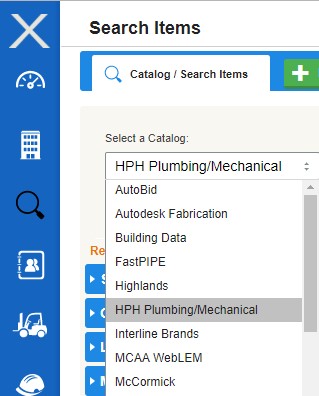
When working with the CINX API in conjunction with a company’s subscription a catalog is often named as Data Source in API responses.
App - Data Sources
CINX Application and Data Source Introduction
For software partner (external) applications that consume data from CINX there is an important attribute in the CINX subscription that defines which CINX catalog is used to acquire information for data outputs. This attribute is called a data source.
Importantly, a company can subscribe to an application multiple times provided that the data source is different. For example, a company using an industry estimating system may have CINX produce updates for different locations using different CINX Catalogs (data sources). One location may want standard list prices from the standard estimating database and another location may want update files to contain net buy prices based on their private catalog of content.
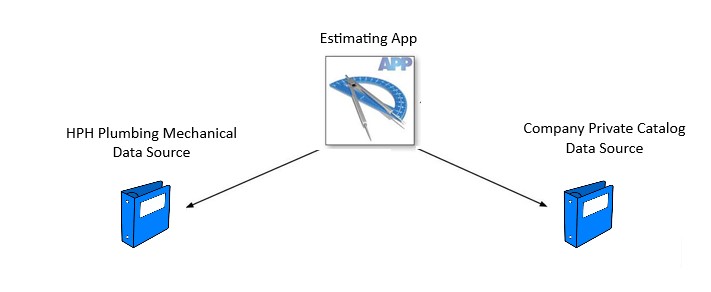
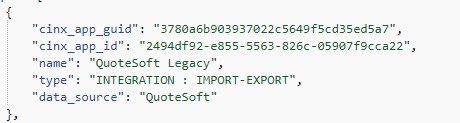
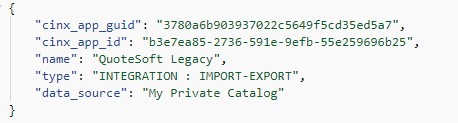
Please note that when working with the CINX Subscription/Authorization API response each combination of an application and a data source will be listed in separate blocks.
Below is a sample showing an App with two different data sources.
Data Source Name: Quotesoft
Data Source Name: My Private Catalog
Templates
CINX Data Object Templates
To assist developers in creating and modifying data objects on the CINX Platform, the API includes templates that define the data structure and provide other information that can be used to present data options to the end-user.
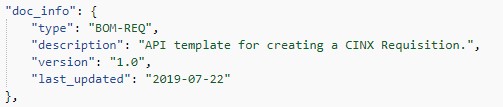
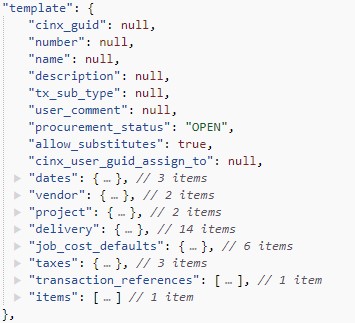
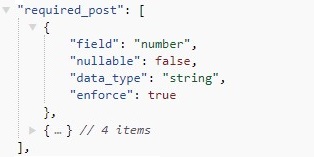
The templates are accessed via the API and use a standardized response structure containing the following data structures:
doc_info: identification and version info for the template
template: data structure that should be used when submitting a POST or PUT payload. Note: fields not used do not have to be submitted.
required_post: defines required fields when a POST is submitted.
required_put: defines required fields when a PUT is submitted
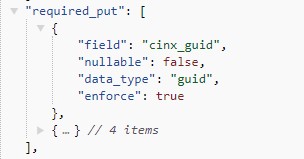
field_options: defines available options for data fields
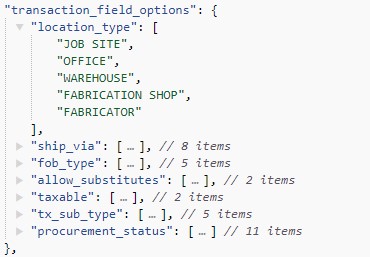
api_calls: lists related API calls. The URL in the response is fully formed with the proper API Token and other variables. The API calls will include the web service to POST/PUT the data and any calls that can be used to access data that can be populated in the template.

Auto-Numbering
CINX Object Auto-Numbering
CINX provides a subscribing company with the option of automating the numbering of common objects when new instances are created. These numbers are the public values used by the company to define the objects. These are NOT system level ids.
Objects on the CINX Platform that can be auto-numbered for contractors are:
- Vendors
- Customers
- Projects
- Requisitions
- RFQs (Request for Quotations)
- POs (Purchase Orders)
- Deliveries
- Returns
- Submittals
- Transmittals
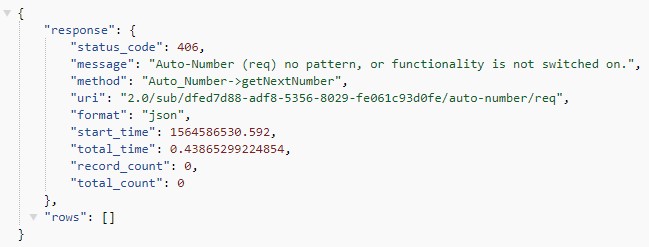
API calls for obtaining the next number for an object are provided and documented. Please note, that a number will only be provided if the company has activated the auto-numbering feature for the object. If the feature is not activated the API will return a 406 response.
Notes on other Transaction Numbering
- Purchase Order Change Orders are numbered by appending a numeric suffix the the original PO Number.
- Invoices use the Vendor Invoice number
PUT/POST Processing
PUT and POST Processing Options
By default some PUT and POST operations will be processed asynchronously. This is due to the fact that some transactions could include a large volume of items which could require longer processing times. These calls will be noted on the API Documentation pages.
If you would like to override the asynchronous default an optional URL parameter is provided. Using synchronous=1 in the URL will switch the processing mode to be synchronous.
CINX Ids
CINX Platform Unique Ids
The CINX platform stores many Ids for different object types from different sources. For example, an item on a PO may have Ids defined by the customer, vendor, and product manufacturer.
To clearly define CINX System Ids in API responses, the CINX Ids will be positioned at the top of response for the requested object. They will in most cases be named cinx_guid.

If a response contains child JSON objects or arrays that list multiple CINX Ids, then the CINX Id will contain the name of the object being referenced.
Commerce GUIDs
CINX Commerce Relationship GUIDs
When a relationship between the two parties is created in CINX, a new document that links the two parties is created. Examples relationships include:
- A contractor (customer) has a CINX relationship with a product wholesale distributor (vendor) that deliver products used in a project.
- A building owner (customer) has a CINX relationship with a contractor (vendor) that completes a job.
The relationship document allows for the storage of important parameters that are required to deliver and process transactions, submittals, and other communications. This relationship is also assigned a new CINX GUID. This new Id is therefore used by the API as a URL parameter when fetching and updating relationship data. To clearly differentiate the Commerce GUID from a GUID assigned to an individual company (org), the API uses a different naming convention.
The Commerce GUIDs in API responses and requests will be named cinx_commerce_guid.

NULL Values
Submitting NULL values
When a NULL value is submitted in a PUT or POST request, any existing value in the data field will be replaced with a NULL. Please see the CINX demo for code to strip fields with NULL values before they are submitted to the API. However, please use caution if you implement code to remove NULLs as this is the only method for deleting an existing value.
Please see the External Refs and Attributes sections below for information regarding removing values in those arrays.
External Refs
CINX External References
To assist in the exchange of data between systems, CINX supports external references for most object types.
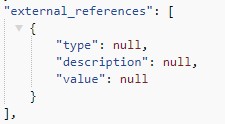
A common use for an external reference is a system id from a non-CINX application. The API supports setting and modifying of these references using a three-field array structure:
Processing Notes
- To update the value of an existing external reference, submit the existing type with the revised value
- To remove an external reference submit the type with a NULL or empty string in the value field
- If a new external reference is submitted without a type or value it will not be saved
Attributes
CINX Attributes
Attributes are also used to assist in the exchange of data between systems. Similar in concept to an external reference, attributes are intended to provide API users the ability to set and retrieve values relevant to another system.
In the API, attributes are used on objects that do not have external references. An important example is a BOM-ITEM.
The API supports setting and modifying of attributes using a two-field array structure:
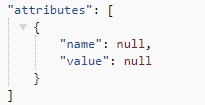
Processing Notes
- To update the value of an existing attribute, submit the existing type with the revised value
- To remove an attribute submit the type with a NULL or empty string in the value field
- If a new attribute is submitted without a type or value it will not be saved
User Auth
User Auth
API Endpoint - User Subscription/Authorization
//Using cinx-api.js
var cinxApi = new CinxApi();
cinxApi.setCredentials('CINX USERNAME', 'CINX PASSWORD');
cinxApi.setApiPathAndVersion('https://api.cinx.com', '2.0');

cinxApi.getSubscriptions()
    .then(function(response) {
        console.log(response);
    });
The above code returns JSON structured like this:
{
    "response": {},
    "rows": [
        {
            "cinx_api_token": "dfed7d88-adf8-5356-8029-fe061c93d0fe",
            "user": {
                "cinx_user_guid": "185aabe1-3487-5f59-9ad5-c577a76bd392",
                "first_name": "Will",
                "middle_name": "",
                "last_name": "Stone",
                "suffix": ""
            },
            "org": {
                "cinx_org_id": "org-0001-4030",
                "name": "WTS Mechanical -DEV"
            },
            "subscription": {
                "status_code": 200,
                "status_message": "OK",
                "status_message_reason": null,
                "start_date": "2017-10-20",
                "end_date": "2025-11-19",
                "catalog_ref": "c5919ab5-68e4-580a-ae1e-9f748abfb223",
                "apps": [
                    {
                        "cinx_app_guid": "3780a6b903937022c5649f5cd391744e",
                        "cinx_app_id": "d217f7b7-ef49-5ae1-adf3-3765160725a4",
                        "name": "Integrated Price Updates",
                        "type": "INTEGRATION : IMPORT-EXPORT",
                        "data_source": "My Private Catalog"
                    }
                ]
            }
        },
        {
            "cinx_api_token": "fde79d15-0a1b-5d51-a665-7b87ed341711",
            "user": {
                "cinx_user_guid": "185aabe1-3487-5f59-9ad5-c577a76bd392",
                "first_name": "Will",
                "middle_name": "",
                "last_name": "Stone",
                "suffix": ""
            },
            "org": {
                "cinx_org_id": "org-0001-4032",
                "name": "Alpine Mechanical"
            },
            "subscription": {
                "status_code": 401,
                "status_message": "Unauthorized",
                "status_message_reason": "Subscription expired on [2017-11-22]",
                "start_date": "2017-10-23",
                "end_date": "2017-11-22",
                "catalog_ref": "d4r19ab5-68e4-580a-ae1e-9f748abfb223",
                "apps": [
                    {
                        "cinx_app_guid": "308-599736-f129d818-ca871bfb90-350af7",
                        "cinx_app_id": "f5e9f665-1239-5a1e-8c01-7afda01d6e3d",
                        "name": "Autodesk Fabrication Add-In",
                        "type": "INTEGRATION : IMPORT-EXPORT",
                        "data_source": "My Private Catalog"
                    }
                ]
            }
        }
    ]
}
GET
This endpoint will be used to get the applications/subscriptions that the user is authorized to access. The response will also contain account status and CINX Ids required to make additional API calls.
Notes
- A User can be associated with multiple companies (orgs). In this case, their will be multiple Rows in the response.
- If a User account is expired, the status_code in the subscription object will be 401.
- For additional information about working with this response see this page Auth Response
URL Pattern: {api path}/{api version}/subs
URL Sample: https://api.cinx.com/2.0/subs
RESPONSE FIELDS
| Field Name | Description |
|---|---|
| cinx_api_token | Company-specific API token value that will be used in the URL of other CINX API calls. Token is valid for the duration of a company’s CINX subscription. Tokens will be different on the two different CINX servers (Dev and Production). |
| user.cinx_user_guid | CINX unique Id for the user. |
| user.first_name | User's first name. |
| user.middle_name | User's middle name. |
| user.last_name | User's last name. |
| user.suffix | User's name suffix. |
| org.cinx_org_id | CINX unique Id for the company/organization. |
| org.name | Name of the company/organization. |
| subscription.status_code | Status code for the subscription. Potential values are 200 and 401. |
| subscription.status_message | Message relating to the status code. Potential values are OK or Unauthorized. |
| subscription.status_message_reason | Reason for the status code. If the account is expired the account expiration date will be provided. |
| subscription.start_date | Start date of the company's subscription. |
| subscription.end_date | Expiration date of the company's subscription. |
| subscription.catalog_ref | Reference Id to the orgnaization's private catalog. |
| apps.cinx_app_guid | System constant value that is used to identify an application within the CINX platform. If you are a software company that requires data access to a specific catalog of content, a CINX app will be created and you will be provided the cinx_app_guid so that you can query the response for instances of your app. |
| apps.cinx_app_id | Unique value that links a subscribing CINX company/org to the application. This value will be required when making API calls to access content. |
| apps.name | Name of the application. |
| apps.type | CINX application type. Current CINX App types include Integration (interactions with other software systems) and Data-Source (catalog of content). |
| apps.data_source | Name of the source of the item content that will be used to create content update files (price updates). |
View
- token: returns the API Token and a smaller set of important data.
Auth Response
Working with the GET User Subscription/Auth API Response
The Subscription/Authorization API response will provide the necessary information to make subsequent API requests.
Please keep the following CINX Platform attributes in mind as you begin to work with the Subscription response:
- A User may be associated with more than one company (multiple Orgs in the CINX subscription result)
- An Org can subscribe to multiple catalogs of content
- An Org might have multiple subscriptions to a single App (the data for the App coming from different sources)
- A User may use a CINX Addin for multiple partner applications on the same computer
- Objects in the CINX Platform are assigned Unique Ids that will be required API URL elements
The JSON response uses the following structure:
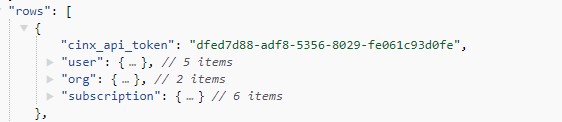
Each Row array of the response will correspond to an Org to which the user is a member and will contain the following components:
CINX API Token: Token that will be used in API calls to access and insert data.
User: provides basic information about the user and his/her CINX Unique Id.
Org: basic information that can be used to identify a registered CINX org.
Subscription: defines the org’s subscription status which controls access to the API.
Subscription [Apps]: an array of applications that the org currently subscribes to and can access using the API. The structure of an app object is governed by its Type. Current CINX App types include Data-Source (catalog of content) and Integration (interactions with other software systems). The contents of this array will only be used if your app needs to access content of a specific CINX Data Source in a pre-defined data format. For example, price updates for an estimating system database.
The following sections contain important information about using the API and the CINX Unique Ids that will be required for making API calls.
Does the subscription response contain a CINX API Token? A CINX API Token is required to grant programmatic access to content on the CINX Platform. The API Token will appear at the top of the response object in a field named cinx_api_token. If there is not a value in this field, then access to content will be denied. A user can contact HPH, to have the necessary account modification made to allow for the generation of the token.

Is the subscription active? API-based access to CINX will also be controlled by the org’s subscription status. You will need to verify that the subscription is active. This is done by checking the subscription object of the response.
If the subscription is active the response will have the following information:
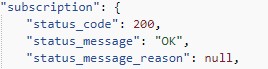
What is the user’s CINX Unique Id? The CINX User Unique Id (GUID) will be required by some API requests. These requests will generally be ones in which new information is created or existing content is updated.

Will you need to access price updates or other item content stored in a CINX Catalog in a specific pre-defined format?
The Apps array within the Subscription object in the response will provide a list of applications to which the org has subscribed.
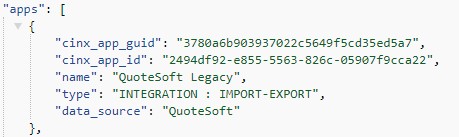
The cinx_app_guid is a constant value that is used to identify an application within the CINX platform. If you are a software company that requires data access to a specific catalog of content, a CINX app will be created and you will be provided the cinx_app_guid so that you can query the response for instances of your app.
The cinx_app_id is a unique value that links a subscribing CINX org to your application. This value will be required when you are making API calls to access content.
The data_source name value will define the source of the item content that will be used to create content update files (price updates). For more information about the relationship between and app and a data source, please review the CINX Applications and Data Source page.
Org/Company
Org Definition
CINX Object Definition - Organization
An Organization in CINX defines a company or grouping of individuals (residential customers) that participate or is referenced on the platform.
Dependencies and Business Rules
- Must be created by a CINX user
Supported API Services
- Get an Org's Details
- Get an Org's List of Users
- Get an Org's List of Locations/Addresses
- Get an Org's List of Customer Types
- Get an Org's List of Vendor Types
- Get an Org's List of Project Types
- Get an Org's List of Invoice Dispute Reasons
- Get an Org's List of Return Reasons
- Get an Org's List of Return Actions
The above list is intended to represent the API endpoints related to an Org and it core entities and references. There are many other org-related endpoint types documented on this site. For example, an Org's Vendors, Projects, and Transactions.
Get Org Details
API Endpoint - Get an Organization's Details
The above code returns JSON structured like this:
{
    "response": {},
    "rows": [
        {
            "is_hidden": "0",
            "is_private": "0",
            "role_primary": "CONTRACTOR",
        }
    ]
}
GET
This endpoint will be used to get company’s CINX organization details.
URL Pattern: {api path}/{api_version}/sub/{api_token}/org
URL Sample: https://api.cinx.com/2.0/sub/dfed7d88-adf8-5356-8029-fe061c93d0fe/org
OPTIONAL URL PARAMETERS
| Parameter Name | Description | Value Type or Options |
|---|---|---|
| format | Defines the response format type. If not specified, json will be used. | json, xml |
Org Users
API Enpoint – Get an Organization's List of Users
//Using cinx-api.js
var cinxApi = new CinxApi();
cinxApi.setCredentials('CINX USERNAME', 'CINX PASSWORD');
cinxApi.setApiPathAndVersion('http://api.dev.cinx.biz', '2.0');

cinxApi.getOrgUsers(cinx_api_token)
    .then(function(response) {
        console.log(response);
    });
The above code returns JSON structured like this:
{
    "response": {},
    "rows": [
        {
            "id": "4a23ff84-9d61-5ab3-95c9-3870cb2727bd",
            "name": "Karl Stone",
            "last_first": "Stone, Karl",
            "email": "karlstone@cinx.com",
            "cinx_role": "Administrator"
        },
        {
            "id": "185aabe1-3487-5f59-9ad5-c577a76bd392",
            "name": "Will Stone",
            "last_first": "Stone, Will",
            "email": "willstone@cinx.com",
            "cinx_role": "Administrator"
        }
    ]
}
GET
This endpoint will be used to get a company’s list of CINX users. The response of this API call will contain the CINX Id for each user.
URL Pattern: {api path}/{api_version}/sub/{api_token}/users
URL Sample: https://api.cinx.com/2.0/sub/dfed7d88-adf8-5356-8029-fe061c93d0fe/users
OPTIONAL URL PARAMETERS
| Parameter Name | Description | Value Type or Options |
|---|---|---|
| format | Defines the response format type. If not specified, json will be used. | json, xml |
Org Locations/Addresses
API Endpoint – Get an Organization's List of Locations/Addresses
//Using cinx-api.js
var cinxApi = new CinxApi();
cinxApi.setCredentials('CINX USERNAME', 'CINX PASSWORD');
cinxApi.setApiPathAndVersion('http://api.dev.cinx.biz', '2.0');

cinxApi.getOrgAddresses(cinx_api_token)
    .then(function(response) {
        console.log(response);
    });
The above code returns JSON structured like this:
{
    "response": {},
    "rows": [
        {
            "guid": "4e1877b6-b485-5be6-9544-80bd2749d5e2",
            "type": "SHIPPING",
            "desc": "Littleton Fab Shop",
            "address1": "995 Industrial Park Road",
            "address2": "Building 2",
            "address3": "Suite 3",
            "country": "USA",
            "city": "Littleton",
            "state": "NH",
            "postal_code": "03561",
            "latitude": "",
            "longitude": ""
        }
    ]
}
GET
This endpoint will be used to get a company’s list of location types and their addresses. This list will be used when creating material transactions that require delivery to a specific location.
URL Pattern: {api path}/{api_version}/sub/{api_token}/addresses
URL Sample: https://api.cinx.com/2.0/sub/dfed7d88-adf8-5356-8029-fe061c93d0fe/addresses
OPTIONAL URL PARAMETERS
| Parameter Name | Description | Value Type or Options |
|---|---|---|
| format | Defines the response format type. If not specified, json will be used. | json, xml |
Get Customer Types
API Endpoint – Get an Organization’s List of Customer Types
The above code returns JSON structured like this:
{
    "response": {},
    "rows": [
        "Industrial",
        "Commercial",
        "Medical",
        "Residential",
        "Hospitality"
    ]
}
GET
This endpoint will be used to get a company’s list of their Customer Types. In CINX, each company can define how it would like to classify its customers.
URL Pattern: {api path}/{api_version}/sub/{api_token}/org-refs/types/customers
URL Sample: https://api.cinx.com/2.0/sub/dfed7d88-adf8-5356-8029-fe061c93d0fe/org-refs/types/customers
OPTIONAL URL PARAMETERS
| Parameter Name | Description | Value Type or Options |
|---|---|---|
| format | Defines the response format type. If not specified, json will be used. | json, xml |
Get Vendor Types
API Endpoint – Get an Organization’s List of Vendor Types
The above code returns JSON structured like this:
{
    "response": {},
    "rows": [
        "PVF",
        "Fixtures",
        "Hardware",
        "Office Supplies",
        "Equipment"
    ]
}
GET
This endpoint will be used to get a company’s list of their Vendor Types. In CINX, each company can define how it would like to classify its vendors.
URL Pattern: {api path}/{api_version}/sub/{api_token}/org-refs/types/vendors
URL Sample: https://api.cinx.com/2.0/sub/dfed7d88-adf8-5356-8029-fe061c93d0fe/org-refs/types/vendors
OPTIONAL URL PARAMETERS
| Parameter Name | Description | Value Type or Options |
|---|---|---|
| format | Defines the response format type. If not specified, json will be used. | json, xml |
Get Project Types
API Endpoint – Get an Organization’s List of Project Types
The above code returns JSON structured like this:
{
    "response": {},
    "rows": [
        "New Construction",
        "Tenant Fit-Up",
        "Service"
    ]
}
GET
This endpoint will be used to get a company’s list of their Project Types. In CINX, each company can define how it would like to classify its projects.
URL Pattern: {api path}/{api_version}/sub/{api_token}/org-refs/types/projects
URL Sample: https://api.cinx.com/2.0/sub/dfed7d88-adf8-5356-8029-fe061c93d0fe/org-refs/types/projects
OPTIONAL URL PARAMETERS
| Parameter Name | Description | Value Type or Options |
|---|---|---|
| format | Defines the response format type. If not specified, json will be used. | json, xml |
Get Dispute Reasons
API Endpoint – Get an Organization’s List of Invoice Dispute Reasons
The above code returns JSON structured like this:
{
    "response": {},
    "rows": [
        {
            "guid": "a9d3277e-6417-5458-98a6-08de16fa7c1b",
            "code": "01-item",
            "name": "Item Level Issue"
        },
        {
            "guid": "75ebe888-4649-50f5-9ccb-08ee82f801c6",
            "code": "02-badterm",
            "name": "Incorrect Terms"
        }
    ]
}
GET
This endpoint will be used to get a company’s list of their Invoice Dispute Types. In CINX, each company can define the list of reasons it can use to identify a dispute on an invoice. Dispute reasons can be at the transaction level and also on individual items. The company can define a code and name for the dispute reasons.
URL Pattern: {api path}/{api_version}/sub/{api_token}/org-refs/invoices/dispute-reasons
URL Sample: https://api.cinx.com/2.0/sub/dfed7d88-adf8-5356-8029-fe061c93d0fe/org-refs/invoices/dispute-reasons
OPTIONAL URL PARAMETERS
| Parameter Name | Description | Value Type or Options |
|---|---|---|
| format | Defines the response format type. If not specified, json will be used. | json, xml |
Get Return Reasons
API Endpoint – Get an Organization’s List of Return Reasons
The above code returns JSON structured like this:
{
    "response": {},
    "rows": [
        {
            "guid": "36502c12-9e1b-56c8-a788-323c51b17a1f",
            "code": "21-damage",
            "name": "Damaged"
        },
        {
            "guid": "57d44251-1b29-5882-bedb-ac59fdc6b90a",
            "code": "22-item",
            "name": "Wrong Product"
        }
    ]
}
GET
This endpoint will be used to get a company’s list of their Return Reasons. In CINX, each company can define the list of the reasons it will return materials. The company can define a code and name for each reason.
URL Pattern: {api path}/{api_version}/sub/{api_token}/org-refs/returns/reasons
URL Sample: https://api.cinx.com/2.0/sub/dfed7d88-adf8-5356-8029-fe061c93d0fe/org-refs/returns/reasons
OPTIONAL URL PARAMETERS
| Parameter Name | Description | Value Type or Options |
|---|---|---|
| format | Defines the response format type. If not specified, json will be used. | json, xml |
Get Return Actions
API Endpoint – Get an Organization’s List of Return Actions
The above code returns JSON structured like this:
{
    "response": {},
    "rows": [
        {
            "guid": "f51cc612-1f47-5f74-b47a-088e2f47d207",
            "code": "41-replace",
            "name": "Replace Item"
        },
        {
            "guid": "31e27fdd-c231-5521-8536-1cb22493db74",
            "code": "42-credit",
            "name": "Credit Account"
        }
    ]
}
GET
This endpoint will be used to get a company’s list of their Return Actions. In CINX, each company can define the list of the actions it would like the vendor to use when processing the return. The company can define a code and name for each action.
URL Pattern: {api path}/{api_version}/sub/{api_token}/org-refs/returns/actions
URL Sample: https://api.cinx.com/2.0/sub/dfed7d88-adf8-5356-8029-fe061c93d0fe/org-refs/returns/actions
OPTIONAL URL PARAMETERS
| Parameter Name | Description | Value Type or Options |
|---|---|---|
| format | Defines the response format type. If not specified, json will be used. | json, xml |
Catalog
Catalog Definition
CINX Object Definition - Private Catalog
A CINX catalog is a collection of items grouped together in a CINX database structure. Catalogs may contain construction materials, sub-contract services, rental equipment, and other content necessary for the execution of a construction project or maintenance of a building.
Every CINX organization can have their own private catalog that can be accessed by the organization's users in the CINX user interface or via the API. A private catalog can be populated by copying items from a CINX public catalog (HPH) or by creating new private items. Private items will not be linked to an HPH item and therefore will have to be managed and updated by the organization.
With a CINX private catalog, an organization can:
- create a hierarchy classification system to group items
- create their own product identifiers and descriptions for items
- manage different pricing levels
- create exports and update files for different software systems
Catalog Lines
Each organization can create its own hierarchy system used to classify and group items together. This hierarchy system is called Lines. The CINX Line system allows a company to create as many levels as needed to group their items. The highest level of lines are named the root level lines in this API documentation. Children lines are those that are linked to a higher level line. The line API responses contain line children counts, this will allow you to determine if you are at the bottom level of the hierarchy. The response will also contain a count of items that belong to that level of the hierarchy.
Catalog Manufacturers
Each private catalog line can be linked to a manufacturer. A manufacturer is the company that produces the item. If the private catalog is copied from a CINX public catalog item, then the API can report information regarding that manufacturer. Using the Manufacturer name is often a convenient way to navigate the items in a catalog. This API provides several API calls to work with manufacturer information related to the items in the organization's private catalog.
Manufacturer Price Sheet Types
In construction sub-contracting trades it is common for product manufacturers to publish price sheets. A price sheet will contain a grouping of products and their corresponding prices. Some manufacturers publish multiple price sheets. It is relatively common for a manufacturer to have separate price sheets for products that are produced for a similar base material (Wrot copper fittings) or have different price sheets for the type of end product (Ball Valves). The CINX API refers to each type or version of the manufacturer price sheets as a Price Sheet Type.
Manufacturer Price Sheets
Manufacturers will frequently issue price sheet revisions with updated prices and product offerings. These revisions will be linked to a price sheet type and will normally have a price sheet number, name, and effective date that the prices will be implemented. In this API these individual instances of a price sheet type will be refereed to as Price Sheets.
Supported API Services
- Get Catalog Line Roots
- Get a Catalog Line Children
- Get a Catalog Line Items
- Get Catalog Manufacturers
- Get Manufacturer Price Sheet Types
- Get Price Sheet Instances
- Get Catalog Items Ids
- Get a Catalog Stats
Get Catalog Line Roots
API Endpoint – Get a Private Catalog's Line Root Levels
{
  "response": {},
  "rows": [{
    "cinx_guid": "268625fa-38cf-5085-9e08-89be31e395e7",
    "name": "(Unassigned)",
    "description": "All items not currently assigned to a specific LINE.",
    "image_url": "http://cdn.dev.cinx.biz/assets/org-0000-7413/image-hier-no-image.jpg",
    "has_children": false,
    "children_count": 0,
    "item_count": 8,
    "parent": {
      "cinx_guid": null,
      "name": null,
      "description": null
    }
  }]
}
GET
This endpoint will be used to get a listing of a company's private catalog root level line hierarchies.
URL Pattern: {api path}/{api_version}/sub/{api_token}/lines/roots
URL Sample: https://api.cinx.com/2.0/sub/dfed7d88-adf8-5356-8029-fe061c93d0fe/lines/roots
OPTIONAL URL PARAMETERS
| Parameter Name | Description | Value Type or Options |
|---|---|---|
| format | Defines the response format type. If not specified, json will be used. | json, xml |
Get Catalog Line Children
API Endpoint – Get a Private Catalog Line's Children Levels
{
  "response": {},
  "rows": [{
    "cinx_guid": "012773c1-d75c-50d8-b53d-7af936fb9311",
    "name": "Fittings - Compression",
    "description": "Fittings - Compression",
    "image_url": "https://cdn.cinx.com/assets/org-0000-0001/image-hier-no-image.jpg",
    "has_children": true,
    "children_count": 2,
    "item_count": 317,
    "parent": {
      "cinx_guid": "3cfc2cdf-c96a-5b00-a572-33d8f343f0c6",
      "name": "Copper",
      "description": ""
    }
  }]
}
GET
This endpoint will be used to get a listing of a private catalog line's children (child lines).
URL Pattern: {api path}/{api_version}/sub/{api_token}/line/{line_cinx_guid}/children
The line_cinx_guid is the CINX Id of the parent line.
URL Sample: https://api.cinx.com/2.0/sub/dfed7d88-adf8-5356-8029-fe061c93d0fe/line/3cfc2cdf-c96a-5b00-a572-33d8f343f0c6/children
OPTIONAL URL PARAMETERS
| Parameter Name | Description | Value Type or Options |
|---|---|---|
| format | Defines the response format type. If not specified, json will be used. | json, xml |
Get Catalog Line Items
API Endpoint – Get a Private Catalog's Items for a given Line
GET
This endpoint will be used to get a listing of a private catalog's items for a given line.
URL Pattern: {api path}/{api_version}/sub/{api_token}/line/{line_cinx_guid}/items
The line_cinx_guid is the CINX Id of the parent line.
URL Sample: https://api.cinx.com/2.0/sub/dfed7d88-adf8-5356-8029-fe061c93d0fe/line/3cfc2cdf-c96a-5b00-a572-33d8f343f0c6/items
OPTIONAL URL PARAMETERS
| Parameter Name | Description | Value Type or Options |
|---|---|---|
| view | Defines the level of content in the response. | compact, details, list-price |
| format | Defines the response format type. If not specified, json will be used. | json, xml |
| offset | Defines the offset to use when returning the items. | Integer |
| limit | Defines the number of results to include in the response. If not specified, 20 will be used. | Integer |
View
- compact: returns a small set of item information fields. This is the default view if one is not specified. Please see Compact View for a definition of the output.
- details: returns a comprehensive set of item information. Please see Details View for a definition of the output.
- list-price: returns the current list price and price sheet information for each item. Please see Details View for a definition of the output.
Line Item View - Compact
API Line Item Response View Definition - Compact
{
  "response": {},
  "rows": [{
    "cinx_guid": "b0f01d82-b996-11e0-b635-00137268a1bf",
    "availability_status": "A",
    "size": "1\"",
    "category": "Copper Fittings & Flanges",
    "sub_category": "Pressure Wrot-Solder",
    "hph_code": "012NI0018",
    "org_item_id": null,
    "org_system_id": null,
    "mfr_part_number": "607",
    "description": "1\" WROT CXC 90 ELBOW",
    "mfr_name": "NIBCO, Inc.",
    "mfr_list_price": 18.11,
    "price_uom": "E"
  }]
}
When requesting the items for a catalog line from the CINX API there are three view options.
The table below defines the fields output using the compact view option.
Line Item View - Details
API Line Item Response View Definition - Details
{
  "response": {},
  "rows": [{
    "cinx_guid": "b0f01d82-b996-11e0-b635-00137268a1bf",
    "availability_status": "A",
    "size": "1\"",
    "category": "Copper Fittings & Flanges",
    "sub_category": "Pressure Wrot-Solder",
    "item_ids": {
      "hph_code": "012NI0018",
      "org_item_id": null,
      "org_system_id": null,
      "mfr_part_number": "607",
      "mfr_order_number": "9055750",
      "upc": "039923312969",
      "gtin": "00039923312969"
    },
    "descriptions": {
      "org": null,
      "cinx_long": "1\" WROT CXC 90 ELBOW",
      "cinx_short": "1 WROT CXC 90 ELL",
      "mfr": null
    },
    "mfr": {
      "cinx_org_id": "org-0000-1411",
      "name": "NIBCO, Inc.",
      "name_short": "NIBCO",
      "status": "A"
    },
    "weight": {
      "weight": 0.177,
      "uom": "lb"
    },
    "image": {
      "url": "http://cdn.dev.cinx.biz/assets/org-0000-1411/5bd9c604de78090ebd153512.jpg",
      "mime_type": "image/jpg"
    },
    "spec_sheet": {
      "url": null,
      "mime_type": null
    },
    "mfr_list_price": {
      "cinx_price_sheet_guid": "3d4c7bfc-49b0-11e9-9891-00137268a1bf",
      "price": 18.11,
      "uom": "E",
      "effective_date": "2019-04-01",
      "price_sheet_number": "WROT-0419",
      "price_sheet_name": "Wrot Copper Fittings"
    },
    "org_prices": [],
    "labor_units": [{
        "cinx_guid": "1b99b258-f362-5127-a354-8a56e1593a21",
        "hph_labor_code": "L02PP11500005201",
        "source": "PHCC",
        "method": "per fitting",
        "description": "Piping/Process | Copper | 1000 Degree Alloy Braze | Elbow | 1\"",
        "joint_quantity": null,
        "base_unit": 0.57,
        "total_unit": 0.57,
        "uom": "HOUR"
      },
      {
        "cinx_guid": "f77b4ca3-1b04-55b3-89cf-a5ada9891f6a",
        "hph_labor_code": "L01FTCU032000022",
        "source": "MCAA",
        "method": "component",
        "description": "Piping Systems (Component Method) | Fittings | Copper | Pressure | Silver Solder Joint (Brazing with Flux) | 90 Elbow Long Radius | 1.0000 Dia. (in)",
        "joint_quantity": null,
        "base_unit": 0.75,
        "total_unit": 0.75,
        "uom": "HOUR"
      }
    ],
    "packaging": [{
        "type": "Master Pack",
        "upc": "039923312969",
        "gtin": "039923312969",
        "quantity": 100,
        "depth": null,
        "height": null,
        "width": null,
        "cube": null,
        "dimension_uom": null,
        "weight": null,
        "weight_uom": null
      }
    ]
  }]
}
When requesting the items for a catalog line from the CINX API there are three view options.
The table below defines the fields output using the details view option.
Line Item View - List-Price
API Line Item Response View Definition - List Price
{
  "response": {},
  "rows": [{
    "cinx_guid": "b0f01d82-b996-11e0-b635-00137268a1bf",
    "mfr_list_price": 18.11,
    "price_uom": "E",
    "effective_date": "2019-04-01",
    "price_sheet_type": "WROT COPPER",
    "price_sheet_number": "WROT-0419",
    "price_sheet_name": "Wrot Copper Fittings",
    "cinx_price_sheet_guid": "3d4c7bfc-49b0-11e9-9891-00137268a1bf"
  }]
}
When requesting the items for a catalog line from the CINX API there are three view options.
The table below defines the fields output using the list-price view option.
Get Catalog Manufacturers
API Endpoint – Get a Private Catalog's Manufacturers
{
  "response": {},
  "rows": [{
    "cinx_org_id": "org-0000-1698",
    "name": "Aegis Technologies, Inc.",
    "short_name": "Aegis",
    "logo": "http://cdn.dev.cinx.biz/assets/org-0000-1698/logo/030_0000-0000.JPG",
    "item_count": 235
  }]
}
GET
This endpoint will be used to get a listing of a company's private catalog manufacturers.
URL Pattern: {api path}/{api_version}/sub/{api_token}/mfrs
URL Sample: https://api.cinx.com/2.0/sub/dfed7d88-adf8-5356-8029-fe061c93d0fe/mfrs
OPTIONAL URL PARAMETERS
| Parameter Name | Description | Value Type or Options |
|---|---|---|
| format | Defines the response format type. If not specified, json will be used. | json, xml |
Get Price Sheet Types
API Endpoint – Get a Manufacturer's Price Sheet Types
{
  "response": {},
  "rows": [{
      "price_sheet_type_guid": "90f7b284-4b7b-11e1-9e73-00137268a1bf",
      "name": "Brass Fittings",
      "description": "Brass Fittings",
      "status": "A",
      "manufacturer": {
        "name": "Brass-Craft",
        "cinx_org_id": "org-0000-1074"
      }
    }
  ]
}
GET
This endpoint will be used to get a listing of a specific manufacturer's price sheet types.
URL Pattern: {api path}/{api_version}/sub/{api_token}/mfr/{mfr_cinx_org_id}/price-sheet-types
URL Sample: https://api.cinx.com/2.0/sub/dfed7d88-adf8-5356-8029-fe061c93d0fe/mfr/org-0000-1074/price-sheet-types
The mfr_cinx_org_id is the CINX Org Id for the manufacturer and can be obtained from the Get Mfrs API response.
OPTIONAL URL PARAMETERS
| Parameter Name | Description | Value Type or Options |
|---|---|---|
| format | Defines the response format type. If not specified, json will be used. | json, xml |
Get Price Sheets
API Endpoint – Get a Manufacturer Price Sheet Type's Price Sheets
{
  "response": {},
  "rows": [{
    "price_sheet_guid": "154dae84-2150-11e8-9eb7-00137268a1bf",
    "name": "Brass Fittings",
    "number": "0302A",
    "date_effective": "2018-03-01",
    "date_release": "",
    "date_expiration": "",
    "sequence_number": "1",
    "version": "1",
    "status": "A"
  }]
}
GET
This endpoint will be used to get a listing of price sheet instances for a given price sheet type that are used on items in the company's private catalog.
URL Pattern: {api path}/{api_version}/sub/{api_token}/mfr/price-sheet-types/{price-sheet-type-cinx-guid}/price-sheets
URL Sample: https://api.cinx.com/2.0/sub/dfed7d88-adf8-5356-8029-fe061c93d0fe/mfr/price-sheet-type/90f7b284-4b7b-11e1-9e73-00137268a1bf/price-sheets
OPTIONAL URL PARAMETERS
| Parameter Name | Description | Value Type or Options |
|---|---|---|
| format | Defines the response format type. If not specified, json will be used. | json, xml |
Get Catalog Items Ids
API Endpoint – Get a Private Catalog Items' Ids
{
  "response": {},
  "rows": [{
    "cinx_guid": "a9c63fa4-ec0d-50eb-ac78-f7c279a996ba",
    "hph_code": "152BC4703",
    "org_item_id": null,
    "org_system_id": null
  }]
}
GET
This endpoint will be used to get a listing of a private catalog items' product identifiers.
URL Pattern: {api path}/{api_version}/sub/{api_token}/items/ids
URL Sample: https://api.cinx.com/2.0/sub/dfed7d88-adf8-5356-8029-fe061c93d0fe/items/ids?offset=50&limit=5
OPTIONAL URL PARAMETERS
| Parameter Name | Description | Value Type or Options |
|---|---|---|
| format | Defines the response format type. If not specified, json will be used. | json, xml |
| offset | Defines the offset to use when returning the items. | Integer |
| limit | Defines the number of results to include in the response. If not specified, 50 will be used. | Integer |
Get Catalog Stats
API Endpoint – Get a Private Catalog Statistics
{
  "response": {},
  "rows": [{
    "items": {
      "private": 6,
      "total": 7457
    },
    "lines": {
      "root": 5,
      "total": 996
    },
    "manufacturers": {
      "total": 19
    }
  }]
}
GET
This endpoint will be used to get a private catalog's statistics for items, lines and manufacturers.
URL Pattern: {api path}/{api_version}/sub/{api_token}/catalog/stats
URL Sample: https://api.cinx.com/2.0/sub/dfed7d88-adf8-5356-8029-fe061c93d0fe/catalog/stats
OPTIONAL URL PARAMETERS
| Parameter Name | Description | Value Type or Options |
|---|---|---|
| format | Defines the response format type. If not specified, json will be used. | json, xml |
Catalog Item
Item Definition
CINX Object Definition - Catalog Item
A CINX Catalog Item is a building material product or construction related service that is stored within a CINX catalog.
A CINX catalog is a collection of items grouped together in a CINX database structure. Catalogs may contain construction materials, sub-contract services, rental equipment, and other content necessary for the execution of a construction project or maintenance of a building.
A CINX organization will have a private catalog where items can be stored. An organization's private CINX catalog can be built from the items from CINX public catalogs including the HPH Plumbing/Mechanical database. Private items not associated with a CINX public catalog can also be inserted into an organization's private catalog. Thus, the responsibility for maintaining that item will be the organization.
Labor Units
HPH has worked with industry labor unit providers (MCAA and PHCC) to store their labor units as CINX Catalogs. HPH has also linked labor units to our HPH Plumbing/Mechanical catalog items. The CINX Get Item API can return labor units when the details view is used. Adding a labor parameter to the URL will enable the output of labor units. Labor units will be returned ONLY if the organization is authorized by the labor unit author to access them.
For more information about labor units, please review the Labor Units pages on this site.
Dependencies and Business Rules
- A catalog item must be associated with a CINX catalog
- A catalog item must have a description
- A catalog item must have a manufacturer
Supported API Services
- Get an Item using the HPH Code
- Get an Item using an Organization Id
- Get an Item using a CINX Id
- Get a Catalog Item Template
- Create a Catalog Item
- Modify a Catalog Item
Get Item - HPH Code
API Endpoint – Get an Item using an HPH Code
The above code returns JSON structured like this:
GET
This endpoint will be used to get a catalog item’s information using the HPH Code of an item.
URL Pattern: {api path}/{api_version}/sub/{api_token}/item/hph-code/{hph_code}?view={view_option}&labor={labor_type}
URL Sample: https://api.cinx.com/2.0/sub/dfed7d88-adf8-5356-8029-fe061c93d0fe/item/hph-code/012EK0018?view=details
OPTIONAL URL PARAMETERS
| Parameter Name | Description | Value Type or Options |
|---|---|---|
| view | Defines the level of content in the response. | compact, details |
| labor | Defines the type of labor units returned. | mcaa, phcc, all |
| format | Defines the response format type. If not specified, json will be used. | json, xml |
View
- compact: returns a small set of item information fields. This is the default view if one is not specified. Please see Compact View for a definition of the output.
- details: returns a comprehensive set of item information. Please see Details View for a definition of the output.
Labor
- all: returns all industry labor units the organization is authorized to use
- mcaa: returns the MCAA labor units if the organization is authorized to access them
- phcc: returns the PHCC labor units if the organization is authorized to access them
Get Item - Org Id
API Endpoint – Get an Item using an Org Item Id
The above code returns JSON structured like this:
GET
This endpoint will be used to get a catalog item’s information using the organization's item id.
URL Pattern: {api path}/{api_version}/sub/{api_token}/item/org-id/{org_item_id}?view={view_option}&labor={labor_type}
URL Sample: https://api.cinx.com/2.0/sub/dfed7d88-adf8-5356-8029-fe061c93d0fe/item/org-id/C90114?view=details
OPTIONAL URL PARAMETERS
| Parameter Name | Description | Value Type or Options |
|---|---|---|
| view | Defines the level of content in the response. | compact, details |
| labor | Defines the type of labor units returned. | mcaa, phcc, all |
| format | Defines the response format type. If not specified, json will be used. | json, xml |
View
- compact: returns a small set of item information fields. This is the default view if one is not specified. Please see Compact View for a definition of the output.
- details: returns a comprehensive set of item information. Please see Details View for a definition of the output.
Labor
- all: returns all industry labor units the organization is authorized to use
- mcaa: returns the MCAA labor units if the organization is authorized to access them
- phcc: returns the PHCC labor units if the organization is authorized to access them
Get Item - CINX Id
API Endpoint – Get an Item using the CINX Id
The above code returns JSON structured like this:
GET
This endpoint will be used to get a catalog item’s information using the item's CINX Id.
URL Pattern: {api path}/{api_version}/sub/{api_token}/item/guid/{cinx_guid}?view={view_option}&labor={labor_type}
URL Sample: https://api.cinx.com/2.0/sub/dfed7d88-adf8-5356-8029-fe061c93d0fe/item/guid/b023b15c-b996-11e0-b635-00137268a1bf?view=details
OPTIONAL URL PARAMETERS
| Parameter Name | Description | Value Type or Options |
|---|---|---|
| view | Defines the level of content in the response. | compact, details |
| labor | Defines the type of labor units returned. | mcaa, phcc, all |
| format | Defines the response format type. If not specified, json will be used. | json, xml |
View
- compact: returns a small set of item information fields. This is the default view if one is not specified. Please see Compact View for a definition of the output.
- details: returns a comprehensive set of item information. Please see Details View for a definition of the output.
Labor
- all: returns all industry labor units the organization is authorized to use
- mcaa: returns the MCAA labor units if the organization is authorized to access them
- phcc: returns the PHCC labor units if the organization is authorized to access them
Item View - Compact
API Item Response View Definition - Compact
{
  "response": {},
  "rows": [{
    "cinx_guid": "b0f01d82-b996-11e0-b635-00137268a1bf",
    "availability_status": "A",
    "size": "1\"",
    "category": "Copper Fittings & Flanges",
    "sub_category": "Pressure Wrot-Solder",
    "hph_code": "012NI0018",
    "org_item_id": null,
    "org_system_id": null,
    "mfr_part_number": "607",
    "description": "1\" WROT CXC 90 ELBOW",
    "mfr_name": "NIBCO, Inc.",
    "mfr_list_price": 18.11,
    "price_uom": "E"
  }]
}
When requesting a catalog from the CINX API there are two view options.
The table below defines the fields output using the compact view option.
Item View - Details
API Item Response View Definition - Details
{
  "response": {},
  "rows": [{
    "cinx_guid": "b0f01d82-b996-11e0-b635-00137268a1bf",
    "availability_status": "A",
    "size": "1\"",
    "category": "Copper Fittings & Flanges",
    "sub_category": "Pressure Wrot-Solder",
    "item_ids": {
      "hph_code": "012NI0018",
      "org_item_id": null,
      "org_system_id": null,
      "mfr_part_number": "607",
      "mfr_order_number": "9055750",
      "upc": "039923312969",
      "gtin": "00039923312969"
    },
    "descriptions": {
      "org": null,
      "cinx_long": "1\" WROT CXC 90 ELBOW",
      "cinx_short": "1 WROT CXC 90 ELL",
      "mfr": null
    },
    "mfr": {
      "cinx_org_id": "org-0000-1411",
      "name": "NIBCO, Inc.",
      "name_short": "NIBCO",
      "status": "A"
    },
    "weight": {
      "weight": 0.177,
      "uom": "lb"
    },
    "image": {
      "url": "http://cdn.dev.cinx.biz/assets/org-0000-1411/5bd9c604de78090ebd153512.jpg",
      "mime_type": "image/jpg"
    },
    "spec_sheet": {
      "url": null,
      "mime_type": null
    },
    "mfr_list_price": {
      "cinx_price_sheet_guid": "3d4c7bfc-49b0-11e9-9891-00137268a1bf",
      "price": 18.11,
      "uom": "E",
      "effective_date": "2019-04-01",
      "price_sheet_number": "WROT-0419",
      "price_sheet_name": "Wrot Copper Fittings"
    },
    "org_prices": [],
    "labor_units": [{
        "cinx_guid": "1b99b258-f362-5127-a354-8a56e1593a21",
        "hph_labor_code": "L02PP11500005201",
        "source": "PHCC",
        "method": "per fitting",
        "description": "Piping/Process | Copper | 1000 Degree Alloy Braze | Elbow | 1\"",
        "joint_quantity": null,
        "base_unit": 0.57,
        "total_unit": 0.57,
        "uom": "HOUR"
      },
      {
        "cinx_guid": "f77b4ca3-1b04-55b3-89cf-a5ada9891f6a",
        "hph_labor_code": "L01FTCU032000022",
        "source": "MCAA",
        "method": "component",
        "description": "Piping Systems (Component Method) | Fittings | Copper | Pressure | Silver Solder Joint (Brazing with Flux) | 90 Elbow Long Radius | 1.0000 Dia. (in)",
        "joint_quantity": null,
        "base_unit": 0.75,
        "total_unit": 0.75,
        "uom": "HOUR"
      }
    ],
    "packaging": [{
        "type": "Master Pack",
        "upc": "039923312969",
        "gtin": "039923312969",
        "quantity": 100,
        "depth": null,
        "height": null,
        "width": null,
        "cube": null,
        "dimension_uom": null,
        "weight": null,
        "weight_uom": null
      }
    ]
  }]
}
When requesting a catalog from the CINX API there are two view options.
The table below defines the fields output using the details view option.
Get Item Template
API Endpoint - Get a Catalog Item Template
{
  "doc_info": {},
  "template": {
    "cinx_guid": null,
    "availability_status": null,
    "size": null,
    "description": null,
    "mfr_name": null,
    "cinx_material_cost_code_guid": null,
    "product_ids": {
      "org_item_id": null,
      "org_system_id": null,
      "mfr_part_number": null,
      "mfr_order_number": null,
      "upc": null,
      "gtin": null
    },
    "cinx_catalog_parent": {
      "cinx_guid": null,
      "hph_code": null
    },
    "weight": {
      "value": null,
      "uom": null
    },
    "lines": [{
      "cinx_guid": null
    }],
    "org_prices": [{
      "type": null,
      "price": null,
      "uom": null
    }],
    "packaging": [{
      "type": null,
      "upc": null,
      "gtin": null,
      "quantity": null,
      "depth": null,
      "height": null,
      "width": null,
      "cube": null,
      "dimension_uom": null,
      "weight": null,
      "weight_uom": null
    }],
    "attributes": [{
      "name": null,
      "value": null
    }]
  },
  "field_options": {},
  "api_calls": []
}
GET
This endpoint will be used to get a CINX Template for a catalog item.
URL Pattern: {api path}/{api_version}/sub/{api_token}/template/item
URL Sample: https://api.cinx.com/2.0/sub/dfed7d88-adf8-5356-8029-fe061c93d0fe/template/item
OPTIONAL URL PARAMETERS
| Parameter Name | Description | Value Type or Options |
|---|---|---|
| format | Defines the response format type. If not specified, json will be used. | json, xml |
The table below defines the input fields within the template.
TEMPLATE FIELDS
| Name | Data Type | Required | Dflt | Note |
|---|---|---|---|---|
| cinx_guid | String (GUID Format) | POST = No; PUT = Yes | CINX System Id. | |
| availability_status | String | Yes (Non-HPH Item) | A | Manufacturer availability status of the item. Template has a list of optional values. |
| size | String | No | Size or rating of the item. | |
| description | String | Yes (Non-HPH Item) | Organization-defined description for the item. | |
| mfr_name | String | Yes (Non-HPH Item) | Name of the item's manufacturer. | |
| cinx_material_cost_code_guid | String (GUID Format) | No | Default CINX Id for the Material Cost Code assigned to the item. | |
| product_ids.org_item_id | String | No | The organization's Item Id for the item . User-friendly code. | |
| product_ids.org_system_id | String | No | The organization's System Item Id for the item. Unique Id code. | |
| product_ids.mfr_part_number | String | No | Manufacturer-defined Part/Catalog Number for the item. | |
| product_ids.mfr_order_number | String | No | Manufacturer-defined Order Number for the item. | |
| product_ids.upc | String | No | Manufacturer-defined UPC Number for the item. | |
| product_ids.gtin | String | No | Manufacturer-defined GTIN for the item. | |
| cinx_catalog_parent.cinx_guid | String (GUID Format) | No | CINX System Id if the organization's item is linked to a public catalog (HPH) item. | |
| cinx_catalog_parent.hph_code | String | No | HPH Item Code if the organization's item is linked to a public catalog (HPH) item. | |
| weight.value | Real | No | Weight of the item. | |
| weight.uom | String | No | Measurement type in which the weight value is expressed. | |
| line.cinx_guid | String (GUID Format) | No | CINX System Id of the Line to which an item is linked. | |
| org_prices.type | String | Yes | Type of item price. Template has a list of optional values. | |
| org_prices.price | Real | Yes | 0 | Unit price of the item. |
| org_prices.uom | String | Yes (Non-HPH Item) | E | Price unit-of-measure. Template has a list of optional values. |
| packaging.type | String | No | Description of the type of packaging unit. Template has a list of optional values. | |
| packaging.upc | String | No | Manufacturer-defined UPC Number for the item package. | |
| packaging.gtin | String | No | Manufacturer-defined GTIN for the item package. | |
| packaging.quantity | Real | No | Number of items in the package. | |
| packaging.depth | Real | No | Depth of the item package. | |
| packaging.height | Real | No | Height of the item package. | |
| packaging.width | Real | No | Width of the item package. | |
| packaging.cube | Real | No | Cube of the item package. | |
| packaging.dimension_uom | String | No | Measurement type in which the dimension values are expressed. | |
| packaging.weight | Real | No | Weight of the item's package. | |
| packaging.weight_uom | String | No | Measurement type in which the weight value is expressed. | |
| attributes.name | String | No | Name of the attribute. | |
| attributes.value | String | No | Value of the attribute. |
Create Item
API Endpoint - Create a New Catalog Item
POST
This endpoint will be used to insert a new item into the organization's private CINX catalog.
Notes
- A CINX Template is available that documents the available fields that can be populated.
- A JSON formatted payload is used in the POST request
- This API call supports the submission of a single item
URL Pattern: {api path}/{api_version}/sub/{api_token}/partner/exec/cinx/json-item-import?body=json
URL Samples:
- Asynchronous processing:
https://api.cinx.com/2.0/sub/dfed7d88-adf8-5356-8029-fe061c93d0fe/partner/exec/cinx/json-item-import?body=json - Synchronous processing:
https://api.cinx.com/2.0/sub/dfed7d88-adf8-5356-8029-fe061c93d0fe/partner/exec/cinx/json-item-import?body=json&synchronous=1
OPTIONAL URL PARAMETERS
| Parameter Name | Description | Value Type or Options |
|---|---|---|
| body | Defines the content type contained in the payload. | json |
| synchronous | Switch to have the payload processed synchronously. | 1 |
Modify Item
API Endpoint - Modify a CINX Catalog Item
PUT
This endpoint will be used to modify an organization's private catalog item.
Notes
- A CINX Template is available that documents the available fields that can be populated.
- A JSON formatted payload is used in the PUT request
URL Pattern: {api path}/{api_version}/sub/{api_token}/partner/exec/cinx/json-item-import?body=json
URL Sample: https://api.cinx.com/2.0/sub/dfed7d88-adf8-5356-8029-fe061c93d0fe/partner/exec/cinx/json-item-import?body=json
OPTIONAL URL PARAMETERS
| Parameter Name | Description | Value Type or Options |
|---|---|---|
| body | Defines the content type contained in the payload. | json |
Catalog Item Prices
Catalog Item Prices
CINX Catalog Item Prices Discussion
This section of the site describes endpoints relating to different price types that can be associated with a catalog item. There are four different types of prices that can be linked to a catalog item. Each price type is defined below.
List Price
Base price for a product that is normally set by the product's manufacturer. The List price is similar in concept to a car's MSRP price. For items in the HPH Plumbing/Mechanical catalog, HPH continuously updates the manufacturer list price as revisions are issued by the manufacturer. Each List price also has the Name and Number of the Manufacturer Price Sheet from which the price was obtained as well as the price's effective date. The Effective Date is the published date upon which the manufacturer implemented the new price.
Buy Price
Price paid to a vendor for the purchase of a product or service. The Buy Price is often a discounted price from a previously established base price - which is commonly referred to as a List Price or a MSRP. Each catalog item in an organization's private catalog can have a Buy Price.
CINX also tracks buy prices that are used on transactions with vendors. Prices from Purchase Orders, Quotes, and Invoices are archived to allow for use by the organization when creating new transactions or performing analytics.
Sell Price
Price charged to a customer for a product or service. A Sell Price is normally related to a Buy Price or an established base price. Each catalog item in an organization's private catalog can have a Sell Price.
Estimate Price
Price for a product or service used in the estimating/bidding phase of a project. An Estimate Price is normally related to a Buy Price or an established base price. Each catalog item in an organization's private catalog can have a Estimate price.
Supported API Services
- Get an Item's List Prices using the HPH Code
- Get an Item's List Prices using a CINX Id
- Get an Item's Price History using the HPH Code
- Get an Item's Price History using an Organization Id
- Get an Item's Price History using a CINX Id
Get List Prices - HPH Code
API Endpoint – Get an Item's List Prices using an HPH Code
The above code returns JSON structured like this:
{
  "response": {},
  "rows": [{
      "cinx_guid": "04b7673a-eb84-11e0-8ba1-00137268a1bf",
      "current_price": false,
      "mfr_list_price": 22,
      "price_uom": "E",
      "effective_date": "2011-07-22",
      "price_sheet_type": "Wrot Solder Joint Fittings",
      "price_sheet_number": "W-162",
      "price_sheet_name": "Wrot Solder Joint Fittings",
      "cinx_price_sheet_guid": "773549d8-b995-11e0-b635-00137268a1bf"
    }]
}
GET
This endpoint will be used to get a catalog item’s manufacturer list prices using the HPH Item Code of the item.
URL Pattern: {api path}/{api_version}/sub/{api_token}/item/hph-code/{hph_code}/list-prices
URL Sample: https://api.cinx.com/2.0/sub/dfed7d88-adf8-5356-8029-fe061c93d0fe/item/hph-code/012EK0018/list-prices
OPTIONAL URL PARAMETERS
| Parameter Name | Description | Value Type or Options |
|---|---|---|
| which | Defines how many list prices are returned. The all option is the default. | current, all |
| format | Defines the response format type. If not specified, json will be used. | json, xml |
Which Parameter Option Definitions
- current: returns only the current or most recent manufacturer list price for the item.
- all: returns all the list prices for the item. This will include the current list price and all historical prices. The result is sorted most recent to earliest.
Get List Prices - CINX Id
API Endpoint – Get an Item's List Prices using the CINX Id
The above code returns JSON structured like this:
{
  "response": {},
  "rows": [{
      "cinx_guid": "04b7673a-eb84-11e0-8ba1-00137268a1bf",
      "current_price": false,
      "mfr_list_price": 22,
      "price_uom": "E",
      "effective_date": "2011-07-22",
      "price_sheet_type": "Wrot Solder Joint Fittings",
      "price_sheet_number": "W-162",
      "price_sheet_name": "Wrot Solder Joint Fittings",
      "cinx_price_sheet_guid": "773549d8-b995-11e0-b635-00137268a1bf"
    }]
}
GET
This endpoint will be used to get a catalog item’s manufacturer list prices using the CINX Id of the item.
URL Pattern: {api path}/{api_version}/sub/{api_token}/item/guid/{cinx_guid}/list-prices
URL Sample: https://api.cinx.com/2.0/sub/dfed7d88-adf8-5356-8029-fe061c93d0fe/item/guid/b023b15c-b996-11e0-b635-00137268a1bf/list-prices
OPTIONAL URL PARAMETERS
| Parameter Name | Description | Value Type or Options |
|---|---|---|
| which | Defines how many list prices are returned. The all option is the default. | current, all |
| format | Defines the response format type. If not specified, json will be used. | json, xml |
Which Parameter Option Definitions
- current: returns only the current or most recent manufacturer list price for the item.
- all: returns all the list prices for the item. This will include the current list price and all historical prices. The result is sorted most recent to earliest.
Get Price History - HPH Code
API Endpoint – Get an Item's Transaction Buy Price History using an HPH Code
GET
This endpoint will be used to get a catalog item’s buy price history using the HPH Item Code of the item. The response will contain a listing of the prices used on transactions.
URL Pattern: {api path}/{api_version}/sub/{api_token}/analytics/item/hph-code/{hph_code}/price-history
URL Sample: https://api.cinx.com/2.0/sub/dfed7d88-adf8-5356-8029-fe061c93d0fe/analytics/item/hph-code/012EK0018/price-history
OPTIONAL URL PARAMETERS
| Parameter Name | Description | Value Type or Options |
|---|---|---|
| source | Limits the prices to a specific transaction type. | po, poco, quote, invoice |
| project | Limits the prices to a specific project. | {cinx_project_guid} |
| vendor | Limits the prices to a specific vendor. | {cinx_commerce_guid} |
| include | Indicator if the same product from a different manufacturer should be included. | xrefs |
| view | Defines the content contained in the response. Summary is the default. | summary, list |
| format | Defines the response format type. If not specified, json will be used. | json, xml |
View Parameter Option Definitions
- summary: returns a summary of the price history. Contents include the following price types: average, last, low, and high.
- list: returns a listing of average price information into addition to all the prices that match the criteria defined by the URL parameters.
Get Price History - Org Id
API Endpoint – Get an Item's Transaction Buy Price History using an Org Item Id
GET
This endpoint will be used to get a catalog item’s buy price history using the Org Id of the item. The response will contain a listing of the prices used on transactions.
URL Pattern: {api path}/{api_version}/sub/{api_token}/analytics/item/org-id/{org_item_id}/price-history
URL Sample: https://api.cinx.com/2.0/sub/dfed7d88-adf8-5356-8029-fe061c93d0fe/analytics/item/org-id/C90114/price-history
OPTIONAL URL PARAMETERS
| Parameter Name | Description | Value Type or Options |
|---|---|---|
| source | Limits the prices to a specific transaction type. | po, poco, quote, invoice |
| project | Limits the prices to a specific project. | {cinx_project_guid} |
| vendor | Limits the prices to a specific vendor. | {cinx_commerce_guid} |
| include | Indicator if the same product from a different manufacturer should be included. | xrefs |
| view | Defines the content contained in the response. Summary is the default. | summary, list |
| format | Defines the response format type. If not specified, json will be used. | json, xml |
View Parameter Option Definitions
- summary: returns a summary of the price history. Contents include the following price types: average, last, low, and high.
- list: returns a listing of average price information into addition to all the prices that match the criteria defined by the URL parameters.
Get Price History - CINX Id
API Endpoint – Get an Item's Transaction Buy Price History using a CINX Id
GET
This endpoint will be used to get a catalog item’s buy price history using the CINX Id of the item. The response will contain a listing of the prices used on transactions.
URL Pattern: {api path}/{api_version}/sub/{api_token}/analytics/item/guid/{cinx_guid}/price-history
URL Sample: https://api.cinx.com/2.0/sub/dfed7d88-adf8-5356-8029-fe061c93d0fe/analytics/item/guid/b023b15c-b996-11e0-b635-00137268a1bf/price-history
OPTIONAL URL PARAMETERS
| Parameter Name | Description | Value Type or Options |
|---|---|---|
| source | Limits the prices to a specific transaction type. | po, poco, quote, invoice |
| project | Limits the prices to a specific project. | {cinx_project_guid} |
| vendor | Limits the prices to a specific vendor. | {cinx_commerce_guid} |
| include | Indicator if the same product from a different manufacturer should be included. | xrefs |
| view | Defines the content contained in the response. Summary is the default. | summary, list |
| format | Defines the response format type. If not specified, json will be used. | json, xml |
View Parameter Option Definitions
- summary: returns a summary of the price history. Contents include the following price types: average, last, low, and high.
- list: returns a listing of average price information into addition to all the prices that match the criteria defined by the URL parameters.
Item Price History View - Summary
API Item Price History Response View Definition - Summary
{
  "response": {},
  "rows": [{
    "include_xrefs": false,
    "counts": {
      "total": 2,
      "primary": 2,
      "xrefs": 0
    },
    "dates": {
      "first": "2019-08-29",
      "last": "2019-09-04"
    },
    "average": {
      "price": 13.18,
      "currency": "USD"
    },
    "low": {
      "item": {
        "is_xref": false,
        "cinx_guid": "b023b15c-b996-11e0-b635-00137268a1bf",
        "hph_code": "012EK0018",
        "org_item_id": null,
        "org_system_id": null,
        "description": "1\" WROT CXC 90 ELBOW",
        "manufacturer": {
          "cinx_org_id": "org-0000-1179",
          "name": "Elkhart Products Corporation"
        }
      },
      "price": 8.25,
      "price_uom": "E",
      "currency": "USD",
      "quantity": 100,
      "date": "2019-08-29",
      "bom": {
        "cinx_guid": "df8a088c-1fd6-5b8f-99f3-ba6d38d8cd82",
        "type": "BOM-PO",
        "number": "",
        "name": "PO-000006",
        "cinx_bom_item_guid": "9cf3ec4f-c162-5262-bb7e-f3bcbec8550d"
      },
      "project": {
        "cinx_guid": "0929772a-fbaf-59ae-bf9b-0a5275f4a847",
        "number": "PRJ-2019-10",
        "name": "PRJ-2019-10"
      },
      "vendor": {
        "cinx_commerce_guid": "9a13fcca-e6ae-524f-95dd-0f4d7d26930f",
        "number": "99999",
        "name": "Keegan Supply"
      }
    },
    "high": {
      "item": {
        "is_xref": false,
        "cinx_guid": "b023b15c-b996-11e0-b635-00137268a1bf",
        "hph_code": "012EK0018",
        "org_item_id": null,
        "org_system_id": null,
        "description": "1\" WROT CXC 90 ELBOW",
        "manufacturer": {
          "cinx_org_id": "org-0000-1179",
          "name": "Elkhart Products Corporation"
        }
      },
      "price": 18.11,
      "price_uom": "E",
      "currency": "USD",
      "quantity": 15,
      "date": "2019-09-04",
      "bom": {
        "cinx_guid": "d15c0678-f8dc-5a03-a9b9-c7a303cd9837",
        "type": "BOM-PO",
        "number": "PO-000007",
        "name": "PO-000007",
        "cinx_bom_item_guid": "a0532c2c-adf3-5190-8aaf-4be57bf3928a"
      },
      "project": {
        "cinx_guid": null,
        "number": null,
        "name": null
      },
      "vendor": {
        "cinx_commerce_guid": "7880c854-017f-5359-96de-fdef626c33cf",
        "number": "V101",
        "name": "Hilti-6"
      }
    },
    "last": {
      "item": {
        "is_xref": false,
        "cinx_guid": "b023b15c-b996-11e0-b635-00137268a1bf",
        "hph_code": "012EK0018",
        "org_item_id": null,
        "org_system_id": null,
        "description": "1\" WROT CXC 90 ELBOW",
        "manufacturer": {
          "cinx_org_id": "org-0000-1179",
          "name": "Elkhart Products Corporation"
        }
      },
      "price": 18.11,
      "price_uom": "E",
      "currency": "USD",
      "quantity": 15,
      "date": "2019-09-04",
      "bom": {
        "cinx_guid": "d15c0678-f8dc-5a03-a9b9-c7a303cd9837",
        "type": "BOM-PO",
        "number": "PO-000007",
        "name": "PO-000007",
        "cinx_bom_item_guid": "a0532c2c-adf3-5190-8aaf-4be57bf3928a"
      },
      "project": {
        "cinx_guid": null,
        "number": null,
        "name": null
      },
      "vendor": {
        "cinx_commerce_guid": "7880c854-017f-5359-96de-fdef626c33cf",
        "number": "V101",
        "name": "Hilti-6"
      }
    }
  }]
}
When requesting an item's price history from the CINX API there are two view options.
The table below defines the fields output using the summary view option.
Item Price History View - List
API Item Price History Response View Definition - List
{
  "response": { },
  "rows": [{
    "include_xrefs": false,
    "counts": {
      "total": 2,
      "primary": 2,
      "xrefs": 0
    },
    "dates": {
      "first": "2019-08-29",
      "last": "2019-09-04"
    },
    "average": {
      "price": 13.18,
      "currency": "USD"
    },
    "prices": [{
        "cinx_item_guid": "b023b15c-b996-11e0-b635-00137268a1bf",
        "hph_code": "012EK0018",
        "org_item_id": null,
        "org_system_id": null,
        "description": "1\" WROT CXC 90 ELBOW",
        "mfr_name": "Elkhart Products Corporation",
        "price": 8.25,
        "uom": "E",
        "currency": "USD",
        "quantity": 100,
        "date": "2019-08-29",
        "bom_cinx_guid": "BOM-PO",
        "bom_type": "BOM-PO",
        "bom_number": "",
        "bom_name": "PO-000006",
        "vendor_number": "99999",
        "vendor_name": "Keegan Supply",
        "project_number": "PRJ-2019-10",
        "project_name": "PRJ-2019-10",
        "is_xref": false,
        "is_low_price": true,
        "is_high_price": true,
        "is_first_date": true,
        "is_last_date": true
      },
      {
        "cinx_item_guid": "b023b15c-b996-11e0-b635-00137268a1bf",
        "hph_code": "012EK0018",
        "org_item_id": null,
        "org_system_id": null,
        "description": "1\" WROT CXC 90 ELBOW",
        "mfr_name": "Elkhart Products Corporation",
        "price": 18.11,
        "uom": "E",
        "currency": "USD",
        "quantity": 15,
        "date": "2019-09-04",
        "bom_cinx_guid": "BOM-PO",
        "bom_type": "BOM-PO",
        "bom_number": "PO-000007",
        "bom_name": "PO-000007",
        "vendor_number": "V101",
        "vendor_name": "Hilti-6",
        "project_number": null,
        "project_name": null,
        "is_xref": false,
        "is_low_price": false,
        "is_high_price": true,
        "is_first_date": false,
        "is_last_date": true
      }
    ]
  }]
}
When requesting an item's price history from the CINX API there are two view options.
The table below defines the fields output using the list view option.
Catalog/App Updates - Prices
Update Intro
CINX Catalog/Application Update Introduction - Price Update Service
CINX allows a company to define their own catalog of material content. This Private Catalog can contain items from the Harrison Plumbing/Mechanical database, vendor catalogs that are hosted on CINX, and items created and maintained by the company. In addition, a company can have access to CINX software partner catalogs. For example, databases used by industry estimating systems are available as CINX catalogs.
As part of CINX’s integration services, a company can request catalog updates formatted for industry software or develop a customized format. The company can have unlimited subscriptions to CINX Import-Export Applications.
Each subscription will define the catalog of items and the output format. This subscription has an app_id that will be required to create API requests. This Id can be obtained from the CINX Subscriptions/Authorizations response.
File Format
As noted above, CINX can produce update files according to the specifications of leading industry software systems. Custom formats are also supported.
In addition to specifying the catalog and format, a subscription has additional settings that are used to manage the update process. Examples include a schedule for when updates are produced, who is notified when updates are ready, and what prices types (sources) to include in the updates.
Schedule
CINX has the ability to define when catalog updates are processed for subscriptions based on a Private CINX catalog. Schedule options include:
- Nightly
- Weekly (select the day)
- Monthly (select the 1st, 15th, of 28th of the month)
- Quarterly
Notifications
When a catalog update is posted, CINX checks the subscription settings and notifies the defined users. Notification types include:
- CINX System Alert
Price Types/Sources
CINX has the ability to include four price types in a catalog update file.
- Manufacturer List
- Buy/Purchase (taken from the company’s private catalog)
- Sell/Invoice (taken from the company’s private catalog)
- Estimate (taken from the company’s private catalog)
Catalog Update File Types
Each CINX catalog update file has field that defines its Type. Catalog update types are:
- Update – file contains any items that have had changes since the previous update was published
- Full – file contains ALL items in the catalog
- Custom – file contains user-defined contents
Catalog Update File Consumption Status Types
Each CINX catalog update file has field that defines its Status. When an API call is made to retrieve catalog updates a Status filter can be submitted. Catalog update status filters are:
- New – files that have not been download or applied
- Applied – files that have been applied to the integrated system (Requires submission of an API call to mark the file as consumed/applied.)
- All – returns all update files for the requested subscription
Apply Update Files in Chronological Order
Catalog Update files of type=Update should always be processed in chronological order starting with the earliest date.
CINX UI – Catalog Updates
The CINX UI provides extensive capabilities to manage the catalog updates. Admin settings can be defined that will allow for the creation of update files that can be accessed via the API. Custom update files can be requested. Updates can be downloaded and a history of activity can be viewed.
Supported API Services
Get Update List
API Endpoint – Get a List of Catalog Updates
//Using cinx-api.js
var cinxApi = new CinxApi();
cinxApi.setCredentials('CINX USERNAME', 'CINX PASSWORD');
cinxApi.setApiPathAndVersion('http://api.dev.cinx.biz', '');

cinxApi.getCatalogUpdates(application_guid, update_type)
    .then(function(response) {
        console.log(response);
    });
The above code returns JSON structured like this:
{
  "response": {},
  "rows": [{
    "cinx_guid": "7b13257e-25ff-3a03-5d7d-9f4dbe30e091",
    "title": "QuoteExpress Mechanical Legacy FULL 08/13/2019",
    "type": "FULL",
    "published": "2019-08-13 21:12:35",
    "range_start": "2001-01-01",
    "range_end": "2019-08-13",
    "documents": [{
        "type": "DATA-FILE",
        "format": "upd",
        "formatter": "generic",
        "size": 80954160
      },
      {
        "type": "BULLETIN",
        "format": "xls",
        "formatter": "excel_bulletin",
        "size": 184320
      },
      {
        "type": "BULLETIN",
        "format": "js",
        "formatter": "json_bulletin",
        "size": 197514
      }
    ],
    "consumed": "Yes",
    "downloads": [{
      "downloaded": "2019-09-23",
      "applied": "2019-09-23",
      "user": "Will Stone",
      "meta": {},
      "reports": []
    }]
  }]
}
GET
This endpoint will be used to retrieve catalog updates for a given subscription.
URL Pattern: {api path}/{api_version}/sub/{api_token}/app/{app_id}/price-updates
URL Sample: https://api.cinx.com/2.0/sub/dfed7d88-adf8-5356-8029-fe061c93d0fe/app/2494df92-e855-5563-826c-05907f9cca22/price-updates?status=all
OPTIONAL URL PARAMETERS
| Parameter Name | Description | Value Type or Options |
|---|---|---|
| status | Limits results based on the consumption status. | NEW, APPLIED, ALL |
| type | Limits results based on type of update file. | UPDATE, FULL, CUSTOM |
| after | Limits results to files published after the submitted date. | YYYY-MM-DD |
| format | Defines the response format type. If not specified, json will be used. | json, xml |
Notes
- If no status parameter is included in the URL, the ALL option will be used by default
- If the URL uses the NEW parameter and there are no new updates, the API response will have an empty rows array
- Catalog Update files of type=Update should always be processed in chronological order starting with the earliest date.
Download Update
API Endpoint – Download a Catalog/App Update File
//Using cinx-api.js
var cinxApi = new CinxApi();
cinxApi.setCredentials('CINX USERNAME', 'CINX PASSWORD');
cinxApi.setApiPathAndVersion('http://api.dev.cinx.biz', '');

cinxApi.getCatalogUpdateFile(application_guid, update_guid)
    .then(function(response) {
        console.log(response);
    });
GET
This endpoint will be used to download a catalog update file.
URL Pattern: {api path}/{api_version}/sub/{api_token}/app/{app_id}/price-update/{update_guid}
URL Sample: https://api.cinx.com/2.0/sub/dfed7d88-adf8-5356-8029-fe061c93d0fe/app/2494df92-e855-5563-826c-05907f9cca22/price-update/7b13257e-25ff-3a03-5d7d-9f4dbe30e091
Notes
- The update guid used in the URL is obtained from the Get Update List response. It is the cinx_guid value in the response.
- Catalog Update files of type=Update should always be processed in chronological order starting with the earliest date.
Download Bulletin
API Endpoint – Download a Catalog/App Update Bulletin File ONLY
GET
This will stream back the update bulletin file in the requested format.
URL Pattern: {api path}/{api_version}/sub/{api_token}/app/{app_id}/price-update/{update_guid}/bulletin
URL Sample: https://api.cinx.com/2.0/sub/dfed7d88-adf8-5356-8029-fe061c93d0fe/app/2494df92-e855-5563-826c-05907f9cca22/price-update/7b13257e-25ff-3a03-5d7d-9f4dbe30e091/bulletin?type=xls
OPTIONAL URL PARAMETERS
| Parameter Name | Description | Value Type or Options |
|---|---|---|
| type | Defines the file type to be returned. | XLS, JS |
Notes
- If no type parameter is included in the URL, the XLS option will be used by default
Mark Update Applied
API Endpoint – Mark Catalog/App Price Update File As Applied
//Using cinx-api.js
var cinxApi = new CinxApi();
cinxApi.setCredentials('CINX USERNAME', 'CINX PASSWORD');
cinxApi.setApiPathAndVersion('http://api.dev.cinx.biz', '');

var values = `{"applied_date":"2019-06-21", "download_date":"2019-06-21"}`;

cinxApi.setCatalogUpdateFileApplied(application_guid, file_guid, values)
    .then(function(response) {
        console.log(response);
    });
PUT
This will mark the update as Applied and it will no longer show up in the New update list.
URL Pattern: {api path}/{api_version}/sub/{api_token}/app/{app_id}/price-update/{update_guid}/apply
URL Sample: https://api.cinx.com/2.0/sub/dfed7d88-adf8-5356-8029-fe061c93d0fe/app/2494df92-e855-5563-826c-05907f9cca22/price-update/7b13257e-25ff-3a03-5d7d-9f4dbe30e091/apply
Catalog/App Updates - Labor
Update Intro
CINX Catalog/Application Update Introduction - Labor Unit Update Service
CINX allows a company to define their own catalog of material content. This Private Catalog can contain items from the Harrison Plumbing/Mechanical database, vendor catalogs that are hosted on CINX, and items created and maintained by the company. The items in a private catalog can also be linked to labor units.
In construction, a labor unit is the estimated time it takes to install an item under good working conditions.
In the Plumbing/Mechanical industry there are two primary sources of labor unit standards. They are both contractor industry trade organizations:
- MCAA - Mechanical Contractors Association of America
- PHCC - Plumbing - Heating - Cooling Contractors Association
Each organization has two two choices or methods for laboring common Pipe, Valves, and Fittings.
- MCAA - Component and Work Activity
- PHCC - Per Fitting and Per Joint
HPH has license agreements with both of these trade organizations which allow us to store their labor units as CINX catalogs and provide API services to access their content.
The CINX API has two different labor unit update options:
- Catalog/App Updates service is based on the items in an org's private catalog and uses the HPH ITEM CODE and is documented in this web site section.
- Industry Labor Catalog update service is based on each trade organization labor catalog and uses the HPH LABOR CODE and is documented in the LABOR UNITS section of this site.
File Format
By default CINX offers to standard file format options: JSON and CSV. Custom formats can also be developed.
The contents of the files are based on the HPH Item Code. Therefore, if an item in the private catalog has multiple labor units their will be multiple rows/entries of the HPH Item Code in the file.
Labor Update File Types
Each CINX catalog labor update file has field that defines its Type. Catalog labor update types are:
- Full – file contains ALL items in the catalog
- Custom – file contains user-defined contents (The CINX UI can be used to trigger the generation of a custom labor unit file)
- Update – file contains any labor units that have had changes since the previous update was published (Trade organizations rarely release updates to existing labor units)
Notifications
When a labor update is posted, CINX checks the subscription settings and notifies the defined users. Notification types include:
- CINX System Alert
Catalog Update File Consumption Status Types
Each CINX catalog labor update file has field that defines its Status. When an API call is made to retrieve catalog labor updates a Status filter can be submitted. Catalog update status filters are:
- New – files that have not been download or applied
- Applied – files that have been applied to the integrated system (Requires submission of an API call to mark the file as consumed/applied.)
- All – returns all update files for the requested subscription
NOTES
- Labor units will be returned ONLY if the organization is authorized by the labor unit source (trade organization) to access them.
- Please review the assumptions from each trade organization in regards to how the units were calculated and their intended use.
- The API responses will contain a field named joint_quantity. This will be populated only when the labor source is PHCC and the method is Per Joint.
Supported API Services
Get Labor Update List
API Endpoint – Get a List of Catalog Labor Unit Updates
The above code returns JSON structured like this:
{
  "response": {},
  "rows": [{
    "cinx_guid": "1c0c6c28-ebe5-5423-b3be-c86d8640f24d",
    "title": "Integrated Labor Updates",
    "type": "FULL",
    "published": "2020-06-01 19:00:09",
    "range_start": "2000-01-01",
    "range_end": "2020-06-02",
    "documents": [{
        "type": "DATA-FILE",
        "format": "zip",
        "size": 101205
      },
      {
        "type": "BULLETIN",
        "format": "xls",
        "size": 20480
      },
      {
        "type": "BULLETIN",
        "format": "json",
        "size": 18018
      }
    ],
    "consumed": "No",
    "downloads": []
  }]
}
GET
This endpoint will be used to retrieve catalog labor updates for a given subscription.
URL Pattern: {api path}/{api_version}/sub/{api_token}/app/{app_id}/labor-updates
The app_id is the cinx_app_id value for the Integrated Labor Updates Import-Export app found in the API's subscription response.
URL Sample: https://api.cinx.com/2.0/sub/dfed7d88-adf8-5356-8029-fe061c93d0fe/app/c5919ab5-68e4-580a-ae1e-9f748abfb223/labor-updates?status=all
OPTIONAL URL PARAMETERS
| Parameter Name | Description | Value Type or Options |
|---|---|---|
| status | Limits results based on the consumption status. | NEW, APPLIED, ALL |
| type | Limits results based on type of update file. | UPDATE, FULL, CUSTOM |
| after | Limits results to files published after the submitted date. | YYYY-MM-DD |
| format | Defines the response format type. If not specified, json will be used. | json, xml |
Notes
- If no status parameter is included in the URL, the ALL option will be used by default
- If the URL uses the NEW parameter and there are no new updates, the API response will have an empty rows array
Download Labor Update
API Endpoint – Download a Catalog/App Labor Update File
GET
This endpoint will be used to download a catalog update file.
URL Pattern: {api path}/{api_version}/sub/{api_token}/app/{app_id}/price-update/{update_guid}
URL Sample: https://api.cinx.com/2.0/sub/dfed7d88-adf8-5356-8029-fe061c93d0fe/app/2494df92-e855-5563-826c-05907f9cca22/price-update/7b13257e-25ff-3a03-5d7d-9f4dbe30e091
Notes
- The update guid used in the URL is obtained from the Get Update List response. It is the cinx_guid value in the response.
- Catalog Update files of type=Update should always be processed in chronological order starting with the earliest date.
Mark Labor Update Applied
API Endpoint – Mark Catalog/App Labor Update File As Applied
PUT
This will mark the labor update as Applied and it will no longer show up in the New update list.
URL Pattern: {api path}/{api_version}/sub/{api_token}/app/{app_id}/labor-update/{update_guid}/apply
URL Sample: https://api.cinx.com/2.0/sub/dfed7d88-adf8-5356-8029-fe061c93d0fe/app/2494df92-e855-5563-826c-05907f9cca22/price-update/7b13257e-25ff-3a03-5d7d-9f4dbe30e091/apply
Labor Units
Labor Units Intro
CINX Introduction to Industry Labor Units
In construction, a labor unit is the estimated time it takes to install an item under good working conditions.
In the Plumbing/Mechanical industry there are two primary sources of labor unit standards. They are both contractor industry trade organizations:
- MCAA - Mechanical Contractors Association of America
- PHCC - Plumbing - Heating - Cooling Contractors Association
Each organization has two two choices or methods for laboring common Pipe, Valves, and Fittings.
- MCAA - Component and Work Activity
- PHCC - Per Fitting and Per Joint
HPH has license agreements with both of these trade organizations which allow us to store their labor units as CINX catalogs and provide API services to access their content. Every labor unit has been assigned a unique HPH Labor Code. The code can stored in local database and used in API calls to access the actual labor unit values.
The CINX API has two different labor unit update options:
- Industry Labor Catalog update service is based on each trade organization labor catalog and uses the HPH LABOR CODE and is documented in this web site section.
- Catalog/App Updates service is based on the items in an org's private catalog and uses the HPH ITEM CODE and is documented in the CATALOG/APP Updates - Labor section of this site.
NOTES
- Labor units will be returned ONLY if the organization is authorized by the labor unit source (trade organization) to access them.
- Please review the assumptions from each trade organization in regards to how the units were calculated and their intended use.
- The API responses will contain a field named joint_quantity. This will be populated only when the labor source is PHCC and the method is Per Joint.
Supported API Services
- Get a Labor Unit using the HPH Labor Code
- Get a Labor Unit using the Source Id
- Get an Item's Labor Units using the HPH Item Code
- Get a List of Labor Unit Update Files
- Download a Labor Unit Update File
- Mark Labor Update Applied
Get Labor - HPH Code
API Endpoint – Get a Labor Unit using an HPH Labor Code
The above code returns JSON structured like this:
{
  "response": {},
  "rows": [{
    "cinx_guid": "e3944e24-5fa5-5880-b140-2e0cbf3d5a6c",
    "hph_labor_code": "L01FTCU030000025",
    "source_unit_id": "533501",
    "source": "MCAA",
    "source_logo": "http://cdn.dev.cinx.biz/assets/apps/app-v2-mcaa.png",
    "method": "component",
    "description": "Piping Systems (Component Method) | Fittings | Copper | Pressure | 95/5 Solder | 90 Elbow Long Radius | 1.0000 Dia. (in)",
    "joint_quantity": null,
    "base_unit": 0.63,
    "total_unit": 0.63,
    "uom": "HOUR",
    "date_effective": "2008-03-01"
  }]
}
GET
This endpoint will be used to get a labor unit’s information using the HPH Labor Code.
URL Pattern: {api path}/{api_version}/sub/{api_token}/labor/hph/{hph_labor_code}
URL Sample: https://api.cinx.com/2.0/sub/dfed7d88-adf8-5356-8029-fe061c93d0fe/labor/hph/L01FTCU030000025
OPTIONAL URL PARAMETERS
| Parameter Name | Description | Value Type or Options |
|---|---|---|
| format | Defines the response format type. If not specified, json will be used. | json, xml |
Get Labor - Source Id
API Endpoint – Get a Labor Unit using the Source's (Trade Organization) Unit Id
The above code returns JSON structured like this:
{
  "response": {},
  "rows": [{
    "cinx_guid": "e3944e24-5fa5-5880-b140-2e0cbf3d5a6c",
    "hph_labor_code": "L01FTCU030000025",
    "source_unit_id": "533501",
    "source": "MCAA",
    "source_logo": "http://cdn.dev.cinx.biz/assets/apps/app-v2-mcaa.png",
    "method": "component",
    "description": "Piping Systems (Component Method) | Fittings | Copper | Pressure | 95/5 Solder | 90 Elbow Long Radius | 1.0000 Dia. (in)",
    "joint_quantity": null,
    "base_unit": 0.63,
    "total_unit": 0.63,
    "uom": "HOUR",
    "date_effective": "2008-03-01"
  }]
}
GET
This endpoint will be used to get a labor unit’s information using the source's (trade organization) Id for the unit.
URL Pattern: {api path}/{api_version}/sub/{api_token}/labor/{labor_source}/{labor_source_unit_id}
URL Sample: https://api.cinx.com/2.0/sub/dfed7d88-adf8-5356-8029-fe061c93d0fe/labor/mcaa/533501
LABOR SOURCE URL COMPONENT OPTIONS
| Parameter Name | Description | Value Type or Options |
|---|---|---|
| labor_source | Defines the labor unit organization. | mcaa, phcc |
| format | Defines the response format type. If not specified, json will be used. | json, xml |
Get Item Labor - HPH Item Code
API Endpoint – Get an Item's Labor Units using an HPH Item Code
The above code returns JSON structured like this:
{
  "response": {},
  "rows": [{
    "cinx_guid": "edc36af3-0c18-5f43-88d8-912525226084",
    "availability_status": "A",
    "size": "1\"",
    "category": "Copper Fittings",
    "sub_category": "Pressure Wrot-Solder",
    "item_ids": {},
    "descriptions": {},
    "mfr": {},
    "weight": {},
    "material_cost_code": {},
    "image": {},
    "spec_sheet": {},
    "mfr_list_price": {},
    "org_prices": [],
    "labor_units": [{
        "cinx_guid": "1b99b258-f362-5127-a354-8a56e1593a21",
        "hph_labor_code": "L02PP11500005201",
        "source_unit_id": "3.9.50.220.3.2054",
        "source": "PHCC",
        "method": "per fitting",
        "description": "Piping/Process | Copper | 1000 Degree Alloy Braze | Elbow | 1\"",
        "joint_quantity": null,
        "base_unit": 0.57,
        "total_unit": 0.57,
        "uom": "HOUR",
        "date_effective": "2012-02-13"
      },
      {
        "cinx_guid": "9d79c10d-4cc9-5a7c-9d59-85268928184d",
        "hph_labor_code": "L02PP21400009539",
        "source_unit_id": "3.9.50.221.3.2054",
        "source": "PHCC",
        "method": "per joint",
        "description": "Piping/Process (Per Joint Method) | Copper | 1000 Degree Alloy Braze | Joint | 1\"",
        "joint_quantity": 3,
        "base_unit": 0.28,
        "total_unit": 0.8400000000000001,
        "uom": "HOUR",
        "date_effective": "2012-02-13"
      }
    ]
  }]
}
GET
This endpoint will be used to get a catalog item’s labor units and descriptive information using the HPH Item Code of an item. The API response contains a labor units array to allow for the inclusion of all available labor units assigned to the item given the org's authorizations in CINX.
URL Pattern: {api path}/{api_version}/sub/{api_token}/item/hph-code/{hph_code}?view=details&labor={labor_type}
URL Sample: https://api.cinx.com/2.0/sub/dfed7d88-adf8-5356-8029-fe061c93d0fe/item/hph-code/012EK0018?view=details&labor=all
OPTIONAL URL PARAMETERS
| Parameter Name | Description | Value Type or Options |
|---|---|---|
| view | Defines which API response format will be returned. | details |
| labor | Defines which organization's units are to be returned. | mcaa, phcc, all |
| format | Defines the response format type. If not specified, json will be used. | json, xml |
Get Labor Update List
API Endpoint – Get a List of Labor Updates
The above code returns JSON structured like this:
{
  "response": {},
  "rows": [{
    "cinx_guid": "13e33a1f-6363-541d-b7f7-8bd23ce7a301",
    "title": "MCAA Labor",
    "type": "FULL",
    "published": "2020-05-20 15:37:16",
    "range_start": "2000-01-01",
    "range_end": "2020-05-21",
    "documents": [{
      "type": "DATA-FILE",
      "format": "zip",
      "size": 5850414
    }],
    "consumed": "Yes",
    "downloads": [{
        "downloaded": "2020-05-21",
        "applied": "2020-05-21",
        "user": "Will Stone"
      },
      {
        "downloaded": "2020-05-21",
        "applied": "2020-05-21",
        "user": "Will Stone"
      }
    ]
  }]
}
GET
This endpoint will be used to retrieve labor updates for a given labor unit catalog.
URL Pattern: {api path}/{api_version}/sub/{api_token}/app/{app_id}/labor-updates
The app_id is the cinx_app_id value for the desired labor unit source found in the API's subscription response.
URL Sample: https://api.cinx.com/2.0/sub/dfed7d88-adf8-5356-8029-fe061c93d0fe/app/3df33ce2-a5f5-5c39-8da1-0a969c23f444/labor-updates
OPTIONAL URL PARAMETERS
| Parameter Name | Description | Value Type or Options |
|---|---|---|
| status | Limits results based on the consumption status. | NEW, APPLIED, ALL |
| type | Limits results based on type of update file. | UPDATE, FULL |
| after | Limits results to files published after the submitted date. | YYYY-MM-DD |
| format | Defines the response format type. If not specified, json will be used. | json, xml |
Notes
- If no status parameter is included in the URL, the ALL option will be used by default
- If the URL uses the NEW parameter and there are no new updates, the API response will have an empty rows array
- Labor Update files of type=Update should always be processed in chronological order starting with the earliest date.
Download Labor Update
API Endpoint – Download a Labor Update File
GET
This endpoint will be used to download a labor unit update file.
URL Pattern: {api path}/{api_version}/sub/{api_token}/app/{app_id}/labor-update/{update_guid}
URL Sample: https://api.cinx.com/2.0/sub/dfed7d88-adf8-5356-8029-fe061c93d0fe/app/3df33ce2-a5f5-5c39-8da1-0a969c23f444/labor-update/13e33a1f-6363-541d-b7f7-8bd23ce7a301
Notes
- The update guid used in the URL is obtained from the Get Update List response. It is the cinx_guid value in the response.
- Labor Update files of type=Update should always be processed in chronological order starting with the earliest date.
Mark Labor Update Applied
API Endpoint – Mark Labor Unit Update File As Applied
PUT
This will mark the update as Applied and it will no longer show up in the New update list.
URL Pattern: {api path}/{api_version}/sub/{api_token}/app/{app_id}/labor-update/{update_guid}/apply
URL Sample: https://api.cinx.com/2.0/sub/dfed7d88-adf8-5356-8029-fe061c93d0fe/app/3df33ce2-a5f5-5c39-8da1-0a969c23f444/labor-update/13e33a1f-6363-541d-b7f7-8bd23ce7a301/apply
Job Costing Setup
Job Costing Intro
CINX Job Costing Introduction
To allow for the proper reporting of project items and integration of transactions with contractor accounting systems, CINX has the ability for a company to define its job costing attributes. CINX supports the following job cost information types:
PHASES
A Phase is construction management concept that allows a company to break-down a project into a smaller group of tasks commonly used for scheduling, sequencing, and reporting purposes. A Phase is also referred to as a Sub-Job, Area, or Extra by other software systems. Example phases include, Site Work, First Floor, and System.
COST CODES
A Cost Code is an accounting and construction management concept that allows a company to track material and labor for cost reporting purposes. Other systems refer to cost codes as Item Groups. Example cost codes are 200-Sanitary Sewer, 400-Domestic Water, and 600-Gas.
CATEGORIES
A Category is an accounting concept that allows a company to classify project costs for expensing purposes. Categories are also known as Cost Classes. For example, Material, Labor, Sub-Contractor, and Rental.
TAX GROUPS
A Tax Group is a collection of tax fields defined in an accounting system that allows for the proper identification and processing of taxes.
Get Phases
API Endpoint - Get an Organization's List of Phases
//Using cinx-api.js
var cinxApi = new CinxApi();
cinxApi.setCredentials('CINX USERNAME', 'CINX PASSWORD');
cinxApi.setApiPathAndVersion('https://api.cinx.com', '2.0');

cinxApi.getPhases(cinx_api_token)
    .then(function(response) {
        console.log(response);
    });
The above code returns JSON structured like this:
{
    "response": {},
    "rows": [
        {
            "cinx_guid": "3b61f993-69b5-5db3-a367-2d204321c857",
            "name": "First Floor",
            "description": "First Floor",
            "material_cost_code_guid": "df8f4e93-3d04-5379-948a-0b3f5319cbd2",
            "material_cost_code_name": "23-854",
            "reference_id": null,
            "modified_by": "Will Stone",
            "date_modified": "2019-06-04",
            "status": "A"
        }
    ]
}
GET
This endpoint will be used to get a company’s list of project phases. In CINX, each company can define the list of standard phases that they use on projects. The company can define a name and description for each phase as well as a default material cost code.
URL Pattern: {api path}/{api_version}/sub/{api_token}/org/job-costing/phases
URL Sample: https://api.cinx.com/2.0/sub/dfed7d88-adf8-5356-8029-fe061c93d0fe/org/job-costing/phases
OPTIONAL URL PARAMETERS
| Parameter Name | Description | Value Type or Options |
|---|---|---|
| format | Defines the response format type. If not specified, json will be used. | json, xml |
Get Phase Template
API Endpoint - Get a Phase Template
//Using cinx-api.js
var cinxApi = new CinxApi();
cinxApi.setCredentials('CINX USERNAME', 'CINX PASSWORD');
cinxApi.setApiPathAndVersion('https://api.cinx.com', '2.0');

cinxApi.getPhaseTemplate(cinx_api_token)
    .then(function(response) {
        console.log(response);
    })
The above code returns JSON structured like this:
{
    "response": {},
    "rows": [{
        "doc_info": {},
        "template": {
            "cinx_guid": null,
            "name": null,
            "description": null,
            "status": "A",
            "reference_id": null,
            "cinx_material_cost_code_guid": null,
            "material_cost_code_name": null
        },
        "field_options": {},
        "api_calls": []
    }]
}
GET
This endpoint will be used to get a CINX Template for a job costing phase.
URL Pattern: {api path}/{api_version}/sub/{api_token}/template/phase
URL Sample: https://api.cinx.com/2.0/sub/dfed7d88-adf8-5356-8029-fe061c93d0fe/template/phase
OPTIONAL URL PARAMETERS
| Parameter Name | Description | Value Type or Options |
|---|---|---|
| format | Defines the response format type. If not specified, json will be used. | json, xml |
The table below defines the input fields within the template.
TEMPLATE FIELDS
| Name | Data Type | Required | Default | Note |
|---|---|---|---|---|
| cinx_guid | String (GUID Format) | POST = No; PUT = Yes | CINX System Id. | |
| name | String | Yes | Full name of the phase. | |
| description | String | Yes | Description of the phase. Can be Null. | |
| status | String | Yes | A | Status of the phase. |
| reference_id | String | Yes | Reference id field that can be used to store an ERP code for the phase. Can be Null. | |
| cinx_material_cost_code_guid | String (GUID Format) | Yes | CINX Id for the default material cost code assigned to the phase. Can be Null. | |
| material_cost_code_name | String | Yes | Name of the default material cost code assigned to the phase. Can be Null. |
Create Phase
API Endpoint - Create a Phase
//Using cinx-api.js
var cinxApi = new CinxApi();
cinxApi.setCredentials('CINX USERNAME', 'CINX PASSWORD');
cinxApi.setApiPathAndVersion('https://api.cinx.com', '2.0');

var isSynchronous = true;
//phaseObject can be created based on the template retrieved from cinxApi.getPhaseTemplate(cinx_api_token) call
cinxApi.postPhase(cinx_api_token, phaseObject, isSynchronous)
            .then(function (response) {
            console.log(response);
            });
The above code returns JSON structured like this:
{
    "response": {},
    "rows": [
        {
            "name": "A",
            "description": "A",
            "status": "A",
            "guid": "ac004964-39f3-5487-8e4f-41d567e083ce",
            "date_modified": "2019-07-26 15:38:05Z",
            "reference_id": null,
            "material_cost_code": "",
            "is_default": 0,
            "modifier": {
                "name": "Will Stone",
                "cinx_id": {
                    "type": "USER",
                    "domain": "users",
                    "id": "185aabe1-3487-5f59-9ad5-c577a76bd392"
                }
            },
            "cinx_id": {
                "type": "ORG-PHASES",
                "domain": "org-0001-4030",
                "id": "d596b228-1b0a-5658-806c-0b5bd2f426ed"
            }
        }
    ]
}
POST
This URL will be used to create a new Phase in the company’s CINX job costing library.
URL Pattern: {api path}/{api_version}/sub/{api_token}/partner/exec/cinx/json-org-phase-import?body=json
URL Sample: https://api.cinx.com/2.0/sub/dfed7d88-adf8-5356-8029-fe061c93d0fe/partner/exec/cinx/json-org-phase-import?body=json
OPTIONAL URL PARAMETERS
| Parameter Name | Description | Value Type or Options |
|---|---|---|
| body | Defines the content type contained in the payload | json |
Modify Phase
API Endpoint - Modify a Phase
//Using cinx-api.js
var cinxApi = new CinxApi();
cinxApi.setCredentials('CINX USERNAME', 'CINX PASSWORD');
cinxApi.setApiPathAndVersion('https://api.cinx.com', '2.0');

var isSynchronous = true;
//phaseObject can be created based on the template retrieved from cinxApi.getPhaseTemplate(cinx_api_token) call
cinxApi.putPhase(cinx_api_token, phaseObject, isSynchronous)
            .then(function (response) {
                console.log(response);
            });
The above code returns JSON structured like this:
{

}
PUT
This URL will be used to modify an existing Phase in the company’s CINX job costing library.
URL Pattern: {api path}/{api_version}/sub/{api_token}/partner/exec/cinx/json-org-phase-import?body=json
URL Sample: https://api.cinx.com/2.0/sub/dfed7d88-adf8-5356-8029-fe061c93d0fe/partner/exec/cinx/json-org-phase-import?body=json
OPTIONAL URL PARAMETERS
| Parameter Name | Description | Value Type or Options |
|---|---|---|
| body | Defines the content type contained in the payload | json |
Get Mat Cost Codes
API Endpoint - Get an Organization's List of Material Cost Codes
//Using cinx-api.js
var cinxApi = new CinxApi();
cinxApi.setCredentials('CINX USERNAME', 'CINX PASSWORD');
cinxApi.setApiPathAndVersion('https://api.cinx.com', '2.0');

cinxApi.getMaterialCostCodes(cinx_api_token)
       .then(function(response) {
            console.log(response);
        });
The above code returns JSON structured like this:
{
    "response": {},
    "rows": [
        {
            "cinx_guid": "314f6a13-56b3-5c3f-b14e-10d159e4c5c0",
            "name": "101-1025",
            "description": "W",
            "category_guid": "31d57bb1-156e-5cf2-a1ce-05b57232e643",
            "category_name": "MAT",
            "reference_id": null,
            "modified_by": "Will Stone",
            "date_modified": "2019-07-26",
            "status": "A"
        }
    ]
}
GET
This endpoint will be used to get a company’s list of material cost codes. In CINX, each company can define the list of cost codes that can be assigned to materials in a project. The company can define a name and description for each cost code as well as a default category.
URL Pattern: {api path}/{api_version}/sub/{api_token}/org/job-costing/material-cost-codes
URL Sample: https://api.cinx.com/2.0/sub/dfed7d88-adf8-5356-8029-fe061c93d0fe/org/job-costing/material-cost-codes
OPTIONAL URL PARAMETERS
| Parameter Name | Description | Value Type or Options |
|---|---|---|
| format | Defines the response format type. If not specified, json will be used. | json, xml |
Get Mat Cost Code Template
API Endpoint - Get a Material Cost Code Template
//Using cinx-api.js
var cinxApi = new CinxApi();
cinxApi.setCredentials('CINX USERNAME', 'CINX PASSWORD');
cinxApi.setApiPathAndVersion('https://api.cinx.com', '2.0');

cinxApi.getMaterialCostCodeTemplate(cinx_api_token)
    .then(function(response) {
        console.log(response);
    })
The above code returns JSON structured like this:
{
    "response": {},
    "rows": [{
        "doc_info": {},
        "template": {
            "cinx_guid": null,
            "name": null,
            "description": null,
            "status": "A",
            "reference_id": null,
            "cinx_category_guid": null,
            "category_name": null
        },
        "field_options": {},
        "api_calls": []
    }]
}
GET
This endpoint will be used to get a CINX Template for a job costing material cost code.
URL Pattern: {api path}/{api_version}/sub/{api_token}/template/material-cost-code
URL Sample: https://api.cinx.com/2.0/sub/dfed7d88-adf8-5356-8029-fe061c93d0fe/template/material-cost-code
OPTIONAL URL PARAMETERS
| Parameter Name | Description | Value Type or Options |
|---|---|---|
| format | Defines the response format type. If not specified, json will be used. | json, xml |
The table below defines the input fields within the template.
TEMPLATE FIELDS
| Name | Data Type | Required | Default | Note |
|---|---|---|---|---|
| cinx_guid | String (GUID Format) | POST = No; PUT = Yes | CINX System Id. | |
| name | String | Yes | Full name of the material cost code. | |
| description | String | Yes | Description of the material cost code. Can be Null. | |
| status | String | Yes | A | Status of the material cost code. |
| reference_id | String | Yes | Reference id field that can be used to store an ERP code for the material cost code. Can be Null. | |
| cinx_category_guid | String (GUID Format) | Yes | CINX Id for the default category assigned to the material cost code. Can be Null. | |
| category_name | String | Yes | Name of the default category assigned to the material cost code. Can be Null. |
Create Mat Cost Code
API Endpoint - Create a Material Cost Code
//Using cinx-api.js
var cinxApi = new CinxApi();
cinxApi.setCredentials('CINX USERNAME', 'CINX PASSWORD');
cinxApi.setApiPathAndVersion('https://api.cinx.com', '2.0');

var isSynchronous = true;
//ccObject can be created based on the template retrieved from cinxApi.getMaterialCostCodeTemplate(cinx_api_token) call
cinxApi.postMaterialCostCode(cinx_api_token, ccObject, isSynchronous)
       .then(function(response) {
            console.log(response);
        });
The above code returns JSON structured like this:
{

}
POST
This URL will be used to create a new Cost Code in the company’s CINX job costing library.
URL Pattern: {api path}/{api_version}/sub/{api_token}/partner/exec/cinx/json-org-material-cost-code-import?body=json
URL Sample: https://api.cinx.com/2.0/sub/dfed7d88-adf8-5356-8029-fe061c93d0fe/partner/exec/cinx/json-org-material-cost-code-import?body=json
OPTIONAL URL PARAMETERS
| Parameter Name | Description | Value Type or Options |
|---|---|---|
| body | Defines the content type contained in the payload | json |
Modify Mat Cost Code
API Endpoint - Modify a Material Cost Code
//Using cinx-api.js
var cinxApi = new CinxApi();
cinxApi.setCredentials('CINX USERNAME', 'CINX PASSWORD');
cinxApi.setApiPathAndVersion('https://api.cinx.com', '2.0');

var isSynchronous = true;
//ccObject can be created based on the template retrieved from cinxApi.getMaterialCostCodeTemplate(cinx_api_token) call
cinxApi.putMaterialCostCode(cinx_api_token, ccObject, isSynchronous)
    .then(function(response) {
        console.log(response);
    });
The above code returns JSON structured like this:
{

}
PUT
This URL will be used to modify an existing Cost Code in the company’s CINX job costing library.
URL Pattern: {api path}/{api_version}/sub/{api_token}/partner/exec/cinx/json-org-material-cost-code-import?body=json
URL Sample: https://api.cinx.com/2.0/sub/dfed7d88-adf8-5356-8029-fe061c93d0fe/partner/exec/cinx/json-org-material-cost-code-import?body=json
OPTIONAL URL PARAMETERS
| Parameter Name | Description | Value Type or Options |
|---|---|---|
| body | Defines the content type contained in the payload | json |
Get Labor Cost Codes
API Endpoint - Get an Organization's List of Labor Cost Codes
{
    "response": {},
    "rows": [
        {
            "cinx_guid": "314f6a13-56b3-5c3f-b14e-10d159e4c5c0",
            "name": "101-1025",
            "description": "W",
            "category_guid": "31d57bb1-156e-5cf2-a1ce-05b57232e643",
            "category_name": "MAT",
            "reference_id": null,
            "modified_by": "Will Stone",
            "date_modified": "2019-07-26",
            "status": "A"
        }
    ]
}
GET
This endpoint will be used to get a company’s list of labor cost codes. In CINX, each company can define the list of cost codes that can be assigned to labor activities associated with material products. The company can define a name and description for each cost code as well as a default category.
URL Pattern: {api path}/{api_version}/sub/{api_token}/org/job-costing/labor-cost-codes
URL Sample: https://api.cinx.com/2.0/sub/dfed7d88-adf8-5356-8029-fe061c93d0fe/org/job-costing/labor-cost-codes
OPTIONAL URL PARAMETERS
| Parameter Name | Description | Value Type or Options |
|---|---|---|
| format | Defines the response format type. If not specified, json will be used. | json, xml |
Get Labor Cost Code Template
API Endpoint - Get a Labor Cost Code Template
{
    "response": {},
    "rows": [{
        "doc_info": {},
        "template": {
            "cinx_guid": null,
            "name": null,
            "description": null,
            "status": "A",
            "reference_id": null,
            "cinx_category_guid": null,
            "category_name": null
        },
        "required_post": [],
        "required_put": [],
        "field_options": {},
        "api_calls": []
    }]
}
GET
This endpoint will be used to get a CINX Template for a job costing labor cost code.
URL Pattern: {api path}/{api_version}/sub/{api_token}/template/labor-cost-code
URL Sample: https://api.cinx.com/2.0/sub/dfed7d88-adf8-5356-8029-fe061c93d0fe/template/labor-cost-code
OPTIONAL URL PARAMETERS
| Parameter Name | Description | Value Type or Options |
|---|---|---|
| format | Defines the response format type. If not specified, json will be used. | json, xml |
The table below defines the input fields within the template.
TEMPLATE FIELDS
| Name | Data Type | Required | Default | Note |
|---|---|---|---|---|
| cinx_guid | String (GUID Format) | POST = No; PUT = Yes | CINX System Id. | |
| name | String | Yes | Full name of the labor cost code. | |
| description | String | Yes | Description of the labor cost code. Can be Null. | |
| status | String | Yes | A | Status of the labor cost code. |
| reference_id | String | Yes | Reference id field that can be used to store an ERP code for the labor cost code. Can be Null. | |
| cinx_category_guid | String (GUID Format) | Yes | CINX Id for the default category assigned to the labor cost code. Can be Null. | |
| category_name | String | Yes | Name of the default category assigned to the labor cost code. Can be Null. |
Create Labor Cost Code
API Endpoint - Create a Labor Cost Code
{

}
POST
This URL will be used to create a new Cost Code in the company’s CINX job costing library.
URL Pattern: {api path}/{api_version}/sub/{api_token}/partner/exec/cinx/json-org-labor-cost-code-import?body=json
URL Sample: https://api.cinx.com/2.0/sub/dfed7d88-adf8-5356-8029-fe061c93d0fe/partner/exec/cinx/json-org-labor-cost-code-import?body=json
OPTIONAL URL PARAMETERS
| Parameter Name | Description | Value Type or Options |
|---|---|---|
| body | Defines the content type contained in the payload | json |
Modify Labor Cost Code
API Endpoint - Modify a Labor Cost Code
{

}
PUT
This URL will be used to modify an existing Cost Code in the company’s CINX job costing library.
URL Pattern: {api path}/{api_version}/sub/{api_token}/partner/exec/cinx/json-org-labor-cost-code-import?body=json
URL Sample: https://api.cinx.com/2.0/sub/dfed7d88-adf8-5356-8029-fe061c93d0fe/partner/exec/cinx/json-org-labor-cost-code-import?body=json
OPTIONAL URL PARAMETERS
| Parameter Name | Description | Value Type or Options |
|---|---|---|
| body | Defines the content type contained in the payload | json |
Get Categories
API Endpoint - Get an Organization's List of Categories
//Using cinx-api.js
var cinxApi = new CinxApi();
cinxApi.setCredentials('CINX USERNAME', 'CINX PASSWORD');
cinxApi.setApiPathAndVersion('https://api.cinx.com', '2.0');

cinxApi.getCategories(cinx_api_token)
       .then(function(response) {
            console.log(response);
        });
The above code returns JSON structured like this:
{
    "response": {},
    "rows": [
        {
            "cinx_guid": "31d57bb1-156e-5cf2-a1ce-05b57232e643",
            "name": "MAT",
            "description": "Material",
            "reference_id": null,
            "modified_by": "Will Stone",
            "date_modified": "2019-06-04",
            "status": "A"
        }
    ]
}
GET
This endpoint will be used to get a company’s list of accounting categories. In CINX, each company can define the list of standard categories. The company can define a name and description for each category.
URL Pattern: {api path}/{api_version}/sub/{api_token}/org/job-costing/categories
URL Sample: https://api.cinx.com/2.0/sub/dfed7d88-adf8-5356-8029-fe061c93d0fe/org/job-costing/categories
OPTIONAL URL PARAMETERS
| Parameter Name | Description | Value Type or Options |
|---|---|---|
| format | Defines the response format type. If not specified, json will be used. | json, xml |
Get Category Template
API Endpoint - Get a Category Template
//Using cinx-api.js
var cinxApi = new CinxApi();
cinxApi.setCredentials('CINX USERNAME', 'CINX PASSWORD');
cinxApi.setApiPathAndVersion('https://api.cinx.com', '2.0');

cinxApi.getCategoryTemplate(cinx_api_token)
    .then(function(response) {
        console.log(response);
    })
The above code returns JSON structured like this:
{
    "response": {},
    "rows": [{
        "doc_info": {},
        "template": {
            "cinx_guid": null,
            "name": null,
            "description": null,
            "status": "A",
            "reference_id": null,
            "cinx_category_guid": null,
            "category_name": null
        },
        "field_options": {},
        "api_calls": []
    }]
}
GET
This endpoint will be used to get a CINX Template for an accounting category.
URL Pattern: {api path}/{api_version}/sub/{api_token}/template/category
URL Sample: https://api.cinx.com/2.0/sub/dfed7d88-adf8-5356-8029-fe061c93d0fe/template/category
OPTIONAL URL PARAMETERS
| Parameter Name | Description | Value Type or Options |
|---|---|---|
| format | Defines the response format type. If not specified, json will be used. | json, xml |
The table below defines the input fields within the template.
TEMPLATE FIELDS
| Name | Data Type | Required | Default | Note |
|---|---|---|---|---|
| cinx_guid | String (GUID Format) | POST = No; PUT = Yes | CINX System Id. | |
| name | String | Yes | Full name of the category. | |
| description | String | Yes | Description of the category. Can be Null. | |
| status | String | Yes | A | Status of the category. |
| reference_id | String | Yes | Reference id field that can be used to store an ERP code for the category. Can be Null. |
Create Category
API Endpoint - Create a Category
//Using cinx-api.js
var cinxApi = new CinxApi();
cinxApi.setCredentials('CINX USERNAME', 'CINX PASSWORD');
cinxApi.setApiPathAndVersion('https://api.cinx.com', '2.0');

var isSynchronous = true;
//cObject can be created based on the template retrieved from cinxApi.getCategoryTemplate(cinx_api_token) call
cinxApi.postCategory(cinx_api_token, cObject, isSynchronous)
    .then(function(response) {
        console.log(response);
    });
The above code returns JSON structured like this:
{
    "response": {},
    "rows": [
        {

        }
    ]
}
POST
This URL will be used to create a new Category in the company’s CINX job costing library.
URL Pattern: {api path}/{api_version}/sub/{api_token}/partner/exec/cinx/json-org-category-import?body=json
URL Sample: https://api.cinx.com/2.0/sub/dfed7d88-adf8-5356-8029-fe061c93d0fe/partner/exec/cinx/json-org-category-import?body=json
OPTIONAL URL PARAMETERS
| Parameter Name | Description | Value Type or Options |
|---|---|---|
| body | Defines the content type contained in the payload | json |
Modify Category
API Endpoint - Modify a Job Cost Category
PUT
This URL will be used to modify an existing Category in the company’s CINX job costing library.
URL Pattern: {api path}/{api_version}/sub/{api_token}/partner/exec/cinx/json-org-category-import?body=json
URL Sample: https://api.cinx.com/2.0/sub/dfed7d88-adf8-5356-8029-fe061c93d0fe/partner/exec/cinx/json-org-category-import?body=json
OPTIONAL URL PARAMETERS
| Parameter Name | Description | Value Type or Options |
|---|---|---|
| body | Defines the content type contained in the payload | json |
Get Tax Groups
API Endpoint - Get an Organization's List of Tax Groups
//Using cinx-api.js
var cinxApi = new CinxApi();
cinxApi.setCredentials('CINX USERNAME', 'CINX PASSWORD');
cinxApi.setApiPathAndVersion('https://api.cinx.com', '2.0');

cinxApi.getTaxGroups(cinx_api_token)
       .then(function(response) {
            console.log(response);
        });
The above code returns JSON structured like this:
{
    "response": {},
    "rows": [
        {
            "cinx_guid": "7c42f24f-766e-5220-bc7e-cce8048dbb57",
            "name": "TAX-12",
            "description": "state Tax",
            "rate": 8,
            "tax_type": "Sales",
            "reference_id": null,
            "modified_by": "Will Stone",
            "date_modified": "2017-10-20",
            "status": "A"
        }
    ]
}
GET
This endpoint will be used to get a company’s list of tax groups. In CINX, each company can define the list of standard tax groups.
URL Pattern: {api path}/{api_version}/sub/{api_token}/org/job-costing/tax-groups
URL Sample: https://api.cinx.com/2.0/sub/dfed7d88-adf8-5356-8029-fe061c93d0fe/org/job-costing/tax-groups
OPTIONAL URL PARAMETERS
| Parameter Name | Description | Value Type or Options |
|---|---|---|
| format | Defines the response format type. If not specified, json will be used. | json, xml |
Get Tax Group Template
API Endpoint - Get a Tax Group Template
//Using cinx-api.js
var cinxApi = new CinxApi();
cinxApi.setCredentials('CINX USERNAME', 'CINX PASSWORD');
cinxApi.setApiPathAndVersion('https://api.cinx.com', '2.0');

cinxApi.getTaxGroupTemplate(cinx_api_token)
    .then(function(response) {
        console.log(response);
    })
The above code returns JSON structured like this:
{
    "response": {},
    "rows": [{
        "doc_info": {},
        "template": {
            "cinx_guid": null,
            "name": null,
            "description": null,
            "rate": null,
            "tax_type": null,
            "status": "A",
            "reference_id": null

        },
        "field_options": {},
        "api_calls": []
    }]
}
GET
This endpoint will be used to get a CINX Template for a tax group.
URL Pattern: {api path}/{api_version}/sub/{api_token}/template/tax-group
URL Sample: https://api.cinx.com/2.0/sub/dfed7d88-adf8-5356-8029-fe061c93d0fe/template/tax-group
OPTIONAL URL PARAMETERS
| Parameter Name | Description | Value Type or Options |
|---|---|---|
| format | Defines the response format type. If not specified, json will be used. | json, xml |
The table below defines the input fields within the template.
TEMPLATE FIELDS
| Name | Data Type | Required | Default | Note |
|---|---|---|---|---|
| cinx_guid | String (GUID Format) | POST = No; PUT = Yes | CINX System Id. | |
| name | String | Yes | Full name of the tax group. | |
| description | String | Yes | Description of the tax group. Can be Null. | |
| rate | Real | Yes | Value of the tax group rate. | |
| tax_type | String | Yes | Type of the tax. Template has a list of optional values. Can be Null. | |
| status | String | Yes | A | Status of the tax group. Template has a list of optional values. |
| reference_id | String | Yes | Reference id field that can be used to store an ERP code for the tax group. Can be Null. |
Create Tax Group
API Endpoint - Create a Job Cost Tax Group
//Using cinx-api.js
var cinxApi = new CinxApi();
cinxApi.setCredentials('CINX USERNAME', 'CINX PASSWORD');
cinxApi.setApiPathAndVersion('https://api.cinx.com', '2.0');

var isSynchronous = true;
//tObject can be created based on the template retrieved from cinxApi.getTaxGroupTemplate(cinx_api_token) call
cinxApi.postTaxGroup(cinx_api_token, tObject, isSynchronous)
    .then(function(response) {
        console.log(response);
    });
The above code returns JSON structured like this:
{
    "response": {},
    "rows": [
        {

        }
    ]
}
POST
This URL will be used to create a new Tax Group in the company’s CINX job costing library.
URL Pattern: {api path}/{api_version}/sub/{api_token}/partner/exec/cinx/json-org-tax-group-import?body=json
URL Sample: https://api.cinx.com/2.0/sub/dfed7d88-adf8-5356-8029-fe061c93d0fe/partner/exec/cinx/json-org-tax-group-import?body=json
OPTIONAL URL PARAMETERS
| Parameter Name | Description | Value Type or Options |
|---|---|---|
| body | Defines the content type contained in the payload | json |
Modify Tax Group
API Endpoint - Modify a Job Cost Tax Group
PUT
This URL will be used to modify an existing Tax Group in the company’s CINX job costing library.
URL Pattern: {api path}/{api_version}/sub/{api_token}/partner/exec/cinx/json-org-tax-group-import?body=json
URL Sample: https://api.cinx.com/2.0/sub/dfed7d88-adf8-5356-8029-fe061c93d0fe/partner/exec/cinx/json-org-tax-group-import?body=json
OPTIONAL URL PARAMETERS
| Parameter Name | Description | Value Type or Options |
|---|---|---|
| body | Defines the content type contained in the payload | json |
Vendors
Vendor Definition
CINX Object Definition - Vendor
Vendor is a generic term that refers to any organization that sells/distributes products or services that are consumed by a customer. Vendors refer to different organization types within the construction vertical market.
For contractors on the CINX platform, a Vendor is a Wholesale Distributor or other entities that provide products or services. As a web-based platform CINX has the ability for contractors and distributors to connect with one another if they are both already members of the CINX site. Similar to LinkedIn and Facebook, a request is sent by the requesting party to create a relationship whereby CINX activities and transactions can be shared between the two companies.
When a relationship between the two parties is created, CINX creates a Commerce GUID that links the two parties. This GUID is the key that allows for the storage of important transaction parameters that are required to deliver and process transactions. It is therefore also used by the API as a URL parameter when fetching and updating relationship data.
CINX also has the ability for a contractor to create a Private vendor. This is a vendor that is not a member of the CINX site. A private vendor is unique to the contractor and will still be linked using a Commerce GUID.
Dependencies and Business Rules
- Must be created by a CINX user linked to an active CINX company
- The customer can assign an account number for the vendor
- The vendor can assign an account number for the customer
- Vendor users can be assigned to customers
- Different branch locations can be loaded for selection by contractors
Supported API Services
- Get a List of Vendors
- Get a Vendor
- Get a Vendor Template
- Get a Vendor Number
- Create a Vendor
- Modify a Vendor
- Get Vendor Transactions
Get Vendor List
API Endpoint - Get List of Vendors
//Using cinx-api.js
var cinxApi = new CinxApi();
cinxApi.setCredentials('CINX USERNAME', 'CINX PASSWORD');
cinxApi.setApiPathAndVersion('https://api.cinx.com', '2.0');

cinxApi.getVendors(cinx_api_token)
    .then(function(response) {
        console.log(response);
    });
The above code returns JSON structured like this:
{
    "response": {},
    "rows": [
        {
            "cinx_commerce_guid": "9a13fcca-e6ae-524f-95dd-0f4d7d26930f",
            "name": "PVF Supply",
            "number": "P-45677",
            "status": "A",
            "type": "PVF",
            "counts": {
                "all_branches": 1315,
                "selected_branches": 0,
                "account_reps": 1
            },
            "address": {
                "type": "SHIPPING",
                "address1": "Address 001",
                "address2": "",
                "address3": "",
                "city": "City 001",
                "state": "AL",
                "postal_code": "00122",
                "country": "USA"
            }
        }
    ]
}
GET
This endpoint will be used to get a list of the organization's vendors.
URL Pattern: {api path}/{api_version}/sub/{api_token}/vendors
URL Sample: https://api.cinx.com/2.0/sub/dfed7d88-adf8-5356-8029-fe061c93d0fe/vendors
OPTIONAL URL PARAMETERS
| Parameter Name | Description | Value Type or Options |
|---|---|---|
| format | Defines the response format type. If not specified, json will be used. | json, xml |
| offset | Defines the offset to use when returning the items. | Integer |
| limit | Defines the number of results to include in the response. If not specified, 50 will be used. | Integer |
Get Vendor
API Endpoint - Get a Vendor
//Using cinx-api.js
var cinxApi = new CinxApi();
cinxApi.setCredentials('CINX USERNAME', 'CINX PASSWORD');
cinxApi.setApiPathAndVersion('https://api.cinx.com', '2.0');

cinxApi.getVendorDetails(cinx_api_token, vendor_guid)
    .then(function(response) {
        console.log(response);
    });
The above code returns JSON structured like this:
{
    "response": {},
    "rows": [{
        "cinx_commerce_guid": "de0cf849-6f7b-5df6-9ae9-f924659f2d25",
        "number": "CXV101",
        "name": "ABS Supply Company",
        "short_name": null,
        "description": "Full Service PVF Distributor.",
        "type": null,
        "web_site": null,
        "logo": "http://cdn.dev.cinx.biz/assets/org-0000-5814/logo/org-0000-5814_logo_1.jpg",
        "status": "A",
        "counts": {
            "all_branches": 1315,
            "selected_branches": 0,
            "account_reps": 1
        },
        "location": {
            "number": null,
            "type": null,
            "emergency_info": "Call night watchman at 314.555.1452"
        },
        "terms": {
            "account_number": "CX101",
            "payment_days_type": "Number of Days",
            "payment_due_days": 15,
            "late_fee_percent": 1,
            "discount_days_type": null,
            "discount_days": 0,
            "discount_percent": 0
        },
        "accounting_defaults": {
            "cinx_material_cost_code_guid": null,
            "material_cost_code_name": null,
            "cinx_category_guid": null,
            "category_name": null,
            "cinx_tax_group_guid": null,
            "tax_group_name": null,
            "gl_account": null
        },
        "addresses": [{
            "type": "SHIPPING",
            "address1": "1533 Delmar Avenue",
            "address2": "",
            "address3": "",
            "country": "USA",
            "city": "St. Louis",
            "state": "AL",
            "postal_code": "63103",
            "description": "1533 Delmar Avenue"
        }],
        "phone_numbers": [{
            "type": "OFFICE",
            "number": "314.555.3200"
        }],
        "fax_numbers": [],
        "email_addresses": [{
            "type": "CORPORATE",
            "address": "sales@abssupply1.com"
        }],
        "id_numbers": [],
        "branches": [],
        "account_reps": [{
            "cinx_guid": "e9bf728d-021c-5644-b934-43c193751f2d",
            "name": "David Farnsworth",
            "email": "dmcpahul@hphguide.com",
            "phone_number": "603.444.0820",
            "role": "User",
            "is_primary": false
        }]
    }]
}
GET
This endpoint will be used to get the details of a specific vendor using the CINX Commerce Id.
URL Pattern: {api path}/{api_version}/sub/{api_token}/vendor/{cinx_commerce_guid}
URL Sample: https://api.cinx.com/2.0/sub/dfed7d88-adf8-5356-8029-fe061c93d0fe/vendor/512d5a2f-1d6c-21ca-9b97-9299ac9c802a
OPTIONAL URL PARAMETERS
| Parameter Name | Description | Value Type or Options |
|---|---|---|
| format | Defines the response format type. If not specified, json will be used. | json, xml |
Get Vendor Template
API Endpoint - Get a Vendor Template
//Using cinx-api.js
var cinxApi = new CinxApi();
cinxApi.setCredentials('CINX USERNAME', 'CINX PASSWORD');
cinxApi.setApiPathAndVersion('http://api.dev.cinx.biz', '2.0');

cinxApi.getVendorTemplate(cinx_api_token)
    .then(function(response) {
        console.log(response);
    });
The above code returns JSON structured like this:
{
    "response": {},
    "rows": [
        {
           "doc_info": {},
           "template": {
                "cinx_commerce_guid": null,
                "number": null,
                "name": null,
                "short_name": null,
                "description": null,
                "type": null,
                "web_site": null,
                "status": "A",
                "location": {
                    "number": null,
                    "type": null,
                    "emergency_info": null
                },
                "terms": {
                    "account_number": null,
                    "payment_days_type": null,
                    "payment_due_days": null,
                    "late_fee_percent": null,
                    "discount_days_type": null,
                    "discount_days": null,
                    "discount_percent": null
                },
                "accounting_defaults": {
                    "cinx_material_cost_code_guid": null,
                    "material_cost_code_name": null,
                    "cinx_category_guid": null,
                    "category_name": null,
                    "cinx_tax_group_guid": null,
                    "tax_group_name": null,
                    "gl_account": null
                },
                "addresses": [
                    {
                        "type": null,
                        "address1": null,
                        "address2": null,
                        "address3": null,
                        "city": null,
                        "state": null,
                        "postal_code": null,
                        "country": "USA"
                    }
                ],
                "phone_numbers": [
                    {
                        "type": null,
                        "number": null
                    }
                ],
                "fax_numbers": [
                    {
                        "type": null,
                        "number": null
                    }
                ],
                "email_addresses": [
                    {
                        "type": null,
                        "address": null
                    }
                ],
                "id_numbers": [
                    {
                        "type": null,
                        "number": null
                    }
                ]
            },
            "field_options": {},
            "api_calls": {}
        }
    ]
}
GET
This endpoint will be used to get a CINX Template for a vendor.
URL Pattern: {api path}/{api_version}/sub/{api_token}/template/vendor
URL Sample: https://api.cinx.com/2.0/sub/dfed7d88-adf8-5356-8029-fe061c93d0fe/template/vendor
OPTIONAL URL PARAMETERS
| Parameter Name | Description | Value Type or Options |
|---|---|---|
| format | Defines the response format type. If not specified, json will be used. | json, xml |
The table below defines the input fields within the template.
TEMPLATE FIELDS
| Name | Data Type | Required | Default | Note |
|---|---|---|---|---|
| cinx_commerce_guid | String (GUID Format) | POST = No; PUT = Yes | CINX System Id. | |
| number | String | No | Public number for the object. | |
| name | String | Yes | Full name of the vendor. | |
| short_name | String | No | Short or abbreviated name of the vendor. | |
| description | String | No | Description of the vendor. | |
| type | String | No | Organization-defined type assigned to the vendor. | |
| web_site | String | No | Primary web site address of the vendor. | |
| status | String | Yes | A | Status of the vendor. |
| location.number | String | No | Number identifying the vendor's location. | |
| location.type | String | No | Type of location. Template has a list of optional values. | |
| location.emergency_info | String | No | Information for contacting the vendor in-case of an emergency. | |
| terms.account_number | String | No | Vendor's system number for the customer. | |
| terms.payment_days_type | String | No | Vendor's payment terms days type. | |
| terms.payment_due_days | Real | No | Vendor's payment terms due days. | |
| terms.late_fee_percent | Real | No | Vendor's payment terms late payment fee percentage. | |
| terms.discount_days_type | String | No | Vendor's payment terms early pay discount days type. | |
| terms.discount_days | Real | No | Vendor's payment terms early pay discount days. | |
| terms.discount_percent | Real | No | Vendor's payment terms early pay discount percentage. | |
| accounting_defaults.cinx_material_cost_code_guid | String (GUID Format) | No | Default CINX Id for the Material Cost Code assigned to the vendor. | |
| accounting_defaults.material_cost_code_name | String | No | Default name for the Material Cost Code assigned to the vendor. | |
| accounting_defaults.cinx_category_guid | String (GUID Format) | No | Default CINX Id for the Category assigned to the vendor. | |
| accounting_defaults.category_name | String | No | Default name for the Category assigned to the vendor. | |
| accounting_defaults.cinx_tax_group_guid | String (GUID Format) | No | Default CINX Id for the Tax Group assigned to the vendor | |
| accounting_defaults.tax_group_name | String | No | Default name for the Tax Group assigned to the vendor. | |
| accounting_defaults.gl_account | String | No | Default name for the General Ledger account assigned to the vendor. | |
| addresses.type | String | No | Type of vendor location address. Template has a list of optional values. | |
| addresses.address1 | String | No | Address 1 value for the vendor location. | |
| addresses.address2 | String | No | Address 2 value for the vendor location. | |
| addresses.address3 | String | No | Address 3 value for the vendor location. | |
| addresses.city | String | No | City value for the vendor location. | |
| addresses.state | String | No | State value for the vendor location. Two-character alpha abbreviation. | |
| addresses.postal_code | String | No | Postal/Zip Code value for the vendor location. | |
| addresses.country | String | Yes | USA | Country value for the vendor location. Three-character alpha abbreviation. |
| phone_numbers.type | String | No | Type of phone number. Template has a list of optional values. | |
| phone_numbers.number | String | No | Value of the phone number. | |
| fax_numbers.type | String | No | Type of fax number. Template has a list of optional values. | |
| fax_numbers.number | String | No | Value of the fax number. | |
| email_addresses.type | String | No | Type of email address. Template has a list of optional values. | |
| email_addresses.address | String | No | Email address. | |
| id_numbers.type | String | No | Type of Id number. Template has a list of optional values. | |
| id_numbers.number | String | No | Id number value. |
Get Vendor Number
API Endpoint - Get a New Vendor Number
//Using cinx-api.js
var cinxApi = new CinxApi();
cinxApi.setCredentials('CINX USERNAME', 'CINX PASSWORD');
cinxApi.setApiPathAndVersion('https://api.cinx.com', '2.0');

cinxApi.getVendorNumber(cinx_api_token)
    .then(function(response) {
        console.log(response);
    });
The above code returns JSON structured like this:
{
    "response": {},
    "rows": [
        {
            "vendor": "V-0001"
        }
    ]
}
GET
This endpoint will be used to get a value to be used in the number field of a new vendor.
Notes
- The response will contain a new value ONLY if the company has turned on the auto-numbering feature in CINX.
URL Pattern: {api path}/{api_version}/sub/{api_token}/auto-number/vendor
URL Sample: https://api.cinx.com/2.0/sub/dfed7d88-adf8-5356-8029-fe061c93d0fe/auto-number/vendor
OPTIONAL URL PARAMETERS
| Parameter Name | Description | Value Type or Options |
|---|---|---|
| format | Defines the response format type. If not specified, json will be used. | json, xml |
Create Vendor
API Endpoint - Create a New Vendor
//Using cinx-api.js
var cinxApi = new CinxApi();
cinxApi.setCredentials('CINX USERNAME', 'CINX PASSWORD');
cinxApi.setApiPathAndVersion('https://api.cinx.com', '2.0');

var isSynchronous = true;
//vendorObject can be created based on the template retrieved from cinxApi.getVendorTemplate(cinx_api_token) call
cinxApi.postVendor(cinx_api_token, vendorObject, isSynchronous)
    .then(function(response) {
        console.log(response);
    });
The above code returns JSON structured like this:
{
    "response": {},
    "rows": [

    ]
}
POST
This endpoint will be used to insert a new private vendor for an organization.
Notes
- A CINX Template is available that documents the available fields that can be populated.
- A JSON formatted payload is used in the POST request
URL Pattern: {api path}/{api_version}/sub/{api_token}/partner/exec/cinx/json-vendor-import?body=json
URL Sample: https://api.cinx.com/2.0/sub/dfed7d88-adf8-5356-8029-fe061c93d0fe/partner/exec/cinx/json-vendor-import?body=json
OPTIONAL URL PARAMETERS
| Parameter Name | Description | Value Type or Options |
|---|---|---|
| body | Defines the content type contained in the payload | json |
Modify Vendor
API Endpoint - Modify a Vendor
//Using cinx-api.js
var cinxApi = new CinxApi();
cinxApi.setCredentials('CINX USERNAME', 'CINX PASSWORD');
cinxApi.setApiPathAndVersion('https://api.cinx.com', '2.0');

var isSynchronous = true;
//vendorObject can be created based on the template retrieved from cinxApi.getVendorTemplate(cinx_api_token) call
cinxApi.putVendor(cinx_api_token, vendorObject, isSynchronous)
    .then(function(response) {
        console.log(response);
    });
The above code returns JSON structured like this:
{
    "response": {},
    "rows": [

    ]
}
PUT
This endpoint will be used to modify a vendor.
Notes
- A CINX Template is available that documents the available fields that can be populated.
- A JSON formatted payload is used in the PUT request
URL Pattern: {api path}/{api_version}/sub/{api_token}/partner/exec/cinx/json-vendor-import?body=json
URL Sample: https://api.cinx.com/2.0/sub/dfed7d88-adf8-5356-8029-fe061c93d0fe/partner/exec/cinx/json-vendor-import?body=json
OPTIONAL URL PARAMETERS
| Parameter Name | Description | Value Type or Options |
|---|---|---|
| body | Defines the content type contained in the payload | json |
Vendor Transactions
Get Vendor RFQs
API Endpoint - Get a List of RFQs Submitted to a Vendor
The above code returns JSON structured like this:
{
    "response": {},
    "rows": [
        {
            "cinx_guid": "f823d544-15dc-551f-94f9-f04283bfddb0",
            "number": "RFQ-1254",
            "name": "RFQ-1254",
            "description": "Sample RFQ Description Text",
            "workflow_status": "SUBMITTED",
            "submitter": "Will Stone",
            "date_submitted": "2019-06-01",
            "date_respond_by": "2019-06-03",
            "vendors": [
                {
                    "number": "H125",
                    "name": "Hilti"
                }
            ],
            "ship_via": "SUPPLIER TRUCK",
            "delivery_location_type": "OFFICE",
            "delivery_location_name": null,
            "date_need_by": "2019-06-08",
            "project_number": "WTS-2017-03",
            "project_name": "HPH HQ Renovation",
            "req_number": null,
            "req_name": null,
            "phase": null,
            "material_cost_code": null,
            "category": null,
            "external_references": [],
            "item_count": 113
        }
    ]
}
GET
This endpoint will be used to get a list of RFQs submitted to a specified vendor. See the Optional URL Parameters list for additional query parameters that can be used in the URL.
URL Pattern: {api path}/{api_version}/sub/{api_token}/vendor/{cinx_commerce_guid}/rfqs
URL Sample: https://api.cinx.com/2.0/sub/dfed7d88-adf8-5356-8029-fe061c93d0fe/vendor/7880c854-017f-5359-96de-fdef626c33cf/rfqs
OPTIONAL URL PARAMETERS
| Parameter Name | Description | Value Type or Options |
|---|---|---|
| delivery | Limits results to a specific delivery type location. | JOB SITE, FABRICATION SHOP, OFFICE, WAREHOUSE, FABRICATOR |
| workflow | Limits results to a specific workflow status. | IN-PROCESS, SUBMITTED, RECEIVED, ACCEPTED, DECLINED, QUOTED |
| project | Limits results to a single project. | {cinx_project_id} |
| ship-via | Limits results to a specific ship via value. | SUPPLIER TRUCK, MOTOR COMMON CARRIER, CUSTOMER PICKUP, TRACKING GROUND, GROUND, AIR EXPRESS, AIR, PRIVATE PARCEL SERVICE |
| need-by | Limits results to a specific need-by or delivery-by date. | Date Format: YYYY-MM-DD |
| submitter | Limits results to a specified CINX user. | {cinx_user_id} |
| number | Limits results to a specified transaction number. | {transaction_number} |
| format | Defines the response format type. If not specified, json will be used. | json, xml |
| offset | Defines the offset to use when returning the items. | Integer |
| limit | Defines the number of results to include in the response. If not specified, 50 will be used. | Integer |
Get Vendor Quotes
API Endpoint - Get a List of Quotes Submitted by a Vendor
The above code returns JSON structured like this:
{
    "response": {},
    "rows": [{
        "cinx_guid": "1eb08930-8744-5213-90f0-3ad63a216b20",
        "number": "Q19-789456",
        "name": "Q19-789456",
        "description": "",
        "workflow_status": "RECEIVED",
        "vendor_number": "99999",
        "vendor_name": "Keegan Supply",
        "submitter": "eb stone",
        "date_received": "2019-07-25",
        "date_expires": "2019-08-26",
        "date_requested": "",
        "project_number": "WTS-2019-06",
        "project_name": "HPH HQ Renovation",
        "rfq_number": "RFQ-456464",
        "rfq_name": "RFQ-456464",
        "links": [],
        "item_count": 11
    }]
}
GET
This endpoint will be used to get a list of Quotes submitted by a specified vendor. See the Optional URL Parameters list for additional query parameters that can be used in the URL.
URL Pattern: {api path}/{api_version}/sub/{api_token}/vendor/{cinx_commerce_guid}/quotes
URL Sample: https://api.cinx.com/2.0/sub/dfed7d88-adf8-5356-8029-fe061c93d0fe/vendor/7880c854-017f-5359-96de-fdef626c33cf/quotes
OPTIONAL URL PARAMETERS
| Parameter Name | Description | Value Type or Options |
|---|---|---|
| delivery | Limits results to a specific delivery type location. | JOB SITE, FABRICATION SHOP, OFFICE, WAREHOUSE, FABRICATOR |
| workflow | Limits results to a specific workflow status. | IN-PROCESS, SUBMITTED, RECEIVED, ERP PENDING, ERP ACCEPTED, ERP FAILED |
| project | Limits results to a single project. | {cinx_project_id} |
| ship-via | Limits results to a specific ship via value. | SUPPLIER TRUCK, MOTOR COMMON CARRIER, CUSTOMER PICKUP, TRACKING GROUND, GROUND, AIR EXPRESS, AIR, PRIVATE PARCEL SERVICE |
| need-by | Limits results to a specific need-by or delivery-by date. | Date Format: YYYY-MM-DD |
| submitter | Limits results to a specified CINX user. | {cinx_user_id} |
| number | Limits results to a specified transaction number. | {transaction_number} |
| format | Defines the response format type. If not specified, json will be used. | json, xml |
| offset | Defines the offset to use when returning the items. | Integer |
| limit | Defines the number of results to include in the response. If not specified, 50 will be used. | Integer |
Get Vendor POs
API Endpoint - Get a List of POs Submitted to a Vendor
The above code returns JSON structured like this:
{
    "response": {},
    "rows": [
        {
            "cinx_guid": "80e6d9c8-d2e4-5aaa-9bd3-3957430741dd",
            "number": "PO-123",
            "name": "PO123",
            "description": null,
            "workflow_status": "SUBMITTED",
            "procurement_status": "ORDERED",
            "vendor_number": "H125",
            "vendor_name": "Hilti",
            "ship_via": "SUPPLIER TRUCK",
            "delivery_location_type": "FABRICATION SHOP",
            "delivery_location_name": null,
            "date_order_by": "2019-06-07",
            "date_submitted": "2019-06-06",
            "submitter": "Will Stone",
            "date_need_by": "2019-06-11",
            "date_received": "",
            "project_number": "WTS-2017-03",
            "project_name": "HPH HQ Renovation",
            "phase": "First Floor",
            "material_cost_code": "101-1025",
            "category": null,
            "tax_group": "TAX-03",
            "terms": "0/0",
            "quote_number": null,
            "quote_name": null,
            "erp_status": "NOT SUBMITTED",
            "external_references": [],
            "item_count": 15
        }
    ]
}
GET
This endpoint will be used to get a list of POs submitted to a specified vendor. See the Optional URL Parameters list for additional query parameters that can be used in the URL.
URL Pattern: {api path}/{api_version}/sub/{api_token}/vendor/{cinx_commerce_guid}/pos
URL Sample: https://api.cinx.com/2.0/sub/dfed7d88-adf8-5356-8029-fe061c93d0fe/vendor/7880c854-017f-5359-96de-fdef626c33cf/pos
OPTIONAL URL PARAMETERS
| Parameter Name | Description | Value Type or Options |
|---|---|---|
| delivery | Limits results to a specific delivery type location. | JOB SITE, FABRICATION SHOP, OFFICE, WAREHOUSE, FABRICATOR |
| procurement | Limits results to a specific procurement status. | NOT ORDERED, ORDER PENDING, ORDERED, BACK-ORDERED, DELIVERED, RETURNED, CANCELLED, CLOSED, ON-HOLD, INVOICE-APPROVED |
| workflow | Limits results to a specific workflow status. | IN-PROCESS, SUBMITTED, RECEIVED, ACCEPTED, DECLINED, ERP PENDING, ERP ACCEPTED, ERP FAILED |
| erp | Limits results to a specific erp status. | NOT SUBMITTED, PENDING, SUBMITTED, APPLIED |
| project | Limits results to a single project. | {cinx_project_id} |
| ship-via | Limits results to a specific ship via value. | SUPPLIER TRUCK, MOTOR COMMON CARRIER, CUSTOMER PICKUP, TRACKING GROUND, GROUND, AIR EXPRESS, AIR, PRIVATE PARCEL SERVICE |
| need-by | Limits results to a specific need-by or delivery-by date. | Date Format: YYYY-MM-DD |
| submitter | Limits results to a specified CINX user. | {cinx_user_id} |
| number | Limits results to a specified transaction number. | {transaction_number} |
| format | Defines the response format type. If not specified, json will be used. | json, xml |
| offset | Defines the offset to use when returning the items. | Integer |
| limit | Defines the number of results to include in the response. If not specified, 50 will be used. | Integer |
Get Vendor POCOs
API Endpoint - Get a List of PO Change Orders Submitted to a Vendor
The above code returns JSON structured like this:
{
    "response": {},
    "rows": [
        {
            "cinx_guid": "a9863525-d926-5441-9f9c-aa47a285a19b",
            "number": "-01",
            "name": "PO123-01",
            "description": null,
            "workflow_status": "SUBMITTED",
            "procurement_status": "ORDERED",
            "po_number": "PO-123",
            "po_name": "PO123",
            "project_number": "WTS-2017-03",
            "project_name": "HPH HQ Renovation",
            "vendor_number": "H125",
            "vendor_name": "Hilti",
            "ship_via": "SUPPLIER TRUCK",
            "delivery_location_type": "FABRICATION SHOP",
            "delivery_location_name": null,
            "date_submitted": "2019-06-06",
            "submitter": "Will Stone",
            "date_need_by": "2019-06-14",
            "phase": "First Floor",
            "material_cost_code": "101-1025",
            "category": null,
            "tax_group": "TAX-03",
            "terms": "0/0",
            "erp_status": "NOT SUBMITTED",
            "external_references": [],
            "item_count": 2
        }
    ]
}
GET
This endpoint will be used to get a list of PO Change Orders submitted to a specified vendor. See the Optional URL Parameters list for additional query parameters that can be used in the URL.
URL Pattern: {api path}/{api_version}/sub/{api_token}/vendor/{cinx_commerce_guid}/pocos
URL Sample: https://api.cinx.com/2.0/sub/dfed7d88-adf8-5356-8029-fe061c93d0fe/vendor/7880c854-017f-5359-96de-fdef626c33cf/pocos
OPTIONAL URL PARAMETERS
| Parameter Name | Description | Value Type or Options |
|---|---|---|
| delivery | Limits results to a specific delivery type location. | JOB SITE, FABRICATION SHOP, OFFICE, WAREHOUSE, FABRICATOR |
| procurement | Limits results to a specific procurement status. | NOT ORDERED, ORDER PENDING, ORDERED, BACK-ORDERED, DELIVERED, RETURNED, CANCELLED, CLOSED, ON-HOLD, INVOICE-APPROVED |
| workflow | Limits results to a specific workflow status. | IN-PROCESS, SUBMITTED, RECEIVED, ACCEPTED, DECLINED, ERP PENDING, ERP ACCEPTED, ERP FAILED |
| erp | Limits results to a specific erp status. | NOT SUBMITTED, PENDING, SUBMITTED, APPLIED |
| project | Limits results to a single project. | {cinx_project_id} |
| ship-via | Limits results to a specific ship via value. | SUPPLIER TRUCK, MOTOR COMMON CARRIER, CUSTOMER PICKUP, TRACKING GROUND, GROUND, AIR EXPRESS, AIR, PRIVATE PARCEL SERVICE |
| need-by | Limits results to a specific need-by or delivery-by date. | Date Format: YYYY-MM-DD |
| submitter | Limits results to a specified CINX user. | {cinx_user_id} |
| number | Limits results to a specified transaction number. | {transaction_number} |
| format | Defines the response format type. If not specified, json will be used. | json, xml |
| offset | Defines the offset to use when returning the items. | Integer |
| limit | Defines the number of results to include in the response. If not specified, 50 will be used. | Integer |
Get Vendor Deliveries
API Endpoint - Get a List of Deliveries for a Vendor
The above code returns JSON structured like this:
{
    "response": {},
    "rows": [
        {
            "cinx_guid": "f116ad07-ab08-5b87-ad42-18cab454e086",
            "number": "D000012",
            "name": "D000012",
            "description": null,
            "workflow_status": "INCOMPLETE",
            "vendor_number": "H125",
            "vendor_name": "Hilti",
            "ship_via": "SUPPLIER TRUCK",
            "location_type": "FABRICATION SHOP",
            "location_name": null,
            "date_received": "2019-06-07",
            "receiver": "Will Stone",
            "total_weight": "456",
            "packing_slip_number": "54654645",
            "project_number": "WTS-2017-03",
            "project_name": "HPH HQ Renovation",
            "po_number": "PO-123",
            "po_name": "PO123",
            "date_need_by": "2019-06-11",
            "external_references": [],
            "item_count": 15
        }
    ]
}
GET
This endpoint will be used to get a list of Deliveries for a vendor. See the Optional URL Parameters list for additional query parameters that can be used in the URL.
URL Pattern: {api path}/{api_version}/sub/{api_token}/vendor/{cinx_commerce_guid}/deliveries
URL Sample: https://api.cinx.com/2.0/sub/dfed7d88-adf8-5356-8029-fe061c93d0fe/vendor/7880c854-017f-5359-96de-fdef626c33cf/deliveries
OPTIONAL URL PARAMETERS
| Parameter Name | Description | Value Type or Options |
|---|---|---|
| project | Limits results to a single project. | {cinx_project_id} |
| delivery | Limits results to a specific delivery type location. | JOB SITE, FABRICATION SHOP, OFFICE, WAREHOUSE, FABRICATOR |
| ship-via | Limits results to a specific ship via value. | SUPPLIER TRUCK, MOTOR COMMON CARRIER, CUSTOMER PICKUP, TRACKING GROUND, GROUND, AIR EXPRESS, AIR, PRIVATE PARCEL SERVICE |
| po-guid | Limits results to a specific purchase order. | {cinx_po_id} |
| submitter | Limits results to a specified CINX user. | {cinx_user_id} |
| number | Limits results to a specified transaction number. | {transaction_number} |
| format | Defines the response format type. If not specified, json will be used. | json, xml |
| offset | Defines the offset to use when returning the items. | Integer |
| limit | Defines the number of results to include in the response. If not specified, 50 will be used. | Integer |
Get Vendor Invoices
API Endpoint - Get a List of Invoices from a Vendor
The above code returns JSON structured like this:
{
    "response": {},
    "rows": [{
        "cinx_guid": "8ead0386-496b-571c-b14f-09eafeeb6758",
        "number": "I456123",
        "name": "I456123",
        "workflow_status": "PENDING E-INVOICE",
        "erp_status": "NOT SUBMITTED",
        "assigned_to": "Will Stone",
        "entry_type": "MANUAL",
        "entered_by": null,
        "date_entered": "",
        "accept_type": "MANUAL",
        "accepted_by": null,
        "date_accepted": "",
        "date_issued": "2019-06-08",
        "date_payment_due": "2019-07-08",
        "vendor_number": "H125",
        "vendor_name": "Hilti",
        "po_number": "PO123",
        "po_name": "PO123",
        "project_number": "WTS-2017-03",
        "project_name": "HPH HQ Renovation",
        "external_references": [],
        "item_count": 15
    }]
}
GET
This endpoint will be used to get a list of Invoices from a vendor. See the Optional URL Parameters list for additional query parameters that can be used in the URL.
URL Pattern: {api path}/{api_version}/sub/{api_token}/vendor/{cinx_commerce_guid}/invoices
URL Sample: https://api.cinx.com/2.0/sub/dfed7d88-adf8-5356-8029-fe061c93d0fe/vendor/7880c854-017f-5359-96de-fdef626c33cf/invoices
OPTIONAL URL PARAMETERS
| Parameter Name | Description | Value Type or Options |
|---|---|---|
| po-guid | Limits results to a specific purchase order. | {cinx_po_id} |
| status | Limits results to a specific status. | PENDING E-INVOICE, ENTERED, REVIEWED, ACCEPTED, IN-DISPUTE, ON-HOLD, REJECTED, SUBMITTED |
| erp | Limits results to a specific erp status. | NOT SUBMITTED, PENDING, SUBMITTED, APPLIED |
| project | Limits results to a single project. | {cinx_project_id} |
| owner | Limits results to a specified CINX user to whom the transaction is assigned | {cinx_user_id} |
| number | Limits results to a specified transaction number. | {transaction_number} |
| format | Defines the response format type. If not specified, json will be used. | json, xml |
| offset | Defines the offset to use when returning the items. | Integer |
| limit | Defines the number of results to include in the response. If not specified, 50 will be used. | Integer |
Get Vendor Returns
API Endpoint - Get a List of Returns for a Vendor
The above code returns JSON structured like this:
{
    "response": {},
    "rows": [
        {
            "cinx_guid": "03dfb081-fc43-5196-8b58-d8277278bc59",
            "number": "R000001",
            "name": "R000001",
            "workflow_status": "RMA REQUESTED",
            "rma_number": null,
            "date_rma_expires": null,
            "reason_name": "Wrong Product",
            "action_name": "Replace Item",
            "assigned_to": "Will Stone",
            "ship_via": "SUPPLIER TRUCK",
            "delivery_location_type": "FABRICATION SHOP",
            "delivery_location_name": null,
            "vendor_number": "H125",
            "vendor_name": "Hilti",
            "po_number": "PO-123",
            "po_name": "PO123",
            "project_number": "WTS-2017-03",
            "project_name": "HPH HQ Renovation",
            "external_references": [],
            "item_count": 1
        }
    ]
}
GET
This endpoint will be used to get a list of Returns for a vendor. See the Optional URL Parameters list for additional query parameters that can be used in the URL.
URL Pattern: {api path}/{api_version}/sub/{api_token}/vendor/{cinx_commerce_guid}/returns
URL Sample: https://api.cinx.com/2.0/sub/dfed7d88-adf8-5356-8029-fe061c93d0fe/vendor/7880c854-017f-5359-96de-fdef626c33cf/returns
OPTIONAL URL PARAMETERS
| Parameter Name | Description | Value Type or Options |
|---|---|---|
| project | Limits results to a single project. | {cinx_project_id} |
| delivery | Limits results to a specific delivery type location. | JOB SITE, FABRICATION SHOP, OFFICE, WAREHOUSE, FABRICATOR |
| ship-via | Limits results to a specific ship via value. | SUPPLIER TRUCK, MOTOR COMMON CARRIER, CUSTOMER PICKUP, TRACKING GROUND, GROUND, AIR EXPRESS, AIR, PRIVATE PARCEL SERVICE |
| po-guid | Limits results to a specific purchase order. | {cinx_po_id} |
| owner | Limits results to a specified CINX user to whom the transaction is assigned | {cinx_user_id} |
| number | Limits results to a specified transaction number. | {transaction_number} |
| format | Defines the response format type. If not specified, json will be used. | json, xml |
| offset | Defines the offset to use when returning the items. | Integer |
| limit | Defines the number of results to include in the response. If not specified, 50 will be used. | Integer |
Get Vendor Back-Orders
API Endpoint - Get a List of Back-Orders from a Vendor
The above code returns JSON structured like this:
{
    "response": {},
    "rows": [
        {
            "cinx_guid": "076bd4bb-d6d9-5096-96f2-ec105d0562b1",
            "date_expected_delivery": null,
            "date_po_deliver_by": null,
            "date_informed": null,
            "date_last_updated": null,
            "reason": null,
            "quantity_backordered": 1,
            "quantity_shipped": 0,
            "quantity_po": 1,
            "org_item_id": null,
            "vendor_item_id": null,
            "mfr_part_number": null,
            "mfr_order": null,
            "hph_code": "326ZU6542",
            "upc": "67024006745",
            "org_description": "Floor, Z1400 Adjustable, 4",
            "cinx_description": null,
            "mfr_description": null,
            "mfr_name": null,
            "delivery_location_type": null,
            "delivery_location_name": "",
            "vendor_number": "",
            "vendor_name": "Hilti",
            "work_order_id": null,
            "work_order_name": null,
            "spool_id": null,
            "spool_name": null,
            "project_number": "WTS-2017-03",
            "project_name": "HPH HQ Renovation",
            "po_number": "P19-062819",
            "po_name": "P19-062819",
            "po_submitted_by": "Will Stone"
        }
    ]
}
GET
This endpoint will be used to get a list of Back-Orders for a vendor. See the Optional URL Parameters list for additional query parameters that can be used in the URL.
URL Pattern: {api path}/{api_version}/sub/{api_token}/vendor/{cinx_commerce_guid}/back-orders
URL Sample: https://api.cinx.com/2.0/sub/dfed7d88-adf8-5356-8029-fe061c93d0fe/vendor/7880c854-017f-5359-96de-fdef626c33cf/back-orders
OPTIONAL URL PARAMETERS
| Parameter Name | Description | Value Type or Options |
|---|---|---|
| delivery | Limits results to a specific delivery type location. | JOB SITE, FABRICATION SHOP, OFFICE, WAREHOUSE, FABRICATOR |
| project | Limits results to a single project. | {cinx_project_id} |
| po-guid | Limits results to a specific purchase order. | {cinx_po_id} |
| format | Defines the response format type. If not specified, json will be used. | json, xml |
Projects
Project Definition
CINX Object Definition - Project
A CINX project is a job that is being performed for a customer/client on building, structure, or other asset.
Dependencies and Business Rules
- Must be created by a CINX user linked to an active CINX company
- A customer and its building can be associated with a project
Supported API Services
- Get a List of Projects
- Get a Project
- Get a Project Template
- Get a Project Number
- Create a Project
- Modify a Project
- Get Project Job Costing
- Get Project Transactions
- Get Project Submittals
Get Project List
API Endpoint - Get List of Projects
//Using cinx-api.js
var cinxApi = new CinxApi();
cinxApi.setCredentials('CINX USERNAME', 'CINX PASSWORD');
cinxApi.setApiPathAndVersion('https://api.cinx.com', '2.0');

cinxApi.getProjects(cinx_api_token)
    .then(function(response) {
        console.log(response);
    });
The above code returns JSON structured like this:
{
    "response": {},
    "rows": [
        {
            "cinx_guid": "e8c5dc6b-e95a-5009-ad89-a11520f55493",
            "number": "A",
            "name": "A",
            "description": "A",
            "project_manager": "Will Stone",
            "status": "CONCEPTUAL",
            "customer": {
                "cinx_commerce_guid": null,
                "customer_name": null,
                "cinx_building_guid": null,
                "building_name": null,
                "project_number": null
            },
            "external_references": [],
            "item_count": 7
        }
    ]
}
GET
This endpoint will be used to get a list of the organization's projects.
URL Pattern: {api path}/{api_version}/sub/{api_token}/projects
URL Sample: https://api.cinx.com/2.0/sub/dfed7d88-adf8-5356-8029-fe061c93d0fe/projects
OPTIONAL URL PARAMETERS
| Parameter Name | Description | Value Type or Options |
|---|---|---|
| number | Limits results to a specific project number. | {project number} |
| status | Limits results to a specific status. | CONCEPTUAL, BID, DESIGN, CONSTRUCTION, CLOSEOUT, COMPLETED, NOT SPECIFIED |
| format | Defines the response format type. If not specified, json will be used. | json, xml |
| offset | Defines the offset to use when returning the items. | Integer |
| limit | Defines the number of results to include in the response. If not specified, 50 will be used. | Integer |
Get Project
API Endpoint - Get a Project
//Using cinx-api.js
var cinxApi = new CinxApi();
cinxApi.setCredentials('CINX USERNAME', 'CINX PASSWORD');
cinxApi.setApiPathAndVersion('http://api.dev.cinx.biz', '2.0');

cinxApi.getProjectDetails(cinx_api_token, project_guid)
    .then(function(response) {
        console.log(response);
    });
The above code returns JSON structured like this:
{
    "response": {},
    "rows": [{
        "cinx_guid": "e1e3cb54-b00a-55ae-a079-072732542bf4",
        "locked": "0",
        "number": "WTS-2017-04",
        "name": "WTS-2017-04 - ATC Denver",
        "description": "17243",
        "project_manager": "Will Stone",
        "status": "DESIGN",
        "item_count": 241,
        "status_counts": {
            "active": 230,
            "discontinued": 10,
            "poa": 1
        },
        "dates": {
            "contract_award": null,
            "scheduled_start": null,
            "actual_start": null,
            "scheduled_complete": null,
            "actual_complete": null
        },
        "customer": {
            "cinx_commerce_guid": "b65d1355-e1f7-55bc-b44a-5dc441989235",
            "customer_name": "Team O'Neil",
            "cinx_building_guid": "070eb515-65d7-5430-9e09-24eb9af9dcd1",
            "building_name": "motorsports",
            "project_number": null
        },
        "classifications": {
            "delivery_method": "INTEGRATED PROJECT DELIVERY",
            "is_leed": "1",
            "org_defined_type": "Industrial",
            "construction_type": "NEW",
            "industry_type": "COMMERCIAL",
            "cinx_type": "PROJECT",
            "sector_type": "PRIVATE - FOR PROFIT"
        },
        "contract": {
            "budget_amount": null,
            "budget_currency": "USD"
        },
        "taxes": {
            "taxable": true,
            "cinx_guid": "7c42f24f-766e-5220-bc7e-cce8048dbb57",
            "tax_group_name": "TAX-12",
            "tax_exempt_id": null
        },
        "size_square": {
            "value": null,
            "uom": "FEET"
        },
        "external_references": []
    }]
}
GET
This endpoint will be used to get the details of a specific project.
URL Pattern: {api path}/{api_version}/sub/{api_token}/project/{project_guid}
URL Sample: https://api.cinx.com/2.0/sub/dfed7d88-adf8-5356-8029-fe061c93d0fe/project/e8c5dc6b-e95a-5009-ad89-a11520f55493
OPTIONAL URL PARAMETERS
| Parameter Name | Description | Value Type or Options |
|---|---|---|
| format | Defines the response format type. If not specified, json will be used. | json, xml |
Get Project Template
API Endpoint - Get a Project Template
//Using cinx-api.js
var cinxApi = new CinxApi();
cinxApi.setCredentials('CINX USERNAME', 'CINX PASSWORD');
cinxApi.setApiPathAndVersion('http://api.dev.cinx.biz', '2.0');

cinxApi.getProjectTemplate(cinx_api_token)
    .then(function(response) {
        console.log(response);
    });
The above code returns JSON structured like this:
{
    "response": {},
    "rows": [{
        "doc_info": {},
        "template": {
            "cinx_guid": null,
            "number": null,
            "name": null,
            "description": null,
            "status": "NOT SPECIFIED",
            "dates": {
                "contract_award": null,
                "scheduled_start": null,
                "actual_start": null,
                "scheduled_complete": null,
                "actual_complete": null
            },
            "customer": {
                "cinx_commerce_guid": null,
                "customer_name": null,
                "cinx_building_guid": null,
                "building_name": null,
                "project_number": null
            },
            "classifications": {
                "delivery_method": null,
                "is_leed": false,
                "org_defined_type": null,
                "construction_type": "NOT SPECIFIED",
                "industry_type": "NOT SPECIFIED",
                "cinx_type": "PROJECT",
                "sector_type": "NOT SPECIFIED"
            },
            "contract": {
                "budget_amount": null,
                "budget_currency": "USD"
            },
            "taxes": {
                "taxable": true,
                "cinx_guid": null,
                "tax_group_name": null,
                "tax_exempt_id": null
            },
            "size_square": {
                "value": null,
                "uom": "FEET"
            },
            "external_references": [{
                "type": null,
                "description": null,
                "value": null
            }],
            "items": [{
                "cinx_guid": null,
                "quantity": 1,
                "currency": "USD",
                "order_lead_time": null,
                "allow_substitutes": true,
                "procurement_status": "NOT ORDERED",
                "construction_status": null,
                "hph_code": null,
                "org_item_id": null,
                "org_system_id": null,
                "mfr_part_number": null,
                "upc": null,
                "size": null,
                "description": null,
                "mfr_name": null,
                "item_type": null,
                "weight": {
                    "value": null,
                    "uom": null
                },
                "dates": {
                    "need_by": null,
                    "order_by": null,
                    "installed": null
                },
                "vendor": {
                    "cinx_commerce_guid": null,
                    "number": null,
                    "item_id": null,
                    "system_id": null,
                    "availability_type": null,
                    "availability_location": null
                },
                "delivery": {
                    "deliver_to": null,
                    "location_type": null,
                    "location_name": null,
                    "instructions": null,
                    "labeling_instructions": null,
                    "packaging_instructions": null
                },
                "work_breakdown": {
                    "trade": null,
                    "work_order_id": null,
                    "work_order_name": null,
                    "spool_id": null,
                    "spool_name": null,
                    "building_name": null,
                    "level": null,
                    "space": null,
                    "sub_space": null,
                    "system": null,
                    "arch_symbol": null,
                    "tag": null
                },
                "job_cost": {
                    "cinx_phase_guid": null,
                    "phase_name": null,
                    "cinx_material_cost_code_guid": null,
                    "material_cost_code_name": null,
                    "cinx_labor_cost_code_guid": null,
                    "labor_cost_code_name": null,
                    "cinx_category_guid": null,
                    "category_name": null
                },
                "taxes": {
                    "taxable": true,
                    "cinx_guid": null,
                    "tax_group_name": null,
                    "tax_type": null
                },
                "design": {
                    "model_item_guid": null,
                    "model_name": null,
                    "model_file": null,
                    "drawing_number": null,
                    "drawing_name": null
                },
                "buy_price": {
                    "base_price": null,
                    "multiplier_code": null,
                    "multiplier_value": null,
                    "unit_price": null,
                    "price_uom": null,
                    "price_source_type": null
                },
                "sell_price": {
                    "base_price": null,
                    "multiplier_code": null,
                    "multiplier_value": null,
                    "unit_price": null,
                    "price_uom": null,
                    "price_source_type": null
                },
                "labor_unit": {
                    "cinx_guid": null,
                    "source": null,
                    "base_unit": null,
                    "uom": null,
                    "multiplier_value": null,
                    "unit": null
                },
                "labor_cost": {
                    "labor_rate": null,
                    "sub_total": null,
                    "adjustment": null,
                    "total": null
                },
                "attributes": [{
                    "name": null,
                    "value": null
                }]
            }]
        },
        "field_options": {},
        "api_calls": []
    }]
}
GET
This endpoint will be used to get a CINX Template for a project.
URL Pattern: {api path}/{api_version}/sub/{api_token}/template/project
URL Sample: https://api.cinx.com/2.0/sub/dfed7d88-adf8-5356-8029-fe061c93d0fe/template/project
OPTIONAL URL PARAMETERS
| Parameter Name | Description | Value Type or Options |
|---|---|---|
| format | Defines the response format type. If not specified, json will be used. | json, xml |
The table below defines the input fields within the template.
TEMPLATE FIELDS
| Name | Data Type | Required | Dflt | Note |
|---|---|---|---|---|
| cinx_guid | String (GUID Format) | POST = No; PUT = Yes | CINX System Id. | |
| number | String | Yes | Public number for the object. | |
| name | String | Yes | Public name for the object. | |
| description | String | No | Public description for the object. | |
| status | String | Yes | NOT SPECIFIED | Status used to track the project. Template has a list of optional values. |
| dates.contract_award | Date (YYYY-MM-DD) | No | Date the contract was awarded to the contractor. | |
| dates.scheduled_start | Date (YYYY-MM-DD) | No | Date the project was scheduled to start. | |
| dates.actual_start | Date (YYYY-MM-DD) | No | Date the project began construction. | |
| dates.scheduled_complete | Date (YYYY-MM-DD) | No | Date the project was scheduled to finish. | |
| dates.actual_complete | Date (YYYY-MM-DD) | No | Date the project was finished. | |
| customer.cinx_commerce_guid | String (GUID Format) | No | CINX Commerce Id for the customer that commissioned the project. | |
| customer.name | String | No | The name of the customer that commissioned the project. | |
| customer.cinx_building_guid | String (GUID Format) | No | CINX Id for the building or structure. | |
| customer.cinx_building_name | String | No | Name of the building or structure. | |
| customer.project_number | String | No | The project number assigned by the customer for the project. | |
| classifications.delivery_method | String | Yes | NOT SPECIFIED | Project delivery method being used on the project. Template has a list of optional values. |
| classifications.is_leed | Boolean | Yes | FALSE | Indicator if the project is a LEED project. |
| classifications.org_defined_type | String | No | Organization-defined type of project | |
| classifications.construction_type | String | Yes | NOT SPECIFIED | The construction type for the project. Template has a list of optional values. |
| classifications.industry_type | String | Yes | NOT SPECIFIED | The construction type for the project. Template has a list of optional values. |
| classifications.cinx_type | String | Yes | PROJECT | The industry type for the project. Template has a list of optional values. |
| classifications.sector_type | String | Yes | NOT SPECIFIED | The sector type for the project. Template has a list of optional values. |
| contract.budget_amount | String | No | The budgeted amount for the project. | |
| contract.budget_currency | String | Yes | USD | The currency in which the budget is defined. |
| taxes.taxable | Boolean | Yes | TRUE | Indicator defining if the project is taxable. |
| taxes.cinx_guid | String (GUID Format) | No | CINX Id for the Tax Group assigned to the items on the project. | |
| taxes.tax_group_name | String | No | Name for the Tax Group assigned to the items on the project. | |
| taxes.tax_exempt_id | String | No | Tax-Exempt Id. | |
| size_square.value | String | No | Size of the project. | |
| size_square.uom | String | Yes | FEET | Unit-of-measure that the size of the project is defined. |
| external_references.type | String | No | Non-CINX system reference type. | |
| external_references.description | String | No | Non-CINX system reference description. | |
| external_references.value | String | No | Non-CINX system reference value. | |
| items.cinx_guid | String (GUID Format) | POST = No; Put = Yes | CINX System Id. | |
| items.quantity | Real | Yes | 1 | Quantity of the item that is being ordered. |
| items.currency | String | Yes | USD | Currency in which the price is being defined. Three-character alpha abbreviation. |
| items.order_lead_time | Real | No | Number of days required for the material vendor to acquire the item. | |
| items.allow_substitutes | Boolean | Yes | TRUE | Indicator if the product can be sourced from an alternate manufacturer. |
| items.procurement_status | String | Yes | NOT ORDERED | Status used to track the procurement activities of the item. Template has a list of optional values. |
| items.construction_status | String | Yes | NOT INSTALLED | Status used to track the installation of the item. Template has a list of optional values. |
| items.hph_code | String | No | HPH Item Code for the item that is being ordered. | |
| items.org_item_id | String | No | The requesting company's Org Item Id for the product that is being ordered. User-friendly code. | |
| items.org_system_id | String | No | The requesting company's Org System Item Id for the product that is being ordered. Unique Id code. | |
| items.mfr_part_number | String | No | Manufacturer-defined Part/Catalog Number for the product that is being ordered. | |
| items.upc | String | No | Manufacturer-defined UPC Number for the product that is being ordered. | |
| items.size | String | No | Size of the item that is being ordered. | |
| items.description | String | No | Description of the item that is being ordered. | |
| items.mfr_name | String | No | Name of the manufacturer or fabricator that produces the item that is being ordered. | |
| items.item_type | String | No | Classification name of the item that is being ordered. | |
| items.weight.value | Real | No | Weight of the item. | |
| items.weight.uom | String | No | Measurement type in which the weight value is expressed. | |
| items.dates.need_by | Date (YYYY-MM-DD) | No | Date the product needs to be delivered to the specified delivery location. | |
| items.dates_order_by | Date (YYYY-MM-DD) | No | Date the product needs to be ordered from the vendor. | |
| items.dates_installed | Date (YYYY-MM-DD) | No | Date the product was installed. | |
| items.vendor.cinx_commerce_guid | String (GUID Format) | No | CINX Commerce Id for the vendor. | |
| items.vendor.number | String | No | The public number of the vendor from whom the product is being sourced. | |
| items.vendor.item_id | String | No | The vendor's Org Item Id for the product that is being ordered. User-friendly code. | |
| items.vendor.system_id | String | No | The vendor's Org System Item Id for the product that is being ordered. Unique Id code. | |
| items.vendor.availability_type | String | No | Vendor stocking type for the item. Template has a list of optional values. | |
| items.vendor.availability_location | String | No | Vendor stocking location for the item. | |
| items.delivery.deliver_to | String | No | Deliver To text. | |
| items.delivery.location_type | String | No | Where the requester would like the product to be delivered. Template has a list of optional values. | |
| items.delivery_location_name | String | No | Name of the location where the item is to be delivered. | |
| items.delivery.instructions | String | No | Delivery instructions to be submitted to the vendor responsible for delivering the item. | |
| items.delivery.labeling_instructions | String | No | Labeling instructions to be submitted to the vendor responsible for delivering the item. | |
| items.delivery.packaging_instructions | String | No | Packaging instructions to be submitted to the vendor responsible for delivering the item. | |
| items.work_breakdown.trade | String | No | Contractor defined trade related to the installation of the item. | |
| items.work_breakdown.work_order_id | String | No | Contractor defined Work Order Id that was assigned to the product. | |
| items.work_breakdown.work_order_name | String | No | Contractor defined Work Order Name that was assigned to the product. | |
| items.work_breakdown.spool_id | String | No | Contractor defined Spool Id that was assigned to the product. | |
| items.work_breakdown.spool_name | String | No | Contractor defined Spool Name that was assigned to the product. | |
| items.work_breakdown.building_name | String | No | Name of the building in which the product will be installed. | |
| items.work_breakdown.level | String | No | Level of the building in which the product will be installed. | |
| items.work_breakdown.space | String | No | Space of the building in which the product will be installed. | |
| items.work_breakdown.sub_space | String | No | Sub-space of the building in which the product will be installed. | |
| items.work_breakdown.system | String | No | Name of the system in which the product will be installed. | |
| items.work_breakdown.arch_symbol | String | No | Architectural symbol of the product. | |
| items.work_breakdown.tag | String | No | Text of what should appear on a tag for the item. | |
| items.job_cost.cinx_phase_guid | String (GUID Format) | No | CINX Id for the Phase/Sub-Job assigned to the item. | |
| items.job_cost.phase_name | String | No | Name for the Phase/Sub-Job assigned to the item. | |
| items.job_cost.cinx_material_cost_code_guid | String (GUID Format) | No | CINX Id for the Material Cost Code assigned to the item. | |
| items.job_cost.material_cost_code_name | String | No | Name for the Material Cost Code assigned to the item. | |
| items.job_cost.cinx_labor_cost_code_guid | String (GUID Format) | No | CINX Id for the Labor Cost Code assigned to the labor reqruired to install the item. | |
| items.job_cost.labor_cost_code_name | String | No | Name for the Labor Cost Code assigned to the labor required to install the item. | |
| items.job_cost.cinx_category_guid | String (GUID Format) | No | CINX Id for the Category assigned to the item. | |
| items.job_cost.category_name | String | No | Name for the Category assigned to the item. | |
| items.taxes.taxable | Boolean | Yes | TRUE | Indicator defining if the product is taxable. |
| items.taxes.cinx_guid | String (GUID Format) | No | CINX Id for the Tax Group assigned to the item. | |
| items.taxes.tax_group_name | String | No | Name of the Tax Group assigned to the item. | |
| items.taxes.tax_type | String | No | Name of the type of tax. Template has a list of optional values. | |
| items.design.model_item_guid | String (GUID Format) | No | Id assigned by the authoring system that placed the item in the model. | |
| items.design.model_name | String | No | Name of the model in which the item is located. | |
| items.design.model_file | String | No | File name of the model in which the item is located. | |
| items.design.drawing_number | String | No | Number of the drawing on which the item is located. | |
| items.design.drawing_name | String | No | Name of the drawing on which the item is located. | |
| items.buy_price.base_price | Real | No | Base price of the item. | |
| items.buy_price.multiplier_code | String | No | Code identifying the multiplier code/class. | |
| items.buy_price.multiplier_value | Real | No | Multiplier to be applied to the base price of the item. | |
| items.buy_price.unit_price | Real | No | Unit price of the item. | |
| items.buy_price.price_uom | String | Yes | E | Price unit-of-measure. Template has a list of optional values. |
| items.buy_price.price_source_type | String | No | Source from which the price was obtained. Template has a list of optional values. | |
| items.sell_price.base_price | Real | No | Base price of the item. | |
| items.sell_price.multiplier_code | String | No | Code identifying the multiplier code/class. | |
| items.sell_price.multiplier_value | Real | No | Multiplier to be applied to the base price of the item. | |
| items.sell_price.unit_price | Real | No | Unit price of the item. | |
| items.sell_price.price_uom | String | Yes | E | Price unit-of-measure. Template has a list of optional values. |
| items.sell_price.price_source_type | String | No | Source from which the price was obtained. Template has a list of optional values. | |
| items.labor_unit.cinx_guid | String (GUID Format) | No | CINX System Id for the labor unit from its source catalog. | |
| items.labor_unit.source | String | No | Name of the source that created the labor unit. | |
| items.labor_unit.base_unit | Real | No | Base labor unit for the item. | |
| items.labor_unit.uom | String | YES | HOUR | Unit-of-measure in which the labor unit is expressed. |
| items.labor_unit.multiplier_value | Real | No | Multiplier to be applied to the base labor unit for the item. | |
| items.labor_unit.unit | Real | No | The labor unit value to be used for the item. | |
| items.labor_cost.labor_rate | Real | No | Labor rate ($) to be used when billing for the installation of the item. | |
| items.labor_cost.sub_total | Real | No | Labor sub-total to be used when billing for the installation of the item. | |
| items.labor_cost.adjustment | Real | No | Adjustment amount ($) applied to the sub-total. | |
| items.labor_cost.total | Real | No | Total amount ($) used when billing for the installation of the item. | |
| items.attributes.name | String | No | Name of the attribute. | |
| items.attributes.value | String | No | Value of the attribute. |
Get Project Number
API Endpoint - Get a New Project Number
//Using cinx-api.js
var cinxApi = new CinxApi();
cinxApi.setCredentials('CINX USERNAME', 'CINX PASSWORD');
cinxApi.setApiPathAndVersion('http://api.dev.cinx.biz', '2.0');

cinxApi.getProjectNumber(cinx_api_token)
    .then(function(response) {
        console.log(response);
    });
The above code returns JSON structured like this:
{
    "response": {},
    "rows": [
        {
            "project": "PRJ-2019-01"
        }
    ]
}
GET
This endpoint will be used to get a value to be used in the number field of a new project.
Notes
- The response will contain a new value ONLY if the company has turned on the auto-numbering feature in CINX.
URL Pattern: {api path}/{api_version}/sub/{api_token}/auto-number/project
URL Sample: https://api.cinx.com/2.0/sub/dfed7d88-adf8-5356-8029-fe061c93d0fe/auto-number/project
OPTIONAL URL PARAMETERS
| Parameter Name | Description | Value Type or Options |
|---|---|---|
| format | Defines the response format type. If not specified, json will be used. | json, xml |
Create Project
API Endpoint - Create a New Project
//Using cinx-api.js
var cinxApi = new CinxApi();
cinxApi.setCredentials('CINX USERNAME', 'CINX PASSWORD');
cinxApi.setApiPathAndVersion('https://api.cinx.com', '2.0');

var isSynchronous = true;
//projectObject can be created based on the template retrieved from cinxApi.getProjectTemplate(cinx_api_token) call
cinxApi.postProject(cinx_api_token, projectObject, isSynchronous)
    .then(function(response) {
        console.log(response);
    });
The above code returns JSON structured like this:
{
    "response": {},
    "rows": [
        {
            "cinx_id": {
                "type": "PROJECT",
                "domain": "org-0001-4030",
                "id": "4b4d08c7-7edf-57d2-b632-2371f8a18496"
            }
        }
    ]
}
POST
This endpoint will be used to insert a new project.
Notes
- A CINX Template is available that documents the available fields that can be populated.
- A JSON formatted payload is used in the POST request
URL Pattern: {api path}/{api_version}/sub/{api_token}/partner/exec/cinx/json-project-import?body=json
URL Samples:
- Asynchronous processing:
https://api.cinx.com/2.0/sub/dfed7d88-adf8-5356-8029-fe061c93d0fe/partner/exec/cinx/json-project-import?body=json - Synchronous processing:
https://api.cinx.com/2.0/sub/dfed7d88-adf8-5356-8029-fe061c93d0fe/partner/exec/cinx/json-project-import?body=json&synchronous=1
OPTIONAL URL PARAMETERS
| Parameter Name | Description | Value Type or Options |
|---|---|---|
| body | Defines the content type contained in the payload. | json |
| synchronous | Switch to have the payload processed synchronously. | 1 |
Modify Project
API Endpoint - Modify a CINX Project
//Using cinx-api.js
var cinxApi = new CinxApi();
cinxApi.setCredentials('CINX USERNAME', 'CINX PASSWORD');
cinxApi.setApiPathAndVersion('https://api.cinx.com', '2.0');

var isSynchronous = true;
//projectObject can be created based on the template retrieved from cinxApi.getProjectTemplate(cinx_api_token) call
cinxApi.putProject(cinx_api_token, projectObject, isSynchronous)
    .then(function(response) {
        console.log(response);
    });
The above code returns JSON structured like this:
{

}
PUT
This endpoint will be used to modify a project.
Notes
- A CINX Template is available that documents the available fields that can be populated.
- A JSON formatted payload is used in the PUT request
URL Pattern: {api path}/{api_version}/sub/{api_token}/partner/exec/cinx/json-project-import?body=json
URL Sample: https://api.cinx.com/2.0/sub/dfed7d88-adf8-5356-8029-fe061c93d0fe/partner/exec/cinx/json-project-import?body=json
OPTIONAL URL PARAMETERS
| Parameter Name | Description | Value Type or Options |
|---|---|---|
| body | Defines the content type contained in the payload. | json |
Project Job Costing
Job Cost Intro
CINX Project Job Costing Introduction
To allow for the proper reporting of project items and integration of transactions with contractor accounting systems, CINX has the ability for a company to define their job costing attributes or each project.
CINX supports the following Job Cost information at the project level:
PHASES
A Phase is construction management concept that allows a company to break-down a project into a smaller group of tasks commonly used for scheduling, sequencing, and reporting purposes. A Phase is also referred to as a Sub-Job, Area, or Extra by other software systems. Examples Phases include, Site Work, Floor, and System.
MATERIAL COST CODES
A Cost Code is an accounting and construction management concept that allows a company to track materials for cost reporting purposes. Other systems refer to Cost Codes as Item Groups. Example Cost Codes are Sanitary Sewer, Domestic Water, and Gas.
CATEGORIES
A Category is an accounting concept that allows a company to classify project costs for expensing purposes. Categories are also known as Cost Classes. For example, Material, Labor, Sub-Contractor, and Rental.
ESTIMATED VALUES
CINX supports the entry of estimated values for a project’s phase/cost code for the following data types: Material Costs, Labor Units, and Labor Costs.
BUDGET VALUES
CINX supports the entry of budget values for a project’s phase/cost code for the following data types: Material Costs, Labor Units, and Labor Costs.
ACTUAL VALUES
CINX supports the entry of actual values for a project’s phase/cost code for the following data types: Material Costs, Labor Units, and Labor Costs.
DATES
CINX supports the entry of the following key date types related to the project’s phase/cost code: Scheduled Start, Actual Start, Scheduled Completion, and Actual Completion.
CONSTRUCTION STATUS
The following statuses can be used to track a project’s phase/cost code: Not Installed, In-Process, Installed, Tested, Commissioned, and Operational.
PERCENT COMPLETE
Each CINX project phase/cost code has a field to track the percent complete.
Phases, Cost Codes, and Categories must be established in the company’s CINX account before they can be attached to a project. Please see Job Costing Setup for information about creating job cost information in CINX:
Get Project Job Costing
API Endpoint - Get a Project’s Job Costing List
//Using cinx-api.js
var cinxApi = new CinxApi();
cinxApi.setCredentials('CINX USERNAME', 'CINX PASSWORD');
cinxApi.setApiPathAndVersion('https://api.cinx.com', '2.0');

cinxApi.getProjectJobCosting(cinx_api_token, project_guid)
    .then(function(response) {
        console.log(response);
    });
The above code returns JSON structured like this:
{
    "response": {},
    "rows": [
        {
            "cinx_guid": "676a95fb-3903-5e01-9f0d-2a31a426a76e",
            "construction_status": "NOT INSTALLED",
            "percent_complete": null,
            "project": {
                "cinx_guid": "3b61f993-69b5-5db3-a367-2d204321c857",
                "number": "WTS-2017-06",
                "name": "HPH HQ Renovation",
                "description": "Sample project description."
            },
            "phase": {
                "cinx_guid": "8e441211-45ca-5c84-b34b-a93cd4cdf853",
                "name": "1",
                "description": "First Floor",
                "status": "A"
            },
            "material_cost_code": {
                "cinx_guid": "df8f4e93-3d04-5379-948a-0b3f5319cbd2",
                "name": "23-850",
                "description": "23-850 Cost Code",
                "status": "A"
            },
            "category": {
                "cinx_guid": "b7c8125e-6048-5085-a02c-8dd645012eda",
                "name": "MAT",
                "description": "Material",
                "status": "A"
            },
            "material_cost": {
                "estimated": null,
                "budgeted": null,
                "actual": null
            },
            "labor_units": {
                "estimated": null,
                "budgeted": null,
                "actual": null
            },
            "labor_cost": {
                "estimated": null,
                "budgeted": null,
                "actual": null
            },
            "dates": {
                "scheduled_start": "2017-10-23",
                "actual_start": "2017-10-28",
                "scheduled_complete": "2019-01-23",
                "actual_complete": "2019-05-02"
            }
        }
    ]
}
GET
This endpoint will be used to get a list of a project’s job costing information – phases and cost codes. The response will contain full details for each phase/cost code.
URL Pattern: {api path}/{api_version}/sub/{api_token}/project/{project_guid}/job-costing
URL Sample: https://api.cinx.com/2.0/sub/dfed7d88-adf8-5356-8029-fe061c93d0fe/project/e1e3cb54-b00a-55ae-a079-072732542bf4/job-costing
OPTIONAL URL PARAMETERS
| Parameter Name | Description | Value Type or Options |
|---|---|---|
| format | Defines the response format type. If not specified, json will be used. | json, xml |
Get Project Job Cost Template
API Endpoint - Get a Project Job Costing Breakdown Template
//Using cinx-api.js
var cinxApi = new CinxApi();
cinxApi.setCredentials('CINX USERNAME', 'CINX PASSWORD');
cinxApi.setApiPathAndVersion('https://api.cinx.com', '2.0');

cinxApi.getProjectJobCostTemplate(cinx_api_token)
    .then(function(response) {
        console.log(response);
    });
The above code returns JSON structured like this:
{
    "response": {},
    "rows": [{
        "doc_info": {},
        "template": {
            "cinx_guid": null,
            "construction_status": "NOT INSTALLED",
            "percent_complete": null,
            "project": {
                "number": null,
                "cinx_guid": null
            },
            "phase": {
                "cinx_guid": null,
                "name": null
            },
            "material_cost_code": {
                "cinx_guid": null,
                "name": null
            },
            "category": {
                "cinx_guid": null,
                "name": null
            },
            "material_cost": {
                "estimated": null,
                "budgeted": null,
                "actual": null
            },
            "labor_units": {
                "estimated": null,
                "budgeted": null,
                "actual": null
            },
            "labor_cost": {
                "estimated": null,
                "budgeted": null,
                "actual": null
            },
            "dates": {
                "scheduled_start": null,
                "actual_start": null,
                "scheduled_complete": null,
                "actual_complete": null
            }
        },
        "field_options": {},
        "api_calls": []
    }]
}
GET
This endpoint will be used to get a CINX Template for a project job costing breakdown.
URL Pattern: {api path}/{api_version}/sub/{api_token}/template/project-job-costing
URL Sample: https://api.cinx.com/2.0/sub/dfed7d88-adf8-5356-8029-fe061c93d0fe/template/project-job-costing
OPTIONAL URL PARAMETERS
| Parameter Name | Description | Value Type or Options |
|---|---|---|
| format | Defines the response format type. If not specified, json will be used. | json, xml |
The table below defines the input fields within the template.
TEMPLATE FIELDS
| Name | Data Type | Required | Default | Note |
|---|---|---|---|---|
| cinx_guid | String (GUID Format) | POST = No; PUT = Yes | CINX System Id. | |
| construction_status | String | Yes | NOT INSTALLED | Status of the project job costing breakdown. Template has a list of optional values. |
| percent_complete | Real | No | Value of the percent complete for the project job costing breakdown. | |
| project.cinx_guid | String (GUID Format) | Yes | CINX Project Id. | |
| project.number | String | No | The public number of the project. | |
| phase.cinx_guid | String (GUID Format) | No | CINX Id for the phase or sub-job. | |
| phase.name | String | No | Name for the phase or sub-job. | |
| material_cost_code.cinx_guid | String (GUID Format) | No | CINX Id for the material cost code. | |
| material_cost_code.name | String | No | Name for the material cost code. | |
| category.cinx_guid | String (GUID Format) | No | CINX Id for the category. | |
| category.name | String | No | Name for the category. | |
| material_cost.estimated | Real | No | Estimated amount for the cost of the materials. | |
| material_cost.budgeted | Real | No | Budgeted amount for the cost of the materials. | |
| material_cost.actual | Real | No | Actual amount for the cost of the materials. | |
| labor_units.estimated | Real | No | Estimated labor units. | |
| labor_units.budgeted | Real | No | Budgeted labor units. | |
| labor_units.actual | Real | No | Actual labor units. | |
| labor_cost.estimated | Real | No | Estimated amount for the cost of the labor. | |
| labor_cost.budgeted | Real | No | Budgeted amount for the cost of the labor. | |
| labor_cost.actual | Real | No | Actual amount for the cost of the labor. | |
| dates.scheduled_start | Date (YYYY-MM-DD) | No | Date the project breakdown was scheduled to start. | |
| dates.actual_start | Date (YYYY-MM-DD) | No | Date the project breakdown began construction. | |
| dates.scheduled_complete | Date (YYYY-MM-DD) | No | Date the project breakdown was scheduled to finish. | |
| dates.actual_complete | Date (YYYY-MM-DD) | No | Date the project breakdown was finished. |
Create Project Job Costing
API Endpoint - Create a Project’s Phase and Cost Code List
//Using cinx-api.js
var cinxApi = new CinxApi();
cinxApi.setCredentials('CINX USERNAME', 'CINX PASSWORD');
cinxApi.setApiPathAndVersion('https://api.cinx.com', '2.0');

var isSynchronous = true;
//projectCostObject can be created based on the template retrieved from cinxApi.getProjectJobCostTemplate(cinx_api_token) call
cinxApi.postProjectJobCosting(cinx_api_token, projectCostObject, isSynchronous)
    .then(function(response) {
        console.log(response);
    });
The above code returns JSON structured like this:
{

}
POST
This endpoint will be used to create a project’s job costing attributes.
Notes
- A CINX Template is available that documents the available fields that can be populated.
- A JSON formatted payload is used in the POST request
URL Pattern: {api path}/{api_version}/sub/{api_token}/partner/exec/cinx/json-project-job-cost-import?body=json
URL Sample: https://api.cinx.com/2.0/sub/dfed7d88-adf8-5356-8029-fe061c93d0fe/partner/exec/cinx/json-project-job-cost-import?body=json
OPTIONAL URL PARAMETERS
| Parameter Name | Description | Value Type or Options |
|---|---|---|
| body | Defines the content type contained in the payload | json |
Modify Project Job Costing
API Endpoint - Modify a Project’s Phase and Cost Code
The above code returns JSON structured like this:
{

}
PUT
This endpoint will be used to modify a project’s phase and cost code attributes.
Notes
- A CINX Template is available that documents the available fields that can be populated.
- A JSON formatted payload is used in the PUT request
URL Pattern: {api path}/{api_version}/sub/{api_token}/partner/exec/cinx/json-project-job-cost-import?body=json
URL Sample: https://api.cinx.com/2.0/sub/dfed7d88-adf8-5356-8029-fe061c93d0fe/partner/exec/cinx/json-project-job-cost-import?body=json
OPTIONAL URL PARAMETERS
| Parameter Name | Description | Value Type or Options |
|---|---|---|
| body | Defines the content type contained in the payload | json |
Project Items
Project Items Definition
CINX Object Definition - Project Items
CINX Project Items are building material products or construction related services that are used on a project.
A CINX project item is linked to its source item in a CINX Catalog. Note: If a project is imported into CINX and its items are not yet linked to a catalog item a new catalog item will be created.
In addition to the catalog-level information, a project item has a large number of fields that can used to manage the item through the different project and procurement workflows. Some important examples include: project job-costing, taxes, order conditions, construction status, work-breakdowns, and ERP integration.
Project items are also tracked on every transaction to which they have been attached.
Dependencies and Business Rules
- A project item must be associated with a CINX project
- A project item must be associated with a CINX catalog item
- A project item must have a quantity
Supported API Services
Get Project Items
API Endpoint – Get a Project Items
The above code returns JSON structured like this:
GET
This endpoint will be used to get a listing of a specific project's item.
URL Pattern: {api path}/{api_version}/sub/{api_token}/project/{project_guid}/items?view={view_option}
URL Sample: https://api.cinx.com/2.0/sub/dfed7d88-adf8-5356-8029-fe061c93d0fe/project/bb613aff-4256-5359-b7cd-391505d19e01/items?view=ids
OPTIONAL URL PARAMETERS
| Parameter Name | Description | Value Type or Options |
|---|---|---|
| view | Defines the level of content in the response. | ids, compact, details |
| guid | Limits the response to a single CINX Project Item GUID. | {cinx_guid} |
| hph-code | Limits the response to a single HPH Item Code. | {hph_item_code} |
| model-guid | Limits the response to a single Model Item GUID. | {model_guid} |
| org-id | Limits the response to a single organization's item id | {org_id} |
| org-sys | Limits the response to a single organization's item system id. | {org_system_id} |
| mfr-part | Limits the response to a single Manufacturer Part Number. | {mfr_part_number} |
| upc | Limits the response to a single Manufacturer UPC Number. | {upc__number} |
| format | Defines the response format type. If not specified, json will be used. | json, xml |
| offset | Defines the offset to use when returning the items. | Integer |
| limit | Defines the number of results to include in the response. If not specified, 10 will be used. | Integer |
View
- ids: returns a small set of item ids. Please see Compact View for a definition of the output.
- compact: returns a small set of project item information fields. This is the default view if one is not specified. Please see Compact View for a definition of the output.
- details: returns a comprehensive set of project item information. Please see Details View for a definition of the output. This is the default view if one is not specified.
Project Items View - Ids
API Project Items Response View Definition - Ids
{
  "response": {},
  "rows": [{
    "cinx_guid": "dc7517d8-6e8c-5bfd-927f-1b784d401143",
    "hph_code": "012NI0018",
    "upc": "039923312969",
    "org_item_id": null,
    "org_system_id": null,
    "model_item_guid": "234234q32fqw5324f3232"
  }]
}
When requesting listing of a project's items from the CINX API there are three view options.
The table below defines the fields output using the ids view option.
NOTE: Limit and Offset information is included in the Response object.
Project Items View - Compact
API Project Items Response View Definition - Compact
{
  "response": {},
  "rows": [{
    "cinx_guid": "dc7517d8-6e8c-5bfd-927f-1b784d401143",
    "hph_code": "012NI0018",
    "upc": "039923312969",
    "org_item_id": null,
    "org_system_id": null,
    "mfr_part_number": "607",
    "model_item_guid": "234234q32fqw5324f3232",
    "size": null,
    "description": "1\" WROT CXC 90 ELBOW",
    "mfr_name": "NIBCO, Inc.",
    "quantity": 3,
    "unit_price": 18.11,
    "price_uom": "E",
    "weight": 0.177,
    "weight_uom": "lb",
    "phase_name": null,
    "material_cost_code": "UG-123",
    "labor_cost_code": null,
    "taxable": "Yes",
    "availability_status": "A",
    "procurement_status": "NOT ORDERED",
    "construction_status": "NOT INSTALLED"
  }]
}
When requesting listing of a project's items from the CINX API there are three view options.
The table below defines the fields output using the compact view option.
NOTE: Limit and Offset information is included in the Response object.
Project Items View - Details
API Project Items Response View Definition - Details
{
  "response": {},
  "rows": [{
    "cinx_guid": "dc7517d8-6e8c-5bfd-927f-1b784d401143",
    "hph_code": "012NI0018",
    "upc": "039923312969",
    "org_item_id": null,
    "org_system_id": null,
    "mfr_part_number": "607",
    "model_item_guid": "234234q32fqw5324f3232",
    "size": null,
    "description": "1\" WROT CXC 90 ELBOW",
    "mfr_name": "NIBCO, Inc.",
    "unit_price": 18.11,
    "price_uom": "E",
    "image_url": "",
    "spec_sheet_url": null,
    "item_type": "MATERIAL",
    "weight": 0.177,
    "weight_uom": "lb",
    "labor_unit": 0,
    "labor_cost": 0,
    "availability_status": "A",
    "procurement_status": "NOT ORDERED",
    "construction_status": "NOT INSTALLED",
    "quantities": {
      "entered": 3,
      "ordered": 3,
      "received": 0,
      "invoiced": 0,
      "back_ordered": 0
    },
    "order_conditions": {
      "allow_substitutes": "Yes",
      "order_lead_time": 10,
      "order_by_date": null
    },
    "delivery": {
      "deliver_to": "Site Forman",
      "location_type": "HPH",
      "instructions": "Handle with double extra care",
      "labeling_instructions": "HPH-789879",
      "packaging_instructions": "Wrapped pallets"
    },
    "work_breakdown": {
      "work_order_name": "WO-8774512",
      "spool_name": null,
      "building_name": "HPH1",
      "level": "1",
      "space": "Lobby",
      "sub_space": "Female Restroom",
      "system": "Domestic Cold Water",
      "arch_symbol": "ELB-045"
    },
    "job_cost": {
      "phase_name": "First Floor",
      "material_cost_code": "UG-123",
      "labor_cost_code": null,
      "category_name": null
    },
    "taxes": {
      "taxable": "Yes",
      "tax_group_name": "TAX-12"
    }
  }]
}
When requesting listing of a project's items from the CINX API there are three view options.
The table below defines the fields output using the details view option.
NOTE: Limit and Offset information is included in the Response object.
Create or Modify a Project Item
API Endpoint - Create or Modify a New Project Item
Project Transactions
Get Project Reqs
API Endpoint - Get a List of Requisitions for a Project
The above code returns JSON structured like this:
{
    "response": {},
    "rows": [
        {
            "cinx_guid": "e98e2fc5-f59b-5091-8b05-54edaa9284cc",
            "number": "R-101",
            "name": "req-101",
            "description": "Sample Req Description",
            "tx_sub_type": "FIELD",
            "assigned_to": "Karl Stone",
            "procurement_status": "SUBMITTED",
            "submitter": "Will Stone",
            "date_submitted": "2019-06-12",
            "ship_via": "SUPPLIER TRUCK",
            "delivery_location_type": "JOB SITE",
            "delivery_location_name": null,
            "date_need_by": "2019-06-14",
            "vendor_number": "N-123",
            "vendor_name": "National Sales Company",
            "project_number": "WTS-2017-04",
            "project_name": "HPH Fab Shop Air System",
            "phase": "First Floor",
            "material_cost_code": "101-1025",
            "category": "MAT",
            "work_order": null,
            "spool": null,
            "allow_substitutes": true,
            "external_references": [],
            "item_count": 4
        }
    ]
}
GET
This endpoint will be used to get a list of Requisitions linked to a project. See the Optional URL Parameters list for additional query parameters that can be used in the URL.
URL Pattern: {api path}/{api_version}/sub/{api_token}/project/{project_guid}/reqs
URL Sample: https://api.cinx.com/2.0/sub/dfed7d88-adf8-5356-8029-fe061c93d0fe/project/7880c854-017f-5359-96de-fdef626c33cf/reqs
OPTIONAL URL PARAMETERS
| Parameter Name | Description | Value Type or Options |
|---|---|---|
| delivery | Limits results to a specific delivery type location. | JOB SITE, FABRICATION SHOP, OFFICE, WAREHOUSE, FABRICATOR |
| procurement | Limits results to a specific procurement status. | OPEN, SUBMITTED, IN-REVIEW, APPROVED, APPROVED W/MODS, REJECTED, PENDING ORDER, COMPLETE, CLOSED, CANCELLED, RESUBMITTED |
| vendor | Limits results to a single vendor. | {organization's vendor number} |
| ship-via | Limits results to a specific ship via value. | SUPPLIER TRUCK, MOTOR COMMON CARRIER, CUSTOMER PICKUP, TRACKING GROUND, GROUND, AIR EXPRESS, AIR, PRIVATE PARCEL SERVICE |
| need-by | Limits results to a specific need-by or delivery-by date. | Date Format: YYYY-MM-DD |
| submitter | Limits results to a specified CINX user. | {cinx_user_id} |
| owner | Limits results to a specified CINX user to whom the transaction is assigned | {cinx_user_id} |
| number | Limits results to a specified transaction number. | {transaction_number} |
| format | Defines the response format type. If not specified, json will be used. | json, xml |
| offset | Defines the offset to use when returning the items. | Integer |
| limit | Defines the number of results to include in the response. If not specified, 50 will be used. | Integer |
Get Project RFQs
API Endpoint - Get a List of RFQs Linked to a Project
The above code returns JSON structured like this:
{
    "response": {},
    "rows": [
        {
            "cinx_guid": "f823d544-15dc-551f-94f9-f04283bfddb0",
            "number": "RFQ-1254",
            "name": "RFQ-1254",
            "description": "Sample RFQ Description Text",
            "workflow_status": "SUBMITTED",
            "submitter": "Will Stone",
            "date_submitted": "2019-06-01",
            "date_respond_by": "2019-06-03",
            "vendors": [
                {
                    "number": "H125",
                    "name": "Hilti",
                    "tx_docs": [{
                            "type": "XLS RFQ",
                            "description": "Excel (xls) version of RFQ",
                            "value": "https://api.cinx.com/sub/12021401-f5e9-5326-b0bc-49a869ae5f23/ncds/c25fba39-50ff-5876-91ea-fcd2c1447500/54f45909-9cc3-50dd-b103-a51d5905df0e/247f71e1-84ed-54af-9e3c-6d994349cf4d"
                    }]
                }
            ],
            "ship_via": "SUPPLIER TRUCK",
            "delivery_location_type": "OFFICE",
            "delivery_location_name": null,
            "date_need_by": "2019-06-08",
            "project_number": "WTS-2017-03",
            "project_name": "HPH HQ Renovation",
            "req_number": null,
            "req_name": null,
            "phase": null,
            "material_cost_code": null,
            "category": null,
            "external_references": [],
            "item_count": 113
        }
    ]
}
GET
This endpoint will be used to get a list of RFQs linked to a project. See the Optional URL Parameters list for additional query parameters that can be used in the URL.
URL Pattern: {api path}/{api_version}/sub/{api_token}/project/{project_guid}/rfqs
URL Sample: https://api.cinx.com/2.0/sub/dfed7d88-adf8-5356-8029-fe061c93d0fe/project/7880c854-017f-5359-96de-fdef626c33cf/rfqs
OPTIONAL URL PARAMETERS
| Parameter Name | Description | Value Type or Options |
|---|---|---|
| delivery | Limits results to a specific delivery type location. | JOB SITE, FABRICATION SHOP, OFFICE, WAREHOUSE, FABRICATOR |
| workflow | Limits results to a specific workflow status. | IN-PROCESS, SUBMITTED, RECEIVED, ACCEPTED, DECLINED, QUOTED |
| vendor | Limits results to a single vendor. | {organization's vendor number} |
| ship-via | Limits results to a specific ship via value. | SUPPLIER TRUCK, MOTOR COMMON CARRIER, CUSTOMER PICKUP, TRACKING GROUND, GROUND, AIR EXPRESS, AIR, PRIVATE PARCEL SERVICE |
| need-by | Limits results to a specific need-by or delivery-by date. | Date Format: YYYY-MM-DD |
| submitter | Limits results to a specified CINX user. | {cinx_user_id} |
| number | Limits results to a specified transaction number. | {transaction_number} |
| format | Defines the response format type. If not specified, json will be used. | json, xml |
| offset | Defines the offset to use when returning the items. | Integer |
| limit | Defines the number of results to include in the response. If not specified, 50 will be used. | Integer |
Get Project Quotes
API Endpoint - Get a List of Quotes for a Project
The above code returns JSON structured like this:
{
    "response": {},
    "rows": [
        {
            "cinx_guid": "1eb08930-8744-5213-90f0-3ad63a216b20",
            "number": "Q19-789456",
            "name": "Q19-789456",
            "description": "",
            "workflow_status": "RECEIVED",
            "vendor_number": "99999",
            "vendor_name": "Keegan Supply",
            "submitter": "eb stone",
            "date_received": "2019-07-25",
            "date_expires": "2019-08-26",
            "date_requested": "",
            "project_number": "WTS-2019-06",
            "project_name": "HPH HQ Renovation",
            "rfq_number": "RFQ-456464",
            "rfq_name": "RFQ-456464",
            "links": [],
            "item_count": 11
        }
    ]
}
GET
This endpoint will be used to get a list of Quotes linked to a project. See the Optional URL Parameters list for additional query parameters that can be used in the URL.
URL Pattern: {api path}/{api_version}/sub/{api_token}/project/{project_guid/quotes
URL Sample: https://api.cinx.com/2.0/sub/dfed7d88-adf8-5356-8029-fe061c93d0fe/project/7880c854-017f-5359-96de-fdef626c33cf/quotes
OPTIONAL URL PARAMETERS
| Parameter Name | Description | Value Type or Options |
|---|---|---|
| delivery | Limits results to a specific delivery type location. | JOB SITE, FABRICATION SHOP, OFFICE, WAREHOUSE, FABRICATOR |
| workflow | Limits results to a specific workflow status. | IN-PROCESS, SUBMITTED, RECEIVED, ERP PENDING, ERP ACCEPTED, ERP FAILED |
| vendor | Limits results to a single vendor. | {organization's vendor number} |
| ship-via | Limits results to a specific ship via value. | SUPPLIER TRUCK, MOTOR COMMON CARRIER, CUSTOMER PICKUP, TRACKING GROUND, GROUND, AIR EXPRESS, AIR, PRIVATE PARCEL SERVICE |
| need-by | Limits results to a specific need-by or delivery-by date. | Date Format: YYYY-MM-DD |
| submitter | Limits results to a specified CINX user. | {cinx_user_id} |
| number | Limits results to a specified transaction number. | {transaction_number} |
| format | Defines the response format type. If not specified, json will be used. | json, xml |
| offset | Defines the offset to use when returning the items. | Integer |
| limit | Defines the number of results to include in the response. If not specified, 50 will be used. | Integer |
Get Project POs
API Endpoint - Get a List of POs for a Project
The above code returns JSON structured like this:
{
    "response": {},
    "rows": [
        {
            "cinx_guid": "80e6d9c8-d2e4-5aaa-9bd3-3957430741dd",
            "number": "PO-123",
            "name": "PO123",
            "description": null,
            "workflow_status": "SUBMITTED",
            "procurement_status": "ORDERED",
            "vendor_number": "H125",
            "vendor_name": "Hilti",
            "ship_via": "SUPPLIER TRUCK",
            "delivery_location_type": "FABRICATION SHOP",
            "delivery_location_name": null,
            "date_order_by": "2019-06-07",
            "date_submitted": "2019-06-06",
            "submitter": "Will Stone",
            "date_need_by": "2019-06-11",
            "date_received": "",
            "project_number": "WTS-2017-03",
            "project_name": "HPH HQ Renovation",
            "phase": "First Floor",
            "material_cost_code": "101-1025",
            "category": null,
            "tax_group": "TAX-03",
            "terms": "0/0",
            "quote_number": null,
            "quote_name": null,
            "erp_status": "NOT SUBMITTED",
            "external_references": [],
            "item_count": 15
        }
    ]
}
GET
This endpoint will be used to get a list of POs linked to a specified project. See the Optional URL Parameters list for additional query parameters that can be used in the URL.
URL Pattern: {api path}/{api_version}/sub/{api_token}/project/{project_guid}/pos
URL Sample: https://api.cinx.com/2.0/sub/dfed7d88-adf8-5356-8029-fe061c93d0fe/project/7880c854-017f-5359-96de-fdef626c33cf/pos
OPTIONAL URL PARAMETERS
| Parameter Name | Description | Value Type or Options |
|---|---|---|
| delivery | Limits results to a specific delivery type location. | JOB SITE, FABRICATION SHOP, OFFICE, WAREHOUSE, FABRICATOR |
| procurement | Limits results to a specific procurement status. | NOT ORDERED, ORDER PENDING, ORDERED, BACK-ORDERED, DELIVERED, RETURNED, CANCELLED, CLOSED, ON-HOLD, INVOICE-APPROVED |
| workflow | Limits results to a specific workflow status. | IN-PROCESS, SUBMITTED, RECEIVED, ACCEPTED, DECLINED, ERP PENDING, ERP ACCEPTED, ERP FAILED |
| erp | Limits results to a specific erp status. | NOT SUBMITTED, PENDING, SUBMITTED, APPLIED |
| vendor | Limits results to a single vendor. | {organization's vendor number} |
| ship-via | Limits results to a specific ship via value. | SUPPLIER TRUCK, MOTOR COMMON CARRIER, CUSTOMER PICKUP, TRACKING GROUND, GROUND, AIR EXPRESS, AIR, PRIVATE PARCEL SERVICE |
| need-by | Limits results to a specific need-by or delivery-by date. | Date Format: YYYY-MM-DD |
| submitter | Limits results to a specified CINX user. | {cinx_user_id} |
| number | Limits results to a specified transaction number. | {transaction_number} |
| format | Defines the response format type. If not specified, json will be used. | json, xml |
| offset | Defines the offset to use when returning the items. | Integer |
| limit | Defines the number of results to include in the response. If not specified, 50 will be used. | Integer |
Get Project POCOs
API Endpoint - Get a List of PO Change Orders for a Project
The above code returns JSON structured like this:
{
    "response": {},
    "rows": [
        {
            "cinx_guid": "a9863525-d926-5441-9f9c-aa47a285a19b",
            "number": "-01",
            "name": "PO123-01",
            "description": null,
            "workflow_status": "SUBMITTED",
            "procurement_status": "ORDERED",
            "po_number": "PO-123",
            "po_name": "PO123",
            "project_number": "WTS-2017-03",
            "project_name": "HPH HQ Renovation",
            "vendor_number": "H125",
            "vendor_name": "Hilti",
            "ship_via": "SUPPLIER TRUCK",
            "delivery_location_type": "FABRICATION SHOP",
            "delivery_location_name": null,
            "date_submitted": "2019-06-06",
            "submitter": "Will Stone",
            "date_need_by": "2019-06-14",
            "phase": "First Floor",
            "material_cost_code": "101-1025",
            "category": null,
            "tax_group": "TAX-03",
            "terms": "0/0",
            "erp_status": "NOT SUBMITTED",
            "external_references": [],
            "item_count": 2
        }
    ]
}
GET
This endpoint will be used to get a list of PO Change Orders linked to a specified project. See the Optional URL Parameters list for additional query parameters that can be used in the URL.
URL Pattern: {api path}/{api_version}/sub/{api_token}/project/{project_guid}/pocos
URL Sample: https://api.cinx.com/2.0/sub/dfed7d88-adf8-5356-8029-fe061c93d0fe/project/7880c854-017f-5359-96de-fdef626c33cf/pocos
OPTIONAL URL PARAMETERS
| Parameter Name | Description | Value Type or Options |
|---|---|---|
| delivery | Limits results to a specific delivery type location. | JOB SITE, FABRICATION SHOP, OFFICE, WAREHOUSE, FABRICATOR |
| procurement | Limits results to a specific procurement status. | NOT ORDERED, ORDER PENDING, ORDERED, BACK-ORDERED, DELIVERED, RETURNED, CANCELLED, CLOSED, ON-HOLD, INVOICE-APPROVED |
| workflow | Limits results to a specific workflow status. | IN-PROCESS, SUBMITTED, RECEIVED, ACCEPTED, DECLINED, ERP PENDING, ERP ACCEPTED, ERP FAILED |
| erp | Limits results to a specific erp status. | NOT SUBMITTED, PENDING, SUBMITTED, APPLIED |
| vendor | Limits results to a single vendor. | {organization's vendor number} |
| ship-via | Limits results to a specific ship via value. | SUPPLIER TRUCK, MOTOR COMMON CARRIER, CUSTOMER PICKUP, TRACKING GROUND, GROUND, AIR EXPRESS, AIR, PRIVATE PARCEL SERVICE |
| need-by | Limits results to a specific need-by or delivery-by date. | Date Format: YYYY-MM-DD |
| submitter | Limits results to a specified CINX user. | {cinx_user_id} |
| number | Limits results to a specified transaction number. | {transaction_number} |
| format | Defines the response format type. If not specified, json will be used. | json, xml |
| offset | Defines the offset to use when returning the items. | Integer |
| limit | Defines the number of results to include in the response. If not specified, 50 will be used. | Integer |
Get Project Deliveries
API Endpoint - Get a List of Deliveries for a Project
The above code returns JSON structured like this:
{
    "response": {},
    "rows": [
        {
            "cinx_guid": "f116ad07-ab08-5b87-ad42-18cab454e086",
            "number": "D000012",
            "name": "D000012",
            "description": null,
            "workflow_status": "INCOMPLETE",
            "vendor_number": "H125",
            "vendor_name": "Hilti",
            "ship_via": "SUPPLIER TRUCK",
            "location_type": "FABRICATION SHOP",
            "location_name": null,
            "date_received": "2019-06-07",
            "receiver": "Will Stone",
            "total_weight": "456",
            "packing_slip_number": "54654645",
            "project_number": "WTS-2017-03",
            "project_name": "HPH HQ Renovation",
            "po_number": "PO-123",
            "po_name": "PO123",
            "date_need_by": "2019-06-11",
            "external_references": [],
            "item_count": 15
        }
    ]
}
GET
This endpoint will be used to get a list of Deliveries for a project. See the Optional URL Parameters list for additional query parameters that can be used in the URL.
URL Pattern: {api path}/{api_version}/sub/{api_token}/project/{project_guid}/deliveries
URL Sample: https://api.cinx.com/2.0/sub/dfed7d88-adf8-5356-8029-fe061c93d0fe/project/7880c854-017f-5359-96de-fdef626c33cf/deliveries
OPTIONAL URL PARAMETERS
| Parameter Name | Description | Value Type or Options |
|---|---|---|
| vendor | Limits results to a single vendor. | {organization's vendor number} |
| delivery | Limits results to a specific delivery type location. | JOB SITE, FABRICATION SHOP, OFFICE, WAREHOUSE, FABRICATOR |
| ship-via | Limits results to a specific ship via value. | SUPPLIER TRUCK, MOTOR COMMON CARRIER, CUSTOMER PICKUP, TRACKING GROUND, GROUND, AIR EXPRESS, AIR, PRIVATE PARCEL SERVICE |
| po-guid | Limits results to a specific purchase order. | {cinx_po_id} |
| submitter | Limits results to a specified CINX user. | {cinx_user_id} |
| number | Limits results to a specified transaction number. | {transaction_number} |
| format | Defines the response format type. If not specified, json will be used. | json, xml |
| offset | Defines the offset to use when returning the items. | Integer |
| limit | Defines the number of results to include in the response. If not specified, 50 will be used. | Integer |
Get Project Invoices
API Endpoint - Get a List of Invoices for a Project
The above code returns JSON structured like this:
{
    "response": {},
    "rows": [
        {
            "cinx_guid": "8ead0386-496b-571c-b14f-09eafeeb6758",
            "number": "I456123",
            "name": "I456123",
            "workflow_status": "PENDING E-INVOICE",
            "erp_status": "NOT SUBMITTED",
            "assigned_to": "Will Stone",
            "entry_type": "MANUAL",
            "entered_by": null,
            "date_entered": "",
            "accept_type": "MANUAL",
            "accepted_by": null,
            "date_accepted": "",
            "date_issued": "2019-06-08",
            "date_payment_due": "2019-07-08",
            "vendor_number": "H125",
            "vendor_name": "Hilti",
            "po_number": "PO123",
            "po_name": "PO123",
            "project_number": "WTS-2017-03",
            "project_name": "HPH HQ Renovation",
            "external_references": [],
            "item_count": 15
        }
    ]
}
GET
This endpoint will be used to get a list of Invoices linked to a project. See the Optional URL Parameters list for additional query parameters that can be used in the URL.
URL Pattern: {api path}/{api_version}/sub/{api_token}/project/{project_guid}/invoices
URL Sample: https://api.cinx.com/2.0/sub/dfed7d88-adf8-5356-8029-fe061c93d0fe/project/7880c854-017f-5359-96de-fdef626c33cf/invoices
OPTIONAL URL PARAMETERS
| Parameter Name | Description | Value Type or Options |
|---|---|---|
| po-guid | Limits results to a specific purchase order. | {cinx_po_id} |
| status | Limits results to a specific status. | PENDING E-INVOICE, ENTERED, REVIEWED, ACCEPTED, IN-DISPUTE, ON-HOLD, REJECTED, SUBMITTED |
| erp | Limits results to a specific erp status. | NOT SUBMITTED, PENDING, SUBMITTED, APPLIED |
| vendor | Limits results to a single vendor. | {organization's vendor number} |
| owner | Limits results to a specified CINX user to whom the transaction is assigned | {cinx_user_id} |
| number | Limits results to a specified transaction number. | {transaction_number} |
| format | Defines the response format type. If not specified, json will be used. | json, xml |
| offset | Defines the offset to use when returning the items. | Integer |
| limit | Defines the number of results to include in the response. If not specified, 50 will be used. | Integer |
Get Project Returns
API Endpoint - Get a List of Returns for a Project
The above code returns JSON structured like this:
{
    "response": {},
    "rows": [
        {
            "cinx_guid": "03dfb081-fc43-5196-8b58-d8277278bc59",
            "number": "R000001",
            "name": "R000001",
            "workflow_status": "RMA REQUESTED",
            "rma_number": null,
            "date_rma_expires": null,
            "reason_name": "Wrong Product",
            "action_name": "Replace Item",
            "assigned_to": "Will Stone",
            "ship_via": "SUPPLIER TRUCK",
            "delivery_location_type": "FABRICATION SHOP",
            "delivery_location_name": null,
            "vendor_number": "H125",
            "vendor_name": "Hilti",
            "po_number": "PO-123",
            "po_name": "PO123",
            "project_number": "WTS-2017-03",
            "project_name": "HPH HQ Renovation",
            "external_references": [],
            "item_count": 1
        }
    ]
}
GET
This endpoint will be used to get a list of Returns linked to a Project. See the Optional URL Parameters list for additional query parameters that can be used in the URL.
URL Pattern: {api path}/{api_version}/sub/{api_token}/project/{project_guid}/returns
URL Sample: https://api.cinx.com/2.0/sub/dfed7d88-adf8-5356-8029-fe061c93d0fe/project/7880c854-017f-5359-96de-fdef626c33cf/returns
OPTIONAL URL PARAMETERS
| Parameter Name | Description | Value Type or Options |
|---|---|---|
| vendor | Limits results to a single vendor. | {organization's vendor number} |
| delivery | Limits results to a specific delivery type location. | JOB SITE, FABRICATION SHOP, OFFICE, WAREHOUSE, FABRICATOR |
| ship-via | Limits results to a specific ship via value. | SUPPLIER TRUCK, MOTOR COMMON CARRIER, CUSTOMER PICKUP, TRACKING GROUND, GROUND, AIR EXPRESS, AIR, PRIVATE PARCEL SERVICE |
| po-guid | Limits results to a specific purchase order. | {cinx_po_id} |
| owner | Limits results to a specified CINX user to whom the transaction is assigned | {cinx_user_id} |
| number | Limits results to a specified transaction number. | {transaction_number} |
| format | Defines the response format type. If not specified, json will be used. | json, xml |
| offset | Defines the offset to use when returning the items. | Integer |
| limit | Defines the number of results to include in the response. If not specified, 50 will be used. | Integer |
Get Project Back-Orders
API Endpoint - Get a List of Back-Orders for a Project
The above code returns JSON structured like this:
{
    "response": {},
    "rows": [
        {
            "cinx_guid": "076bd4bb-d6d9-5096-96f2-ec105d0562b1",
            "date_expected_delivery": null,
            "date_po_deliver_by": null,
            "date_informed": null,
            "date_last_updated": null,
            "reason": null,
            "quantity_backordered": 1,
            "quantity_shipped": 0,
            "quantity_po": 1,
            "org_item_id": null,
            "vendor_item_id": null,
            "mfr_part_number": null,
            "mfr_order": null,
            "hph_code": "326ZU6542",
            "upc": "67024006745",
            "org_description": "Floor, Z1400 Adjustable, 4",
            "cinx_description": null,
            "mfr_description": null,
            "mfr_name": null,
            "delivery_location_type": null,
            "delivery_location_name": "",
            "vendor_number": "",
            "vendor_name": "Hilti-6",
            "work_order_id": null,
            "work_order_name": null,
            "spool_id": null,
            "spool_name": null,
            "project_number": "WTS-2017-03",
            "project_name": "WTS-2017-03",
            "po_number": "P19-062819",
            "po_name": "P19-062819",
            "po_submitted_by": "Will Stone"
        }
    ]
}
GET
This endpoint will be used to get a list of Back-Orders linked to a project. See the Optional URL Parameters list for additional query parameters that can be used in the URL.
URL Pattern: {api path}/{api_version}/sub/{api_token}/project/{project_guid}/back-orders
URL Sample: https://api.cinx.com/2.0/sub/dfed7d88-adf8-5356-8029-fe061c93d0fe/project/7880c854-017f-5359-96de-fdef626c33cf/back-orders
OPTIONAL URL PARAMETERS
| Parameter Name | Description | Value Type or Options |
|---|---|---|
| delivery | Limits results to a specific delivery type location. | JOB SITE, FABRICATION SHOP, OFFICE, WAREHOUSE, FABRICATOR |
| vendor | Limits results to a single vendor. | {organization's vendor number} |
| po-guid | Limits results to a specific purchase order. | {cinx_po_id} |
| format | Defines the response format type. If not specified, json will be used. | json, xml |
Get Project Lead-Times
API Endpoint - Get a List of Lead-Times for a Project
The above code returns JSON structured like this:
{
    "response": {},
    "rows": [{
        "cinx_guid": "fe30ea8b-78bf-5dc4-962b-1fb034061b08",
        "lead_time": 5,
        "date_need_by": "2019-09-27",
        "date_order_by": "2019-09-22",
        "quantity": 1,
        "org_item_id": null,
        "vendor_item_id": null,
        "mfr_part_number": null,
        "hph_code": "505VC2080",
        "upc": null,
        "description": "10\" EPDM GASKET",
        "mfr_name": "Victaulic Company",
        "delivery_location_type": "JOB SITE",
        "delivery_location_name": null,
        "vendor_number": null,
        "vendor_name": null,
        "work_order_id": null,
        "work_order_name": null,
        "spool_id": null,
        "spool_name": null,
        "project_number": "PRJ-2019-04",
        "project_name": "Snow-making Pump House",
        "requisition_number": null,
        "requisition_name": null,
        "po_number": null,
        "po_name": null
    }]
}
GET
This endpoint will be used to get a list of items with a lead-time. See the Optional URL Parameters list for additional query parameters that can be used in the URL.
URL Pattern: {api path}/{api_version}/sub/{api_token}/project/{project_guid}/lead-times
URL Sample: https://api.cinx.com/2.0/sub/dfed7d88-adf8-5356-8029-fe061c93d0fe/project/7880c854-017f-5359-96de-fdef626c33cf/lead-times
OPTIONAL URL PARAMETERS
| Parameter Name | Description | Value Type or Options |
|---|---|---|
| format | Defines the response format type. If not specified, json will be used. | json, xml |
Project Submittals
Project Submittal Definition
CINX Object Definition - Project Submittal
A project submittal is a document that is prepared and submitted to an engineer or other entity for approval.
For larger projects, a project specification or manual is created and provided to all the project participants. The specification defines everything on a project from bidding requirements to product specifications and installation practices. Engineers normally define the sections of the specification relating to products used by contractors on the project.
Prior to the installation of products, contractors may have to submit documents relating to the products to the engineer or other responsible party for approval. Each document required by the specification and submitted for approval is called a submittal. Typically, the submittal will go through an approval process which may require several iterations.
The CINX web application has functionality to help a contractor create and manage submittals. User's can select product documentation to add as submittals and also upload new documents that needed to be provided to the approving entity.
Currently, the API supports working with documents defined as submittals within CINX.
Supported API Services
Get Project Submittals
API Endpoint – Get a Project's Submittals
{
 "response": {},
 "rows": [{
  "cinx_guid": "3dcecae7-c25e-5cc6-8bf9-609f2df56b61",
  "number": "SUB-4579",
  "description": "600WOG SDR BRS LOW LEAD 2PC BALL VLV",
  "type": "Specification Sheet",
  "workflow_status": "CREATED",
  "approval_status": "NOT APPROVED",
  "project_number": "PRJ-2019-13",
  "project_name": "PRJ-2019-13",
  "date_due": "2020-03-04",
  "date_approved": null,
  "date_created": "2020-03-02",
  "date_modified": "2020-03-02",
  "document": {
   "mime_type": "application/pdf",
   "url": "http://cdn.dev.cinx.biz/submittals/org-0001-4030/5bd8a7fbde7809766143984e.pdf"
  }
 }]
}
GET
This endpoint will be used to get a listing of a project's submittals.
URL Pattern: {api path}/{api_version}/sub/{api_token}/project/{project_guid}/submittals
URL Sample: https://api.cinx.com/2.0/sub/dfed7d88-adf8-5356-8029-fe061c93d0fe/project/7880c854-017f-5359-96de-fdef626c33cf/submittals
OPTIONAL URL PARAMETERS
| Parameter Name | Description | Value Type or Options |
|---|---|---|
| type | Limits results to a specific submittal document type. | SPECIFICATION SHEET, OPERATION MANUAL, SDS, WARRANTY, INSTALL INSTRUCTIONS, PARTS, MILL TEST REPORT, TECHNICAL BULLETIN, TECHNICAL DRAWING, WIRING DIAGRAM, SHOP DRAWING, AS-BUILT-PLAN, BROCHURE, OTHER |
| approval | Limits results to a specific approval status. | NOT APPROVED, APPROVED, APPROVED WITH CHANGES, REVISE AND RESUBMIT, REJECTED-NOT SPECIFIED DOCUMENT, REJECTED-INCOMPLETE, REJECTED-OTHER, INFORMATIONAL ONLY-FOR RECRORDS, NOT REQUIRED-NOT REVIEWED |
| workflow | Limits results to a specific workflow status. | CREATED, RECEIVED FROM VENDOR, APPLIED BY CINX, UPLOADED, APPROVED BY ORG, SUBMITTED, PENDING APPROVAL, APPROVED |
| number | Limits results to a specified submittal number. | {submittal_number} |
| format | Defines the response format type. If not specified, json will be used. | json, xml |
| offset | Defines the offset to use when returning the items. | Integer |
| limit | Defines the number of results to include in the response. If not specified, 10 will be used. | Integer |
Get Submittal
API Endpoint – Get a Project Submittal
{
  "response": {},
  "rows": [{
    "cinx_guid": "3dcecae7-c25e-5cc6-8bf9-609f2df56b61",
    "locked": "0",
    "number": "SUB-4579",
    "description": "125SWP/200WOG THD BZ CHECK VLV| MV",
    "type": "Specification Sheet",
    "source": "CINX",
    "workflow_status": "CREATED",
    "approval_status": "REJECTED-OTHER",
    "dates": {
      "created": "2020-03-02",
      "last_modified": "2020-03-02",
      "due": "2020-03-04",
      "approved": null
    },
    "project": {
      "guid": "eac76f6c-a988-5b53-a987-58e4bc01bd66",
      "name": "PRJ-2019-13",
      "number": "PRJ-2019-13"
    },
    "project_spec": {
      "page_number": "45",
      "page_paragraph": "5"
    },
    "reference_ids": {
      "architect": "ArchRef-1245",
      "drawing_symbol": null,
      "engineer": "ArchRef-1245",
      "general_contractor": "GCRef-4578",
      "serial_number": null,
      "mfr_part_number": null,
      "mfr_order_number": null
    },
    "master_format": {
      "division_number": "22",
      "division_name": "Plumbing",
      "section_number": "22-05-23",
      "section_name": "General Duty Valves for Plumbing Piping"
    },
    "documents": [{
        "revision": "2",
        "is_current": true,
        "description": "509/509T - Ver2",
        "url": "http://cdn.dev.cinx.biz/submittals/org-0001-4030/1583180007RLSProductCatalog.pdf",
        "mime_type": "application/pdf",
        "date_created": "2020-03-02",
        "creator": {
          "cinx_guid": "185aabe1-3487-5f59-9ad5-c577a76bd392",
          "name": "Will Stone",
          "email": "willstone@cinx.com"
        }
      },
      {
        "revision": "1",
        "is_current": false,
        "description": "Autogeneration File",
        "url": "http://cdn.dev.cinx.biz/submittals/org-0001-4030/5bd88151de780971827e7079.pdf",
        "mime_type": "application/pdf",
        "date_created": "2020-03-02",
        "creator": {
          "cinx_guid": "185aabe1-3487-5f59-9ad5-c577a76bd392",
          "name": "Will Stone",
          "email": "willstone@cinx.com"
        }
      }
    ],
    "participants": [{
      "cinx_guid": "185aabe1-3487-5f59-9ad5-c577a76bd392",
      "name": "Will Stone",
      "email": "willstone@cinx.com",
      "phone": "",
      "org_name": "WTS Mechanical -DEV",
      "org_type": "CONTRACTOR"
    }],
    "attributes": []
  }]
}
GET
This endpoint will be used to get the details of a specific project submittal.
URL Pattern: {api path}/{api_version}/sub/{api_token}/submittal/{submittal_guid}/
URL Sample: https://api.cinx.com/2.0/sub/dfed7d88-adf8-5356-8029-fe061c93d0fe/submittal/cd204035-368e-5677-838b-17d7506c4523
OPTIONAL URL PARAMETERS
| Parameter Name | Description | Value Type or Options |
|---|---|---|
| format | Defines the response format type. If not specified, json will be used. | json, xml |
Project Transmittals
Project Transmittal Definition
CINX Object Definition - Project Transmittal
A CINX project transmittal consists of two components. The transmittal cover page provides identification and submission information. Also included on the cover page is a listing of documents included in the package.
The second section contains the actual documents that are being submitted.
Today, transmittals are often referred to as submittal packages.
The CINX web application has functionality to help a contractor create and manage transmittals. User's can select documents from the project's submittals and add them to a transmittal. Each transmittal can have a recipients list which will be used when the transmittal is electronically submitted.
Currently, the API supports working with documents defined as transmittals within CINX.
Supported API Services
Get Project Transmittals
API Endpoint – Get a Project's Transmittals
{
 "response": {},
 "rows": [{
  "cinx_guid": "0229f4de-65bf-531a-be48-d1aebc372f07",
  "number": "TRAN-030220",
  "revision": "1",
  "name": "TRAN-030220",
  "description": "Valve Spec Sheets",
  "workflow_status": "SUBMITTED",
  "project_number": "PRJ-2019-13",
  "project_name": "PRJ-2019-13",
  "date_due": "2020-03-12",
  "date_submitted": "2020-03-02",
  "date_created": "2020-03-02",
  "date_modified": "2020-03-02",
  "document": {
    "mime_type": "application/pdf",
    "url": "http://5f062a51145e77536a19-9611898491c752c3179a567caf577a77.r87.cf1.rackcdn.com/TRAN_030220__20200302160457.pdf",
    "submittal_count": 7
 }}]
}
GET
This endpoint will be used to get a listing of a project's transmittals.
URL Pattern: {api path}/{api_version}/sub/{api_token}/project/{project_guid}/transmittals
URL Sample: https://api.cinx.com/2.0/sub/dfed7d88-adf8-5356-8029-fe061c93d0fe/project/7880c854-017f-5359-96de-fdef626c33cf/transmittals
OPTIONAL URL PARAMETERS
| Parameter Name | Description | Value Type or Options |
|---|---|---|
| workflow | Limits results to a specific workflow status. | CREATED, APPROVED FOR SUBMISSION, SUBMITTED |
| number | Limits results to a specified transmittal number. | {transmittal_number} |
| format | Defines the response format type. If not specified, json will be used. | json, xml |
| offset | Defines the offset to use when returning the items. | Integer |
| limit | Defines the number of results to include in the response. If not specified, 10 will be used. | Integer |
Get Transmittal
API Endpoint – Get a Project Transmittal
{
  "response": {},
  "rows": [{
    "cinx_guid": "2dc90e17-bbdc-59fa-8845-ee80bdfdec74",
    "locked": "0",
    "number": "TRAN-200301A",
    "revision": "1",
    "name": "TRAN-200301A",
    "description": "Valve Spec Sheets",
    "workflow_status": "SUBMITTED",
    "delivery_type": "CINX",
    "remarks": "Please review ASAP.  We need to order these soon.",
    "dates": {
      "created": "2020-03-02",
      "last_modified": "2020-03-02",
      "due": "2020-03-20",
      "submitted": "2020-03-02"
    },
    "project": {
      "guid": "eac76f6c-a988-5b53-a987-58e4bc01bd66",
      "name": "PRJ-2019-13",
      "number": "PRJ-2019-13"
    },
    "document": {
      "cinx_guid": "c3ea0b9b-5e6d-5caa-bcb3-4a42344bc9d1",
      "url": "http://5f062a51145e77536a19-9611898491c752c3179a567caf577a77.r87.cf1.rackcdn.com/TRAN_200301A__20200302210151.pdf",
      "mime_type": "application/pdf",
      "submittal_count": 2
    },
    "submittals": [{
        "cinx_guid": "d894dd54-c489-57ba-a62b-98590ca0d2ea",
        "revision": "1",
        "description": "Autogeneration File",
        "url": "http://cdn.dev.cinx.biz/submittals/org-0001-4030/5bd72c4ede78090bbd5e9c8f.pdf",
        "mime_type": "application/pdf",
        "date_created": "2020-03-02",
        "creator": {
          "guid": "185aabe1-3487-5f59-9ad5-c577a76bd392",
          "name": "Will Stone",
          "email": "willstone@cinx.com"
        }
      },
      {
        "cinx_guid": "4e3ba9ff-d189-51a7-9ad2-511c4c058413",
        "revision": "1",
        "description": "Autogeneration File",
        "url": "http://cdn.dev.cinx.biz/submittals/org-0001-4030/5bd9b461de78090dac7d35b9.pdf",
        "mime_type": "application/pdf",
        "date_created": "2020-03-02",
        "creator": {
          "guid": "185aabe1-3487-5f59-9ad5-c577a76bd392",
          "name": "Will Stone",
          "email": "willstone@cinx.com"
        }
      }
    ],
    "participants": [{
      "cinx_guid": "d89f99cd-99da-50d8-94e7-91314d95ec86",
      "name": "David McPhaul",
      "email": "dmcphaul@hphguide.com",
      "phone": "6034440820",
      "org_name": "HPH",
      "org_type": "ENGINEER"
    }],
    "attributes": []
  }]
}
GET
This endpoint will be used to get the details of a specific project transmittal.
URL Pattern: {api path}/{api_version}/sub/{api_token}/transmittal/{transmittal_guid}/
URL Sample: https://api.cinx.com/2.0/sub/dfed7d88-adf8-5356-8029-fe061c93d0fe/transmittal/cd204035-368e-5677-838b-17d7506c4523
OPTIONAL URL PARAMETERS
| Parameter Name | Description | Value Type or Options |
|---|---|---|
| format | Defines the response format type. If not specified, json will be used. | json, xml |
Requisitions
Req Definition
CINX Object Definition - Requisition
A CINX Material Requisition is a compilation of parts that need to be purchased. The list might be for a whole project, phase, system, pre-fab work-order, spool, or a general list created by a project foreman in the field. The parts on a requisition might also contain items from multiple projects that are combined into one purchase to achieve volume pricing.
It is important to understand that the parts on a requisition may be divided onto different purchase orders which might be sent to different vendors.
Dependencies and Business Rules
- Must be created by a CINX user linked to an active CINX company
- Must have a unique number
- Must have a procurement status
- Must be assigned to a valid CINX user
- Must have at least one item before it can be submitted
Supported API Services
- Get a List of Requisitions
- Get a Requisition
- Get a Requisition Template
- Get a Requisition Number
- Create a Requisition
- Modify a Requisition
Get Req List
API Endpoint - Get a List of Requisitions
//Using cinx-api.js
var cinxApi = new CinxApi();
cinxApi.setCredentials('CINX USERNAME', 'CINX PASSWORD');
cinxApi.setApiPathAndVersion('http://api.dev.cinx.biz', '2.0');

cinxApi.getReqs(cinx_api_token)
    .then(function(response) {
        console.log(response);
    });
The above code returns JSON structured like this:
{
    "response": {},
    "rows": [
        {
            "cinx_guid": "e98e2fc5-f59b-5091-8b05-54edaa9284cc",
            "number": "R-101",
            "name": "req-101",
            "description": "Sample Req Description",
            "tx_sub_type": "FIELD",
            "assigned_to": "Karl Stone",
            "procurement_status": "SUBMITTED",
            "submitter": "Will Stone",
            "date_submitted": "2019-06-12",
            "ship_via": "SUPPLIER TRUCK",
            "delivery_location_type": "JOB SITE",
            "delivery_location_name": null,
            "date_need_by": "2019-06-14",
            "vendor_number": "N-123",
            "vendor_name": "National Sales Company",
            "project_number": "WTS-2017-04",
            "project_name": "HPH Fab Shop Air System",
            "phase": "First Floor",
            "material_cost_code": "101-1025",
            "category": "MAT",
            "work_order": null,
            "spool": null,
            "allow_substitutes": true,
            "external_references": [],
            "item_count": 4
        }
    ]
}
GET
This endpoint will be used to get a list of requisitions. See the Optional URL Parameters list for additional query parameters that can be used in the URL.
URL Pattern: {api path}/{api_version}/sub/{api_token}/reqs
URL Sample: https://api.cinx.com/2.0/sub/dfed7d88-adf8-5356-8029-fe061c93d0fe/reqs
OPTIONAL URL PARAMETERS
| Parameter Name | Description | Value Type or Options |
|---|---|---|
| delivery | Limits results to a specific delivery type location. | JOB SITE, FABRICATION SHOP, OFFICE, WAREHOUSE, FABRICATOR |
| procurement | Limits results to a specific procurement status. | OPEN, SUBMITTED, IN-REVIEW, APPROVED, APPROVED W/MODS, REJECTED, PENDING ORDER, COMPLETE, CLOSED, CANCELLED, RESUBMITTED |
| vendor | Limits results to a single vendor. | {organization's vendor number} |
| ship-via | Limits results to a specific ship via value. | SUPPLIER TRUCK, MOTOR COMMON CARRIER, CUSTOMER PICKUP, TRACKING GROUND, GROUND, AIR EXPRESS, AIR, PRIVATE PARCEL SERVICE |
| need-by | Limits results to a specific need-by or delivery-by date. | Date Format: YYYY-MM-DD |
| submitter | Limits results to a specified CINX user. | {cinx_user_id} |
| owner | Limits results to a specified CINX user to whom the transaction is assigned | {cinx_user_id} |
| number | Limits results to a specified transaction number. | {transaction_number} |
| format | Defines the response format type. If not specified, json will be used. | json, xml |
| offset | Defines the offset to use when returning the items. | Integer |
| limit | Defines the number of results to include in the response. If not specified, 50 will be used. | Integer |
Get Req
API Endpoint - Get a Requisition
//Using cinx-api.js
var cinxApi = new CinxApi();
cinxApi.setCredentials('CINX USERNAME', 'CINX PASSWORD');
cinxApi.setApiPathAndVersion('http://api.dev.cinx.biz', '2.0');

cinxApi.getReq(cinx_api_token, req_guid)
    .then(function(response) {
        console.log(response);
    });
{
    "response": {},
    "rows": [{
        "cinx_guid": "40b43924-e7b8-5827-935e-14bd70c1d04e",
        "locked": "0",
        "number": "REQ-0005",
        "name": "REQ-TEST EMS",
        "description": null,
        "tx_sub_type": "SHOP",
        "user_comment": null,
        "procurement_status": "OPEN",
        "allow_substitutes": true,
        "item_count": 8,
        "assigned_to": {
            "cinx_guid": "185aabe1-3487-5f59-9ad5-c577a76bd392",
            "name": "Will Stone",
            "email": "willstone@cinx.com"
        },
        "submitter": {
            "cinx_quid": null,
            "name": null,
            "email": null
        },
        "dates": {
            "created": "2019-08-06",
            "last_modified": "2019-08-06",
            "submitted": null,
            "need_by": null,
            "approved": null,
            "closed": null
        },
        "vendor": {
            "cinx_commerce_guid": "9a13fcca-e6ae-524f-95dd-0f4d7d26930f",
            "number": "99999",
            "name": "Keegan Supply"
        },
        "project": {
            "cinx_guid": "e1e3cb54-b00a-55ae-a079-072732542bf4",
            "number": "WTS-2017-04",
            "name": "WTS-2017-04 - ATC Denver"
        },
        "delivery": {
            "address1": "995 Industrial Park Rd",
            "address2": "",
            "address3": "",
            "city": "Littleton",
            "state": "NH",
            "postal_code": "03561",
            "country": "USA",
            "ship_via": "MOTOR COMMON CARRIER",
            "fob_type": null,
            "ship_from": null,
            "attention": null,
            "location_type": "OFFICE",
            "location_name": null,
            "instructions": null
        },
        "job_cost_defaults": {
            "cinx_phase_guid": null,
            "phase_name": null,
            "cinx_material_cost_code_guid": null,
            "material_cost_code": null,
            "cinx_category_guid": null,
            "category_name": null
        },
        "taxes": {
            "taxable": true,
            "cinx_guid": null,
            "tax_group_name": null
        },
        "external_references": [],
        "items": [{
                "cinx_guid": "090e00f4-b942-5234-acc0-4ead0b2e3538",
                "sequence": 1,
                "order_status": "REQUEST PENDING",
                "quantity": 1,
                "date_need_by": "",
                "order_lead_time": null,
                "date_order_by": "",
                "allow_substitutes": true,
                "hph_code": "512EK0232",
                "org_item_id": null,
                "org_system_id": null,
                "mfr_part_number": "10020189",
                "upc": "683264201897",
                "size": "1-3/8\"",
                "description": "1-3/8\" ACR CXC 45 ELBOW",
                "mfr_name": "Elkhart Products Corporation",
                "item_type": "MATERIAL",
                "vendor": {
                    "cinx_commerce_guid": null,
                    "number": null,
                    "name": null,
                    "item_id": null,
                    "system_id": null
                },
                "project": {
                    "cinx_guid": null,
                    "number": null,
                    "name": null
                },
                "delivery": {
                    "deliver_to": null,
                    "location_type": "JOBSITE",
                    "location_name": null,
                    "instructions": null,
                    "labeling_instructions": null,
                    "packaging_instructions": null
                },
                "work_breakdown": {
                    "work_order_id": null,
                    "work_order_name": null,
                    "spool_id": null,
                    "spool_name": null,
                    "building_name": null,
                    "level": null,
                    "space": null,
                    "sub_space": null,
                    "system": null,
                    "arch_symbol": null,
                    "tag": null
                },
                "job_cost": {
                    "cinx_phase_guid": null,
                    "phase_name": null,
                    "cinx_material_cost_code_guid": null,
                    "material_cost_code": null,
                    "cinx_category_guid": null,
                    "category_name": null
                },
                "taxes": {
                    "taxable": true,
                    "cinx_guid": null,
                    "tax_group_name": null
                },
                "design": {
                    "model_item_guid": null,
                    "model_name": null,
                    "model_file": null,
                    "drawing_number": null,
                    "drawing_name": null
                },
                "attributes": []
            }
        ]
    }]
}
GET
This endpoint will be used to get the details of a specific requisition. Note: This response will include the requisition’s items.
URL Pattern: {api path}/{api_version}/sub/{api_token}/req/{cinx_guid}
The cinx_guid will be the requisition’s CINX Id.
URL Sample: https://api.cinx.com/2.0/sub/dfed7d88-adf8-5356-8029-fe061c93d0fe/req/e73c118f-1ee9-57e0-9c79-1775c1a04b81
OPTIONAL URL PARAMETERS
| Parameter Name | Description | Value Type or Options |
|---|---|---|
| format | Defines the response format type. If not specified, json will be used. | json, xml |
Get Req Template
API Endpoint - Get a Requisition Template
//Using cinx-api.js
var cinxApi = new CinxApi();
cinxApi.setCredentials('CINX USERNAME', 'CINX PASSWORD');
cinxApi.setApiPathAndVersion('http://api.dev.cinx.biz', '2.0');

cinxApi.getReqTemplate(cinx_api_token)
    .then(function(response) {
        console.log(response);
    });
The above code returns JSON structured like this:
{
    "response": {},
    "rows": [{
        "doc_info": {},
        "template": {
            "cinx_guid": null,
            "number": null,
            "name": null,
            "description": null,
            "tx_sub_type": null,
            "user_comment": null,
            "procurement_status": "OPEN",
            "allow_substitutes": true,
            "cinx_user_guid_assign_to": null,
            "dates": {
                "need_by": null,
                "approved": null,
                "closed": null
            },
            "vendor": {
                "cinx_commerce_guid": null,
                "number": null
            },
            "project": {
                "cinx_guid": null,
                "number": null
            },
            "delivery": {
                "address1": null,
                "address2": null,
                "address3": null,
                "city": null,
                "state": null,
                "postal_code": null,
                "country": "USA",
                "ship_via": null,
                "fob_type": null,
                "ship_from": null,
                "attention": null,
                "location_type": "JOB SITE",
                "location_name": null,
                "instructions": null
            },
            "job_cost_defaults": {
                "cinx_phase_guid": null,
                "phase_name": null,
                "cinx_material_cost_code_guid": null,
                "material_cost_code_name": null,
                "cinx_category_guid": null,
                "category_name": null
            },
            "taxes": {
                "taxable": true,
                "cinx_guid": null,
                "tax_group_name": null
            },
            "external_references": [{
                "type": null,
                "description": null,
                "value": null
            }],
            "items": [{
                "cinx_guid": null,
                "quantity": 1,
                "date_need_by": null,
                "allow_substitutes": true,
                "hph_code": null,
                "org_item_id": null,
                "org_system_id": null,
                "mfr_part_number": null,
                "upc": null,
                "size": null,
                "description": null,
                "mfr_name": null,
                "item_type": null,
                "vendor": {
                    "cinx_commerce_guid": null,
                    "number": null
                },
                "project": {
                    "cinx_guid": null,
                    "number": null
                },
                "delivery": {
                    "deliver_to": null,
                    "location_type": "JOB SITE",
                    "instructions": null,
                    "labeling_instructions": null,
                    "packaging_instructions": null
                },
                "work_breakdown": {
                    "work_order_id": null,
                    "work_order_name": null,
                    "spool_id": null,
                    "spool_name": null,
                    "building_name": null,
                    "level": null,
                    "space": null,
                    "sub_space": null,
                    "system": null,
                    "arch_symbol": null,
                    "tag": null
                },
                "job_cost": {
                    "cinx_phase_guid": null,
                    "phase_name": null,
                    "cinx_material_cost_code_guid": null,
                    "material_cost_code_name": null,
                    "cinx_category_guid": null,
                    "category_name": null
                },
                "taxes": {
                    "taxable": true,
                    "cinx_guid": null,
                    "tax_group_name": null
                },
                "design": {
                    "model_item_guid": null,
                    "model_name": null,
                    "model_file": null,
                    "drawing_number": null,
                    "drawing_name": null
                },
                "attributes": [
                    {
                        "name": null,
                        "value": null
                    }]
            }]
        },
        "field_options": {},
        "api_calls": []
    }]
}
GET
This endpoint will be used to get a CINX Template for a requisition.
URL Pattern: {api path}/{api_version}/sub/{api_token}/template/req
URL Sample: https://api.cinx.com/2.0/sub/dfed7d88-adf8-5356-8029-fe061c93d0fe/template/req
OPTIONAL URL PARAMETERS
| Parameter Name | Description | Value Type or Options |
|---|---|---|
| format | Defines the response format type. If not specified, json will be used. | json, xml |
The table below defines the input fields within the template.
TEMPLATE FIELDS
| Name | Data Type | Required | Default | Note |
|---|---|---|---|---|
| cinx_guid | String (GUID Format) | POST = No; PUT = Yes | CINX System Id. | |
| number | String | Yes | Public number for the object. | |
| name | String | Yes | Public name for the object. | |
| description | String | No | Public description for the object. | |
| tx_sub_type | String | No | Used to define the specific type of requisition. See template for available options. | |
| user_comment | String | No | General comment defined by a CINX user. | |
| procurement_status | String | Yes | OPEN | Status used to track the procurement activities of the requisition. Template has a list of optional values. |
| allow_substitutes | Boolean | Yes | TRUE | Transaction level default used to indicate if the items on the requisition can be sourced from an alternate manufacturer. |
| cinx_user_guid_assign_to | String (GUID Format) | No | CINX Id for the user to whom the requisition should be assigned. | |
| dates.need_by | Date (YYYY-MM-DD) | No | Date the products on the requisition need to be delivered to the specified delivery location. | |
| dates.approved | Date (YYYY-MM-DD) | No | Date the requisition was approved for ordering. | |
| dates.closed | Date (YYYY-MM-DD) | No | Date the requisition was closed. | |
| vendor.cinx_commerce_guid | String (GUID Format) | No | Transaction level default. CINX Commerce Id for the requested vendor. | |
| vendor.number | String | No | Transaction level default. The public number of the vendor from whom the requester would like the products to be sourced. | |
| project.cinx_guid | String (GUID Format) | No | Transaction level default. CINX Project Id. | |
| project.number | String | No | Transaction level default. The public number of the project from which the items are being requested. | |
| delivery.address1 | String | No | Address 1 value for the location to which the products on the requisition are to be delivered. | |
| delivery.address2 | String | No | Address 2 value for the location to which the products on the requisition are to be delivered. | |
| delivery.address3 | String | No | Address 3 value for the location to which the products on the requisition are to be delivered. | |
| delivery.city | String | No | City to which the products on the requisition are to be delivered. | |
| delivery.state | String | No | State to which the products on the requisition are to be delivered. Two-character alpha abbreviation. | |
| delivery.postal_code | String | No | Postal/Zip Code to which the products on the requisition are to be delivered. | |
| delivery.country | String | Yes | USA | Country to which the products on the requisition are to be delivered. Three-character alpha abbreviation. |
| delivery.ship_via | String | No | How the products are to be delivered or otherwise acquired. Template has a list of optional values. | |
| delivery.fob_type | String | No | F.O.B. Type. Template has a list of optional values. | |
| delivery.ship_from | String | No | Location from which the requester would like the materials on the requisition to be shipped. | |
| delivery.attention | String | No | User-defined delivery attention. | |
| delivery.location_type | String | Yes | JOB SITE | Transaction level default. Type of location where the requester would like the materials delivered. Template has a list of optional values. |
| delivery.location_name | String | No | Name of the location where the requester would like the materials delivered. | |
| job_cost_defaults.cinx_phase_guid | String (GUID Format) | No | Transaction level default. CINX Id for the Phase/Sub-Job assigned to the items on the requisition. | |
| job_cost_defaults.phase_name | String | No | Transaction level default. Name for the Phase/Sub-Job assigned to the items on the requisition. | |
| job_cost_defaults.cinx_material_cost_code_guid | String (GUID Format) | No | Transaction level default. CINX Id for the Material Cost Code assigned to the items on the requisition. | |
| job_cost_defaults.material_cost_code_name | String | No | Transaction level default. Name for the Material Cost Code assigned to the items on the requisition. | |
| job_cost_defaults.cinx_category_guid | String (GUID Format) | No | Transaction level default. CINX Id for the Category assigned to the items on the requisition. | |
| job_cost_defaults.category_name | String | No | Transaction level default. Name for the Category assigned to the items on the requisition. | |
| taxes.taxable | Boolean | Yes | TRUE | Transaction level default. Indicator defining if the products on the requisition are taxable. |
| taxes.cinx_guid | String (GUID Format) | No | Transaction level default. CINX Id for the Tax Group assigned to the items on the requisition. | |
| taxes.tax_group_name | String | No | Transaction level default. Name for the Tax Group assigned to the items on the requisition. | |
| external_references.type | String | No | Non-CINX system reference type. | |
| external_references.description | String | No | Non-CINX system reference description. | |
| external_references.value | String | No | Non-CINX system reference value. | |
| items.cinx_guid | String (GUID Format) | POST = No; PUT = Yes | CINX System Id. | |
| items.quantity | Real | Yes | 1 | Quantity of the item that needs to be ordered. |
| items.date_need_by | Date (YYYY-MM-DD) | No | Date the product needs to be delivered to the specified delivery location. | |
| items.allow_substitutes | Boolean | Yes | TRUE | Indicator if the product can be sourced from an alternate manufacturer. |
| items.hph_code | String | No | HPH Item Code for the item that needs to be ordered. | |
| items.org_item_id | String | No | The requesting company's Org Item Id for the product that needs to be ordered. User-friendly code. | |
| items.org_system_id | String | No | The requesting company's Org System Item Id for the product that needs to be ordered. Unique Id code. | |
| items.mfr_part_number | String | No | Manufacturer-defined Part/Catalog Number for the product that needs to be ordered. | |
| items.upc | String | No | Manufacturer-defined UPC Number for the product that needs to be ordered. | |
| items.size | String | No | Size of the item that needs to be ordered. | |
| items.description | String | No | Description of the item that needs to be ordered. | |
| items.mfr_name | String | No | Name of the manufacturer or fabricator that produces the item that needs to be ordered. | |
| items.item_type | String | No | Classification name of the item that needs to be ordered. | |
| items.vendor.cinx_commerce_guid | String (GUID Format) | No | CINX Commerce Id for the requested vendor. | |
| items.vendor.number | String | No | The public number of the vendor from whom the requester would like the product to be sourced. | |
| items.project.cinx_guid | String | No | CINX Project Id. | |
| items.project.number | String | No | The public number of the project from which the item are being requested. | |
| items.delivery.deliver_to | String | No | Deliver To text. | |
| items.delivery.location_type | String | Yes | JOB SITE | Where the requester would like the product to be delivered. Template has a list of optional values. |
| items.delivery.instructions | String | No | Delivery instructions the requester would like submitted to the vendor responsible for delivering the item. | |
| items.delivery.labeling_instructions | String | No | Labeling instructions the requester would like submitted to the vendor responsible for delivering the item. | |
| items.delivery.packaging_instructions | String | No | Packaging instructions the requester would like submitted to the vendor responsible for delivering the item. | |
| items.work_breakdown.work_order_id | String | No | Contractor defined Work Order Id that was assigned to the product. | |
| items.work_breakdown.work_order_name | String | No | Contractor defined Work Order Name that was assigned to the product. | |
| items.work_breakdown.spool_id | String | No | Contractor defined Spool Id that was assigned to the product. | |
| items.work_breakdown.spool_name | String | No | Contractor defined Spool Name that was assigned to the product. | |
| items.work_breakdown.building_name | String | No | Name of the building in which the product will be installed. | |
| items.work_breakdown.level | String | No | Level of the building in which the product will be installed. | |
| items.work_breakdown.space | String | No | Space of the building in which the product will be installed. | |
| items.work_breakdown.sub_space | String | No | Sub-space of the building in which the product will be installed. | |
| items.work_breakdown.system | String | No | Name of the system in which the product will be installed. | |
| items.work_breakdown.arch_symbol | String | No | Architectural symbol of the product. | |
| items.work_breakdown.tag | String | No | Text of what should appear on a tag for the item. | |
| items.job_cost.cinx_phase_guid | String (GUID Format) | No | CINX Id for the Phase/Sub-Job assigned to the item. | |
| items.job_cost.phase_name | String | No | Name for the Phase/Sub-Job assigned to the item. | |
| items.job_cost.cinx_material_cost_code_guid | String (GUID Format) | No | CINX Id for the Material Cost Code assigned to the item. | |
| items.job_cost.material_cost_code_name | String | No | Name for the Material Cost Code assigned to the item. | |
| items.job_cost.cinx_category_guid | String (GUID Format) | No | CINX Id for the Category assigned to the item. | |
| items.job_cost.category_name | String | No | Name for the Category assigned to the item. | |
| items.taxes.taxable | Boolean | Yes | TRUE | Indicator defining if the product is taxable. |
| items.taxes.cinx_guid | String (GUID Format) | No | CINX Id for the Tax Group assigned to the item. | |
| items.taxes.tax_group_name | String | No | Name of the Tax Group assigned to the item. | |
| items.design.model_item_guid | String (GUID Format) | No | Id assigned by the authoring system that placed the item in the model. | |
| items.design.model_name | String | No | Name of the model in which the item is located. | |
| items.design.model_file | String | No | File name of the model in which the item is located. | |
| items.design.drawing_number | String | No | Number of the drawing on which the item is located. | |
| items.design.drawing_name | String | No | Name of the drawing on which the item is located. | |
| items.attributes.name | String | No | Name of the attribute. | |
| items.attributes.value | String | No | Value of the attribute. |
Get Req Number
API Endpoint - Get a New Requisition Number
//Using cinx-api.js
var cinxApi = new CinxApi();
cinxApi.setCredentials('CINX USERNAME', 'CINX PASSWORD');
cinxApi.setApiPathAndVersion('http://api.dev.cinx.biz', '2.0');

cinxApi.getReqNumber(cinx_api_token)
    .then(function(response) {
        console.log(response);
    });
The above code returns JSON structured like this:
{
    "response": {},
    "rows": [
        {
            "req": "REQ-0003"
        }
    ]
}
GET
This endpoint will be used to get a value to be used in the number field of a new requisition.
Notes
- The response will contain a new value ONLY if the company has turned on the auto-numbering feature in CINX.
URL Pattern: {api path}/{api_version}/sub/{api_token}/auto-number/req
URL Sample: https://api.cinx.com/2.0/sub/dfed7d88-adf8-5356-8029-fe061c93d0fe/auto-number/req
OPTIONAL URL PARAMETERS
| Parameter Name | Description | Value Type or Options |
|---|---|---|
| format | Defines the response format type. If not specified, json will be used. | json, xml |
Create Req
API Endpoint - Create a New Requisition
//Using cinx-api.js
var cinxApi = new CinxApi();
cinxApi.setCredentials('CINX USERNAME', 'CINX PASSWORD');
cinxApi.setApiPathAndVersion('https://api.cinx.com', '2.0');

var isSynchronous = true;
//requisitionObject can be created based on the template retrieved from cinxApi.getReqTemplate(cinx_api_token) call
cinxApi.postReq(cinx_api_token, requisitionObject, true)
            .then(function (response) {
                console.log(response);
            });
POST
This endpoint will be used to create a new requisition.
Notes
- A CINX Template is available that documents the available fields that can be populated.
- A JSON formatted payload is used in the POST request
URL Pattern: {api path}/{api_version}/sub/{api_token}/partner/exec/cinx/json-req-import?body=json
URL Samples:
- Asynchronous processing:
https://api.cinx.com/2.0/sub/dfed7d88-adf8-5356-8029-fe061c93d0fe/partner/exec/cinx/json-req-import?body=json - Synchronous processing:
https://api.cinx.com/2.0/sub/dfed7d88-adf8-5356-8029-fe061c93d0fe/partner/exec/cinx/json-req-import?body=json&synchronous=1
OPTIONAL URL PARAMETERS
| Parameter Name | Description | Value Type or Options |
|---|---|---|
| body | Defines the content type contained in the payload | json |
| synchronous | Switch to have the payload processed synchronously. | 1 |
Modify Req
API Endpoint - Modify a Requisition
PUT
This API call will be used to modify an existing CINX requisition.
Notes
- A CINX Template is available that documents the available fields that can be populated.
- A JSON formatted payload is used in the PUT request
URL Pattern: {api path}/{api_version}/sub/{api_token}/partner/exec/cinx/json-req-import?body=json
URL Samples:
- Asynchronous processing:
https://api.cinx.com/2.0/sub/dfed7d88-adf8-5356-8029-fe061c93d0fe/partner/exec/cinx/json-req-import?body=json - Synchronous processing:
https://api.cinx.com/2.0/sub/dfed7d88-adf8-5356-8029-fe061c93d0fe/partner/exec/cinx/json-req-import?body=json&synchronous=1
OPTIONAL URL PARAMETERS
| Parameter Name | Description | Value Type or Options |
|---|---|---|
| body | Defines the content type contained in the payload | json |
| synchronous | Switch to have the payload processed synchronously. | 1 |
RFQs
RFQ Definition
CINX Object Definition - Request for Quotation
A CINX Request for Quotation is a compilation of that a customer wants a vendor(s) to provide pricing on before making ordering/sourcing decisions. The list might be for a whole project, phase, system, pre-fab work-order, spool, or a general list created by a project foreman in the field.
Dependencies and Business Rules
- Must be created by a CINX user linked to an active CINX company
- Can be submitted to multiple vendors
- Will be locked after it is submitted
Supported API Services
Get RFQ List
API Endpoint - Get a List of RFQs
The above code returns JSON structured like this:
{
    "response": {},
    "rows": [
        {
            "cinx_guid": "f823d544-15dc-551f-94f9-f04283bfddb0",
            "number": "RFQ-1254",
            "name": "RFQ-1254",
            "description": "Sample RFQ Description Text",
            "workflow_status": "SUBMITTED",
            "submitter": "Will Stone",
            "date_submitted": "2019-06-01",
            "date_respond_by": "2019-06-03",
            "vendors": [
                {
                    "number": "H125",
                    "name": "Hilti",
                    "tx_docs": [{
                            "type": "XLS RFQ",
                            "description": "Excel (xls) version of RFQ",
                            "value": "https://api.cinx.com/sub/12021401-f5e9-5326-b0bc-49a869ae5f23/ncds/c25fba39-50ff-5876-91ea-fcd2c1447500/54f45909-9cc3-50dd-b103-a51d5905df0e/247f71e1-84ed-54af-9e3c-6d994349cf4d"
                    }]
                }
            ],
            "ship_via": "SUPPLIER TRUCK",
            "delivery_location_type": "OFFICE",
            "delivery_location_name": null,
            "date_need_by": "2019-06-08",
            "project_number": "WTS-2017-03",
            "project_name": "HPH HQ Renovation",
            "req_number": null,
            "req_name": null,
            "phase": null,
            "material_cost_code": null,
            "category": null,
            "external_references": [],
            "item_count": 113
        }
    ]
}
GET
This endpoint will be used to get a list of RFQs. See the Optional URL Parameters list for additional query parameters that can be used in the URL.
URL Pattern: {api path}/{api_version}/sub/{api_token}/rfqs
URL Sample: https://api.cinx.com/2.0/sub/dfed7d88-adf8-5356-8029-fe061c93d0fe/rfqs
OPTIONAL URL PARAMETERS
| Parameter Name | Description | Value Type or Options |
|---|---|---|
| delivery | Limits results to a specific delivery type location. | JOB SITE, FABRICATION SHOP, OFFICE, WAREHOUSE, FABRICATOR |
| workflow | Limits results to a specific workflow status. | IN-PROCESS, SUBMITTED, RECEIVED, ACCEPTED, DECLINED, QUOTED |
| vendor | Limits results to a single vendor. | {organization's vendor number} |
| ship-via | Limits results to a specific ship via value. | SUPPLIER TRUCK, MOTOR COMMON CARRIER, CUSTOMER PICKUP, TRACKING GROUND, GROUND, AIR EXPRESS, AIR, PRIVATE PARCEL SERVICE |
| need-by | Limits results to a specific need-by or delivery-by date. | Date Format: YYYY-MM-DD |
| submitter | Limits results to a specified CINX user. | {cinx_user_id} |
| number | Limits results to a specified transaction number. | {transaction_number} |
| format | Defines the response format type. If not specified, json will be used. | json, xml |
| offset | Defines the offset to use when returning the items. | Integer |
| limit | Defines the number of results to include in the response. If not specified, 50 will be used. | Integer |
Get RFQ
API Endpoint - Get an RFQ
{
    "response": {},
    "rows": [{
        "cinx_guid": "a71e023c-f809-5a51-a51f-d4546ed0c9fd",
        "locked": "1",
        "number": "",
        "name": "TestNSCXRef",
        "description": "",
        "terms": null,
        "user_comment": "",
        "workflow_status": "SUBMITTED",
        "item_count": 3,
        "submitter": {
            "cinx_guid": "185aabe1-3487-5f59-9ad5-c577a76bd392",
            "name": "Will Stone",
            "email": "willstone@cinx.com"
        },
        "dates": {
            "created": "2019-03-29",
            "last_modified": "2019-03-29",
            "respond_by": "2019-03-30",
            "need_by": null,
            "submitted": "2019-03-29",
            "quoted": null
        },
        "customer": {
            "cinx_commerce_guid": null,
            "number": null,
            "name": "WTS Mechanical -DEV"
        },
        "vendors": [{
            "cinx_commerce_guid": "de0cf849-6f7b-5df6-9ae9-f924659f2d25",
            "number": "CXV101",
            "name": "National Sales Company"
        }],
        "project": {
            "cinx_guid": null,
            "number": null,
            "name": null
        },
        "requisition": {
            "cinx_guid": null,
            "number": null,
            "name": null
        },
        "delivery": {
            "address1": "995 Industrial Park Rd",
            "address2": "",
            "address3": "",
            "city": "Littleton",
            "state": "NH",
            "postal_code": "03561",
            "country": "USA",
            "ship_via": null,
            "fob_type": null,
            "ship_from": null,
            "attention": null,
            "location_type": "JOB SITE",
            "location_name": null,
            "instructions": null
        },
        "job_cost_defaults": {
            "cinx_phase_guid": null,
            "phase_name": null,
            "cinx_material_cost_code_guid": null,
            "material_cost_code": null,
            "cinx_category_guid": null,
            "category_name": null
        },
        "taxes": {
            "taxable": true,
            "cinx_id": null,
            "tax_group_name": null
        },
        "external_references": [],
        "items": [{
                "cinx_guid": "ca43c356-f686-5211-92ca-484d4ad4ef08",
                "sequence": 1,
                "quantity": 1,
                "date_need_by": null,
                "allow_substitutes": true,
                "hph_code": "012NI0010",
                "org_item_id": null,
                "org_system_id": null,
                "mfr_part_number": "9055450",
                "upc": "039923312723",
                "size": "1/2\"",
                "description": "1/2\" WROT CXC 90 ELBOW",
                "mfr_name": "NIBCO, Inc.",
                "item_type": "MATERIAL",
                "project": {
                    "cinx_guid": null,
                    "number": null,
                    "name": null
                },
                "requisition": {
                    "cinx_guid": null,
                    "number": null,
                    "name": null
                },
                "delivery": {
                    "deliver_to": null,
                    "location_type": "JOBSITE",
                    "instructions": null,
                    "labeling_instructions": null,
                    "packaging_instructions": null
                },
                "work_breakdown": {
                    "work_order_id": null,
                    "work_order_name": null,
                    "spool_id": null,
                    "spool_name": null,
                    "building_name": null,
                    "level": null,
                    "space": null,
                    "sub_space": null,
                    "system": null,
                    "arch_symbol": null,
                    "tag": null
                },
                "job_cost": {
                    "cinx_phase_guid": null,
                    "phase_name": null,
                    "cinx_material_cost_code_guid": null,
                    "material_cost_code": null,
                    "cinx_category_guid": null,
                    "category_name": null
                },
                "taxes": {
                    "taxable": true,
                    "cinx_guid": null,
                    "tax_group_name": null,
                    "tax_type": null,
                    "tax_rate": 0,
                    "tax_amount": 0
                },
                "design": {
                    "model_item_guid": null,
                    "model_name": null,
                    "model_file": null,
                    "drawing_number": null,
                    "drawing_name": null
                },
                "attributes": []
            }
        ]
    }]
}
GET
This endpoint will be used to get the details of a specific RFQ. Note: This response will include the RFQ’s items.
URL Pattern: {api path}/{api_version}/sub/{api_token}/rfq/{cinx_guid}
The cinx_guid will be the RFQ’s CINX Id.
URL Sample: https://api.cinx.com/2.0/sub/dfed7d88-adf8-5356-8029-fe061c93d0fe/rfq/e73c118f-1ee9-57e0-9c79-1775c1a04b81
OPTIONAL URL PARAMETERS
| Parameter Name | Description | Value Type or Options |
|---|---|---|
| format | Defines the response format type. If not specified, json will be used. | json, xml |
Get RFQ Template
API Endpoint - Get an RFQ Template
{
    "response": {},
    "rows": [{
        "doc_info": {},
        "template": {
            "cinx_guid": null,
            "number": null,
            "name": null,
            "description": null,
            "terms": null,
            "user_comment": null,
            "dates": {
                "respond_by": null,
                "need_by": null,
                "submitted": null
            },
            "vendors": [{
                "cinx_commerce_guid": null,
                "number": null
            }],
            "project": {
                "cinx_guid": null,
                "number": null
            },
            "delivery": {
                "address1": null,
                "address2": null,
                "address3": null,
                "city": null,
                "state": null,
                "postal_code": null,
                "country": "USA",
                "ship_via": null,
                "fob_type": null,
                "ship_from": null,
                "attention": null,
                "location_type": "JOB SITE",
                "location_name": null,
                "instructions": null
            },
            "job_cost_defaults": {
                "cinx_phase_guid": null,
                "phase_name": null,
                "cinx_material_cost_code_guid": null,
                "material_cost_code_name": null,
                "cinx_category_guid": null,
                "category_name": null
            },
            "taxes": {
                "taxable": true,
                "cinx_id": null,
                "tax_group_name": null
            },
            "external_references": [{
                "type": null,
                "description": null,
                "value": null
            }],
            "items": [{
                "cinx_guid": null,
                "quantity": 1,
                "date_need_by": null,
                "allow_substitutes": "true",
                "hph_code": null,
                "org_item_id": null,
                "org_system_id": null,
                "mfr_part_number": null,
                "upc": null,
                "size": null,
                "description": null,
                "mfr_name": null,
                "item_type": null,
                "vendor": {
                    "cinx_commerce_guid": null,
                    "number": null
                },
                "project": {
                    "cinx_guid": null,
                    "number": null
                },
                "delivery": {
                    "deliver_to": null,
                    "location_type": "JOB SITE",
                    "instructions": null,
                    "labeling_instructions": null,
                    "packaging_instructions": null
                },
                "work_breakdown": {
                    "work_order_id": null,
                    "work_order_name": null,
                    "spool_id": null,
                    "spool_name": null,
                    "building_name": null,
                    "level": null,
                    "space": null,
                    "sub_space": null,
                    "system": null,
                    "arch_symbol": null,
                    "tag": null
                },
                "job_cost": {
                    "cinx_phase_guid": null,
                    "phase_name": null,
                    "cinx_material_cost_code_guid": null,
                    "material_cost_code_name": null,
                    "cinx_category_guid": null,
                    "category_name": null
                },
                "taxes": {
                    "taxable": true,
                    "cinx_guid": null,
                    "tax_group_name": null
                },
                "design": {
                    "model_item_guid": null,
                    "model_name": null,
                    "model_file": null,
                    "drawing_number": null,
                    "drawing_name": null
                },
                "attributes": [
                    {
                        "name": null,
                        "value": null
                    }]
            }]
        },
        "field_options": {},
        "api_calls": []
    }]
}
GET
This endpoint will be used to get a CINX Template for an RFQ.
URL Pattern: {api path}/{api_version}/sub/{api_token}/template/rfq
URL Sample: https://api.cinx.com/2.0/sub/dfed7d88-adf8-5356-8029-fe061c93d0fe/template/rfq
OPTIONAL URL PARAMETERS
| Parameter Name | Description | Value Type or Options |
|---|---|---|
| format | Defines the response format type. If not specified, json will be used. | json, xml |
The table below defines the input fields within the template.
TEMPLATE FIELDS
| Name | Data Type | Required | Default | Note |
|---|---|---|---|---|
| cinx_guid | String (GUID Format) | POST = No; PUT = Yes | CINX System Id. | |
| number | String | Yes | Public number for the object. | |
| name | String | Yes | Public name for the object. | |
| description | String | No | Public description for the object. | |
| terms | String | No | Transaction terms. | |
| user_comment | String | No | General comment defined by a CINX user. | |
| dates.respond_by | Date (YYYY-MM-DD) | No | Date the requester would like the vendor to provide the quoted prices. | |
| dates.need_by | Date (YYYY-MM-DD) | No | Date the products on the RFQ need to be delivered to the specified delivery location. | |
| dates.submitted | Date (YYYY-MM-DD) | No | Date the RFQ was submitted to the vendor. Field is not modifiable. | |
| vendor.cinx_commerce_guid | String (GUID Format) | No | CINX Commerce Id for the vendor that will receive the RFQ. | |
| vendor.number | String | No | The public number of the vendor that will receive the RFQ. | |
| project.cinx_guid | String (GUID Format) | No | CINX Project Id. | |
| project.number | String | No | The public number of the project for which the items are linked. | |
| delivery.address1 | String | No | Address 1 value for the location to which the products on the RFQ are to be delivered. | |
| delivery.address2 | String | No | Address 2 value for the location to which the products on the RFQ are to be delivered. | |
| delivery.address3 | String | No | Address 3 value for the location to which the products on the RFQ are to be delivered. | |
| delivery.city | String | No | City to which the products on the RFQ are to be delivered. | |
| delivery.state | String | No | State to which the products on the RFQ are to be delivered. Two-character alpha abbreviation. | |
| delivery.postal_code | String | No | Postal/Zip Code to which the products on the RFQ are to be delivered. | |
| delivery.country | String | Yes | USA | Country to which the products on the RFQ are to be delivered. Three-character alpha abbreviation. |
| delivery.ship_via | String | No | How the products are to be delivered or otherwise acquired. Template has a list of optional values. | |
| delivery.fob_type | String | No | F.O.B. Type. Template has a list of optional values. | |
| delivery.ship_from | String | No | Location from which the requester would like the materials on the RFQ to be shipped. | |
| delivery.attention | String | No | User-defined delivery attention. | |
| delivery.location_type | String | Yes | JOB SITE | Type of location where the requester would like the materials delivered. Template has a list of optional values. |
| delivery.Instructions | String | No | General delivery instructions to be used on an order. | |
| job_cost_defaults.cinx_phase_guid | String (GUID Format) | No | Transaction level default. CINX Id for the Phase/Sub-Job assigned to the items on the RFQ. | |
| job_cost_defaults.phase_name | String | No | Transaction level default. Name for the Phase/Sub-Job assigned to the items on the RFQ. | |
| job_cost_defaults.cinx_material_cost_code_guid | String (GUID Format) | No | Transaction level default. CINX Id for the Material Cost Code assigned to the items on the RFQ. | |
| job_cost_defaults.material_cost_code_name | String | No | Transaction level default. Name for the Material Cost Code assigned to the items on the RFQ. | |
| job_cost_defaults.cinx_category_guid | String (GUID Format) | No | Transaction level default. CINX Id for the Category assigned to the items on the RFQ. | |
| job_cost_defaults.category_name | String | No | Transaction level default. Name for the Category assigned to the items on the RFQ. | |
| taxes.taxable | Boolean | Yes | TRUE | Transaction level default. Indicator defining if the products on the RFQ are taxable. |
| taxes.cinx_guid | String (GUID Format) | No | Transaction level default. CINX Id for the Tax Group assigned to the items on the RFQ. | |
| taxes.tax_group_name | String | No | Transaction level default. Name for the Tax Group assigned to the items on the RFQ. | |
| external_references.type | String | No | Non-CINX system reference type. | |
| external_references.description | String | No | Non-CINX system reference description. | |
| external_references.value | String | No | Non-CINX system reference value. | |
| items.cinx_guid | String (GUID Format) | POST = No; Put = Yes | CINX System Id. | |
| items.quantity | Real | Yes | 1 | Quantity of the item. |
| items.date_need_by | Date (YYYY-MM-DD) | No | Date the product needs to be delivered to the specified delivery location. | |
| items.allow_substitutes | Boolean | Yes | TRUE | Indicator if the product can be sourced from an alternate manufacturer. |
| items.hph_code | String | No | HPH Item Code for the item. | |
| items.org_item_id | String | No | The requesting company's Org Item Id. User-friendly code. | |
| items.org_system_id | String | No | The requesting company's Org System Item Id. Unique Id code. | |
| items.mfr_part_number | String | No | Manufacturer-defined Part/Catalog Number. | |
| items.upc | String | No | Manufacturer-defined UPC Number. | |
| items.size | String | No | Size of the item. | |
| items.description | String | No | Description of the item. | |
| items.mfr_name | String | No | Name of the manufacturer or fabricator that produces the item. | |
| items.item_type | String | No | Classification name of the item. | |
| items.project.cinx_guid | String | No | CINX Project Id. | |
| items.project.number | String | No | The public number of the project. | |
| items.delivery.ship_via | String | No | How the product is to be delivered or otherwise acquired. Template has a list of optional values. | |
| items.delivery.deliver_to | String | No | Deliver To text. | |
| items.delivery.location_type | String | Yes | JOB SITE | Where the requester would like the product to be delivered. Template has a list of optional values. |
| items.delivery.instructions | String | No | Delivery instructions to be submitted to the vendor responsible for delivering the item. | |
| items.delivery.labeling_instructions | String | No | Labeling instructions to be submitted to the vendor responsible for delivering the item. | |
| items.delivery.packaging_instructions | String | No | Packaging instructions to be submitted to the vendor responsible for delivering the item. | |
| items.work_breakdown.work_order_id | String | No | Contractor defined Work Order Id that was assigned to the product. | |
| items.work_breakdown.work_order_name | String | No | Contractor defined Work Order Name that was assigned to the product. | |
| items.work_breakdown.spool_id | String | No | Contractor defined Spool Id that was assigned to the product. | |
| items.work_breakdown.spool_name | String | No | Contractor defined Spool Name that was assigned to the product. | |
| items.work_breakdown.building_name | String | No | Name of the building in which the product will be installed. | |
| items.work_breakdown.level | String | No | Level of the building in which the product will be installed. | |
| items.work_breakdown.space | String | No | Space of the building in which the product will be installed. | |
| items.work_breakdown.sub_space | String | No | Sub-space of the building in which the product will be installed. | |
| items.work_breakdown.system | String | No | Name of the system in which the product will be installed. | |
| items.work_breakdown.arch_symbol | String | No | Architectural symbol of the product. | |
| items.work_breakdown.tag | String | No | Text of what should appear on a tag for the item. | |
| items.job_cost.cinx_phase_guid | String (GUID Format) | No | CINX Id for the Phase/Sub-Job assigned to the item. | |
| items.job_cost.phase_name | String | No | Name for the Phase/Sub-Job assigned to the item. | |
| items.job_cost.cinx_material_cost_code_guid | String (GUID Format) | No | CINX Id for the Material Cost Code assigned to the item. | |
| items.job_cost.material_cost_code_name | String | No | Name for the Material Cost Code assigned to the item. | |
| items.job_cost.cinx_category_guid | String (GUID Format) | No | CINX Id for the Category assigned to the item. | |
| items.job_cost.category_name | String | No | Name for the Category assigned to the item. | |
| items.taxes.taxable | Boolean | Yes | TRUE | Indicator defining if the product is taxable. |
| items.taxes.cinx_guid | String (GUID Format) | No | CINX Id for the Tax Group assigned to the item. | |
| items.taxes.tax_group_name | String | No | Name of the Tax Group assigned to the item. | |
| items.design.model_item_guid | String (GUID Format) | No | Id assigned by the authoring system that placed the item in the model. | |
| items.design.model_name | String | No | Name of the model in which the item is located. | |
| items.design.model_file | String | No | File name of the model in which the item is located. | |
| items.design.drawing_number | String | No | Number of the drawing on which the item is located. | |
| items.design.drawing_name | String | No | Name of the drawing on which the item is located. | |
| items.attributes.name | String | No | Name of the attribute. | |
| items.attributes.value | String | No | Value of the attribute. |
Get RFQ Number
API Endpoint - Get a New RFQ Number
//Using cinx-api.js
var cinxApi = new CinxApi();
cinxApi.setCredentials('CINX USERNAME', 'CINX PASSWORD');
cinxApi.setApiPathAndVersion('https://api.cinx.com', '2.0');

cinxApi.getRfqNumber(cinx_api_token)
    .then(function(response) {
        console.log(response);
    });
The above code returns JSON structured like this:
{
    "response": {},
    "rows": [
        {
            "rfq": "RFQ-0001"
        }
    ]
}
GET
This endpoint will be used to get a value to be used in the number field of a new RFQ.
Notes
- The response will contain a new value ONLY if the company has turned on the auto-numbering feature in CINX.
URL Pattern: {api path}/{api_version}/sub/{api_token}/auto-number/rfq
URL Sample: https://api.cinx.com/2.0/sub/dfed7d88-adf8-5356-8029-fe061c93d0fe/auto-number/rfq
OPTIONAL URL PARAMETERS
| Parameter Name | Description | Value Type or Options |
|---|---|---|
| format | Defines the response format type. If not specified, json will be used. | json, xml |
Create RFQ
API Endpoint - Create a New RFQ
POST
This endpoint will be used to create a new RFQ.
Notes
- A CINX Template is available that documents the available fields that can be populated
- A JSON formatted payload is used in the POST request
URL Pattern: {api path}/{api_version}/sub/{api_token}/partner/exec/cinx/json-rfq-import?body=json
URL Samples:
- Asynchronous processing:
https://api.cinx.com/2.0/sub/dfed7d88-adf8-5356-8029-fe061c93d0fe/partner/exec/cinx/json-rfq-import?body=json - Synchronous processing:
https://api.cinx.com/2.0/sub/dfed7d88-adf8-5356-8029-fe061c93d0fe/partner/exec/cinx/json-rfq-import?body=json&synchronous=1
OPTIONAL URL PARAMETERS
| Parameter Name | Description | Value Type or Options |
|---|---|---|
| body | Defines the content type contained in the payload | json |
| synchronous | Switch to have the payload processed synchronously. | 1 |
Modify RFQ
API Endpoint - Modify an RFQ
PUT
This API endpoint will be used to modify an existing CINX RFQ.
Notes
- A CINX Template is available that documents the available fields that can be populated.
- A JSON formatted payload is used in the PUT request
URL Pattern: {api path}/{api_version}/sub/{api_token}/partner/exec/cinx/json-rfq-import?body=json
URL Samples:
- Asynchronous processing:
https://api.cinx.com/2.0/sub/dfed7d88-adf8-5356-8029-fe061c93d0fe/partner/exec/cinx/json-rfq-import?body=json - Synchronous processing:
https://api.cinx.com/2.0/sub/dfed7d88-adf8-5356-8029-fe061c93d0fe/partner/exec/cinx/json-rfq-import?body=json&synchronous=1
OPTIONAL URL PARAMETERS
| Parameter Name | Description | Value Type or Options |
|---|---|---|
| synchronous | Switch to have the payload processed synchronously. | 1 |
Get RFQ Quotes
API Endpoint - Get a List of Quotes for an RFQ
The above code returns JSON structured like this:
{
    "response": {},
    "rows": [{
        "cinx_guid": "1eb08930-8744-5213-90f0-3ad63a216b20",
        "number": "Q19-789456",
        "name": "Q19-789456",
        "description": "",
        "workflow_status": "RECEIVED",
        "vendor_number": "99999",
        "vendor_name": "Keegan Supply",
        "submitted_by": "eb stone",
        "date_received": "2019-07-25",
        "date_expires": "2019-08-26",
        "date_requested": "",
        "links": [],
        "project_number": "WTS-2019-06",
        "project_name": "HPH HQ Renovation",
        "rfq_number": "RFQ-456464",
        "rfq_name": "RFQ-456464",
        "item_count": 11
    }]
}
GET
This endpoint will be used to get a list of Quotes for a specified RFQ.
URL Pattern: {api path}/{api_version}/sub/{api_token}/rfq/{rfq_guid}/quotes
URL Sample: https://api.cinx.com/2.0/sub/dfed7d88-adf8-5356-8029-fe061c93d0fe/rfq/8902980f-4a4f-504c-8fc3-2e71067ab59b/quotes
OPTIONAL URL PARAMETERS
| Parameter Name | Description | Value Type or Options |
|---|---|---|
| delivery | Limits results to a specific delivery type location. | JOB SITE, FABRICATION SHOP, OFFICE, WAREHOUSE, FABRICATOR |
| workflow | Limits results to a specific workflow status. | IN-PROCESS, SUBMITTED, RECEIVED, ERP PENDING, ERP ACCEPTED, ERP FAILED |
| project | Limits results to a single project. | {cinx_project_id} |
| vendor | Limits results to a single vendor. | {organization's vendor number} |
| ship-via | Limits results to a specific ship via value. | SUPPLIER TRUCK, MOTOR COMMON CARRIER, CUSTOMER PICKUP, TRACKING GROUND, GROUND, AIR EXPRESS, AIR, PRIVATE PARCEL SERVICE |
| need-by | Limits results to a specific need-by or delivery-by date. | Date Format: YYYY-MM-DD |
| submitter | Limits results to a specified CINX user. | {cinx_uer_id} |
| number | Limits results to a specified transaction number. | {transaction_number} |
| format | Defines the response format type. If not specified, json will be used. | json, xml |
Quotes
Quote Definition
CINX Object Definition - Quote
A CINX Quote is a document a vendor prepares in response to a customer’s Request for Quotation. Quotes will contain the net prices a customer will pay if they place an order.
Supported API Services
Get Quote List
API Endpoint - Get a List of Quotes
The above code returns JSON structured like this:
{
    "response": {},
    "rows": [{
        "cinx_guid": "1eb08930-8744-5213-90f0-3ad63a216b20",
        "number": "Q19-789456",
        "name": "Q19-789456",
        "description": "",
        "workflow_status": "RECEIVED",
        "vendor_number": "99999",
        "vendor_name": "Keegan Supply",
        "submitter": "eb stone",
        "date_received": "2019-07-25",
        "date_expires": "2019-08-26",
        "date_requested": "",
        "project_number": "WTS-2019-06",
        "project_name": "HPH HQ Renovation",
        "rfq_number": "RFQ-456464",
        "rfq_name": "RFQ-456464",
        "links": [],
        "item_count": 11
    }]
}
GET
This endpoint will be used to get a list of quotes. See the Optional URL Parameters list for additional query parameters that can be used in the URL.
URL Pattern: {api path}/{api_version}/sub/{api_token}/quotes
URL Sample: https://api.cinx.com/2.0/sub/dfed7d88-adf8-5356-8029-fe061c93d0fe/quotes
OPTIONAL URL PARAMETERS
| Parameter Name | Description | Value Type or Options |
|---|---|---|
| delivery | Limits results to a specific delivery type location. | JOB SITE, FABRICATION SHOP, OFFICE, WAREHOUSE, FABRICATOR |
| workflow | Limits results to a specific workflow status. | IN-PROCESS, SUBMITTED, RECEIVED, ERP PENDING, ERP ACCEPTED, ERP FAILED |
| project | Limits results to a single project. | {cinx_project_id} |
| vendor | Limits results to a single vendor. | {organization's vendor number} |
| ship-via | Limits results to a specific ship via value. | SUPPLIER TRUCK, MOTOR COMMON CARRIER, CUSTOMER PICKUP, TRACKING GROUND, GROUND, AIR EXPRESS, AIR, PRIVATE PARCEL SERVICE |
| need-by | Limits results to a specific need-by or delivery-by date. | Date Format: YYYY-MM-DD |
| submitter | Limits results to a specified CINX user. | {cinx_user_id} |
| number | Limits results to a specified transaction number. | {transaction_number} |
| format | Defines the response format type. If not specified, json will be used. | json, xml |
| offset | Defines the offset to use when returning the items. | Integer |
| limit | Defines the number of results to include in the response. If not specified, 50 will be used. | Integer |
Get Quote List for a RFQ
API Endpoint - Get a List of Quotes for a Given RFQ
The above code returns JSON structured like this:
{
    "response": {},
    "rows": [{
        "cinx_guid": "1eb08930-8744-5213-90f0-3ad63a216b20",
        "number": "Q19-789456",
        "name": "Q19-789456",
        "description": "",
        "workflow_status": "RECEIVED",
        "vendor_number": "99999",
        "vendor_name": "Keegan Supply",
        "submitter": "eb stone",
        "date_received": "2019-07-25",
        "date_expires": "2019-08-26",
        "date_requested": "",
        "project_number": "WTS-2019-06",
        "project_name": "HPH HQ Renovation",
        "rfq_number": "RFQ-456464",
        "rfq_name": "RFQ-456464",
        "links": [],
        "item_count": 11
    }]
}
GET
This endpoint will be used to get a list of quotes for a specific RFQ.
URL Pattern: {api path}/{api_version}/sub/{api_token}/rfq/{rfq guid}/quotes
URL Sample: https://api.cinx.com/2.0/sub/dfed7d88-adf8-5356-8029-fe061c93d0fe/rfq/eff2e2e0-a042-5839-8b45-770559abbb53/quotes
Get Quote
API Endpoint - Get a Quote
GET
This endpoint will be used to get the details of a specific quote. Note: This response will include the quote’s items.
URL Pattern: {api path}/{api_version}/sub/{api_token}/quote/{cinx_guid}
The cinx_guid will be the quote’s CINX Id.
URL Sample: https://api.cinx.com/2.0/sub/dfed7d88-adf8-5356-8029-fe061c93d0fe/quote/e73c118f-1ee9-57e0-9c79-1775c1a04b81
{
    "response": {},
    "rows": [{
        "cinx_guid": "1eb08930-8744-5213-90f0-3ad63a216b20",
        "locked": "0",
        "number": "Q101254",
        "name": "Q101254",
        "description": "",
        "terms": "1.5/15",
        "user_comment": "",
        "workflow_status": "RECEIVED",
        "vendor": {
            "cinx_commerce_guid": "9a13fcca-e6ae-524f-95dd-0f4d7d26930f",
            "number": "99999",
            "name": "Keegan Supply"
        },
        "customer": {
            "cinx_commerce_guid": "9a13fcca-e6ae-524f-95dd-0f4d7d26930f",
            "number": "ABCD1234",
            "name": "WTS Mechanical",
            "rfq_number": "RFQ-8745",
            "rfq_name": "RFQ-8745",
            "requested_by_name": "Will Stone",
            "project_number": "WTS-2019-06",
            "project_name": "Martha's Restaurant Upgrade",
            "phase_name": null,
            "material_cost_code_name": null,
            "category_name": null,
            "taxable": true,
            "tax_group_name": null
        },
        "counts": {
            "credits": 0,
            "charges": 0,
            "items": 11
        },
        "submitter": {
            "cinx_guid": "0317a60e-2a5a-50a2-8674-39e8f54ad49b",
            "name": "eb stone",
            "email": "estone@cinx.com"
        },
        "dates": {
            "created": "2019-07-25",
            "last_modified": "2019-07-25",
            "expiration": "2019-07-26",
            "rfq_respond_by": null,
            "submitted": null,
            "need_by": null
        },
        "delivery": {
            "address1": "995 Industrial Park Rd",
            "address2": "",
            "address3": "",
            "city": "Littleton",
            "state": "NH",
            "postal_code": "03561",
            "country": "USA",
            "ship_via": null,
            "fob_type": null,
            "ship_from": null,
            "attention": null,
            "location_type": "JOB SITE",
            "location_name": null,
            "instructions": null
        },
        "external_references": [],
        "charges": [],
        "credits": [],
        "items": [{
                "cinx_guid": "61e3150a-ec0e-50dc-a358-89af1819c601",
                "sequence": 1,
                "quantity": 1,
                "base_price": 6.667,
                "multiplier_value": 1,
                "unit_price": 6.667,
                "price_uom": "E",
                "currency": "USD",
                "multiplier_code": null,
                "availability_type": null,
                "availability_location": null,
                "order_lead_time": null,
                "date_need_by": null,
                "allow_substitutes": false,
                "substituted": false,
                "hph_code": null,
                "org_item_id": null,
                "org_system_id": null,
                "mfr_part_number": null,
                "upc": null,
                "size": "4\"",
                "description": "4\" DC CI LVL-TROL ABS PLUG ADJ FLOOR CO",
                "mfr_name": "Zurn Industries/Drains",
                "item_type": "MATERIAL",
                "customer": {
                    "item_id": null,
                    "item_system_id": null,
                    "project_number": "WTS-2019-06",
                    "phase_name": null,
                    "material_cost_code_name": null,
                    "category_name": null,
                    "taxable": true,
                    "tax_group_name": null,
                    "ship_via": null,
                    "location_type": null,
                    "instructions": null,
                    "labeling_instructions": "wo-101",
                    "packaging_instructions": "crate",
                    "model_item_guid": null,
                    "work_order_name": null,
                    "spool_name": null,
                    "building": null,
                    "level": null,
                    "space": null,
                    "sub_space": null,
                    "system": null,
                    "arch_symbol": null,
                    "tag": null,
                "attributes": []
                }
            }
        ]
    }]
}
OPTIONAL URL PARAMETERS
| Parameter Name | Description | Value Type or Options |
|---|---|---|
| format | Defines the response format type. If not specified, json will be used. | json, xml |
Purchase Orders
PO Definition
CINX Object Definition - Purchase Order
A CINX Purchase Order is a compilation of parts that are being ordered. The list might be for a whole project, phase, system, pre-fab work-order, spool, or a general list created by a project foreman in the field.
Dependencies and Business Rules
- Must be created by a CINX user linked to an active CINX company
- Must have a unique number
- Must have a procurement status
- Must have at least one item before it can be submitted
- Will be locked after it is submitted
Supported API Services
- Get a List of Purchase Orders
- Get a Purchase Order
- Get a Purchase Order Template
- Get a Purchase Order Number
- Create a Purchase Order
- Modify a Purchase Order
- Get a List of Change Orders for a Purchase Order
- Get a List of Deliveries for a Purchase Order
- Get a List of Invoices for a Purchase Order
- Get a List of Returns for a Purchase Order
- Get a List of Back-Orders for a Purchase Order
- Update a Purchase Order's ERP Status
Get PO List
API Endpoint - Get a List of Purchase Orders
//Using cinx-api.js
var cinxApi = new CinxApi();
cinxApi.setCredentials('CINX USERNAME', 'CINX PASSWORD');
cinxApi.setApiPathAndVersion('http://api.dev.cinx.biz', '2.0');

cinxApi.getPOs(cinx_api_token)
    .then(function(response) {
        console.log(response);
    });
The above code returns JSON structured like this:
{
    "response": {},
    "rows": [
        {
            "cinx_guid": "80e6d9c8-d2e4-5aaa-9bd3-3957430741dd",
            "number": "PO-123",
            "name": "PO123",
            "description": null,
            "workflow_status": "SUBMITTED",
            "procurement_status": "ORDERED",
            "vendor_number": "H125",
            "vendor_name": "Hilti",
            "ship_via": "SUPPLIER TRUCK",
            "delivery_location_type": "FABRICATION SHOP",
            "delivery_location_name": null,
            "date_order_by": "2019-06-07",
            "date_submitted": "2019-06-06",
            "submitter": "Will Stone",
            "date_need_by": "2019-06-11",
            "date_received": "",
            "project_number": "WTS-2017-03",
            "project_name": "HPH HQ Renovation",
            "phase": "First Floor",
            "material_cost_code": "101-1025",
            "category": null,
            "tax_group": "TAX-03",
            "terms": "0/0",
            "quote_number": null,
            "quote_name": null,
            "erp_status": "NOT SUBMITTED",
            "external_references": [],
            "item_count": 15
        }
    ]
}
GET
This endpoint will be used to get a list of purchase orders. See the Optional URL Parameters list for additional query parameters that can be used in the URL.
URL Pattern: {api path}/{api_version}/sub/{api_token}/pos
URL Sample: https://api.cinx.com/2.0/sub/dfed7d88-adf8-5356-8029-fe061c93d0fe/pos
OPTIONAL URL PARAMETERS
| Parameter Name | Description | Value Type or Options |
|---|---|---|
| delivery | Limits results to a specific delivery type location. | JOB SITE, FABRICATION SHOP, OFFICE, WAREHOUSE, FABRICATOR |
| procurement | Limits results to a specific procurement status. | NOT ORDERED, ORDER PENDING, ORDERED, BACK-ORDERED, DELIVERED, RETURNED, CANCELLED, CLOSED, ON-HOLD, INVOICE-APPROVED |
| workflow | Limits results to a specific workflow status. | IN-PROCESS, SUBMITTED, RECEIVED, ACCEPTED, DECLINED, ERP PENDING, ERP ACCEPTED, ERP FAILED |
| erp | Limits results to a specific erp status. | NOT SUBMITTED, PENDING, SUBMITTED, APPLIED |
| vendor | Limits results to a single vendor. | {organization's vendor number} |
| ship-via | Limits results to a specific ship via value. | SUPPLIER TRUCK, MOTOR COMMON CARRIER, CUSTOMER PICKUP, TRACKING GROUND, GROUND, AIR EXPRESS, AIR, PRIVATE PARCEL SERVICE |
| need-by | Limits results to a specific need-by or delivery-by date. | Date Format: YYYY-MM-DD |
| submitter | Limits results to a specified CINX user. | {cinx_user_id} |
| number | Limits results to a specified transaction number. | {transaction_number} |
| format | Defines the response format type. If not specified, json will be used. | json, xml |
| offset | Defines the offset to use when returning the items. | Integer |
| limit | Defines the number of results to include in the response. If not specified, 50 will be used. | Integer |
Get PO
API Endpoint - Get a Purchase Order
//Using cinx-api.js
var cinxApi = new CinxApi();
cinxApi.setCredentials('CINX USERNAME', 'CINX PASSWORD');
cinxApi.setApiPathAndVersion('http://api.dev.cinx.biz', '2.0');

cinxApi.getPO(cinx_api_token)
    .then(function(response) {
        console.log(response);
    });
The above code returns JSON structured like this:
{
    "response": {},
    "rows": [
        {
            "cinx_guid": "8185cbd2-18c6-5cdc-b3ed-25795aabbfcc",
            "locked": "1",
            "number": "PO-111111",
            "name": "PO-111111",
            "description": "Sample PO description text",
            "terms": "1.5/10",
            "user_comment": "Sample PO user Comment",
            "procurement_status": "ORDERED",
            "workflow_status": "SUBMITTED",
            "erp_status": "NOT SUBMITTED",
            "allow_substitutes": "1",
            "submitter": {
                "cinx_guid": "185aabe1-3487-5f59-9ad5-c577a76bd392",
                "name": "Will Stone",
                "email": "willstone@cinx.com"
            },
            "dates": {
                "created": "2019-07-29",
                "last_modified": "2019-07-29",
                "order_by": null,
                "need_by": "2019-08-02",
                "submitted": "2019-07-29",
                "received": ""
            },
            "customer": {
                "cinx_commerce_guid": "de0cf849-6f7b-5df6-9ae9-f924659f2d25",
                "number": "CX101",
                "name": "WTS Mechanical"
            },
            "vendor": {
                "cinx_commerce_guid": "7880c854-017f-5359-96de-fdef626c33cf",
                "number": "V101",
                "name": "Hilti"
            },
            "project": {
                "cinx_guid": "bb613aff-4256-5359-b7cd-391505d19e01",
                "number": "WTS-2017-03",
                "name": "WTS-Building 3"
            },
            "delivery": {
                "address1": "377 Route 117",
                "address2": null,
                "address3": null,
                "city": "Sugar Hill",
                "state": "NH",
                "postal_code": "03586",
                "country": "USA",
                "ship_via": "SUPPLIER TRUCK",
                "fob_type": "PREPAID",
                "ship_from": "BRANCH",
                "attention": "Site Forman",
                "location_type": "JOB SITE",
                "location_name": "HPH",
                "instructions": "Handle with care"
            },
            "job_cost_defaults": {
                "cinx_phase_guid": "3b61f993-69b5-5db3-a367-2d204321c857",
                "phase_name": "First Floor",
                "cinx_material_cost_code_guid": "5d9b83d0-a3de-5475-959d-04b92fd4de75",
                "material_cost_code": "UG-123",
                "cinx_category_guid": "31d57bb1-156e-5cf2-a1ce-05b57232e643",
                "category_name": "MAT"
            },
            "taxes": {
                "taxable": true,
                "cinx_guid": "7c42f24f-766e-5220-bc7e-cce8048dbb57",
                "tax_group_name": "TAX-12",
                "tax_type": "Sales",
                "tax_rate": 8
            },
            "external_references": [{
                "type": "FAB SHOP TRANSACTION REF",
                "description": "",
                "value": "465465498796189fgf349"
            }],
            "charges": [],
            "credits": [],
            "counts": {
                "credits": 0,
                "charges": 0,
                "items": 1
            },
            "items": [{
                "cinx_guid": "11208a81-c1d2-53c8-8b46-272d65b3e295",
                "sequence": 1,
                "unit_price": 18.11,
                "price_uom": "E",
                "currency": "USD",
                "price_source_type": "MFR LIST",
                "date_need_by": "2019-07-15",
                "allow_substitutes": true,
                "hph_code": "012NI0018",
                "org_item_id": null,
                "org_system_id": null,
                "mfr_part_number": "9055750",
                "upc": "039923312969",
                "size": "1\"",
                "description": "1\" WROT CXC 90 ELBOW",
                "mfr_name": "NIBCO, Inc.",
                "item_type": "MATERIAL",
                "procurement_status": "ORDERED",
                "quantities": {
                    "ordered": 3,
                    "received": 0,
                    "invoiced": 0,
                    "back-ordered": ""
                },
                "vendor": {
                    "cinx_commerce_guid": "7880c854-017f-5359-96de-fdef626c33cf",
                    "number": "V101",
                    "name": "Hilti",
                    "item_id": null,
                    "system_id": null,
                    "cinx_quote_guid": null,
                    "quote_number": null
                },
                "requisition": {
                    "cinx_guid": "2e5763f6-f7be-5179-9109-5e81014fb5b5",
                    "number": "REQ-19-001",
                    "name": "REQ-19-001"
                },
                "project": {
                    "cinx_guid": "bb613aff-4256-5359-b7cd-391505d19e01",
                    "number": "WTS-2017-03",
                    "name": "WTS-Building 3"
                },
                "delivery": {
                    "ship_via": "SUPPLIER TRUCK",
                    "deliver_to": "Site Forman",
                    "location_type": "JOBSITE",
                    "location_name": "HPH",
                    "instructions": "Handle with double extra care",
                    "labeling_instructions": "HPH-789879",
                    "packaging_instructions": "Wrapped pallets"
                },
                "work_breakdown": {
                    "work_order_id": null,
                    "work_order_name": "WO-8774512",
                    "spool_id": null,
                    "spool_name": "SPL-4897987",
                    "building_name": "HPH1",
                    "level": "1",
                    "space": "Lobby",
                    "sub_space": "Domestic Cold Water",
                    "system": null,
                    "arch_symbol": "ELB-045",
                    "tag": null
                },
                "job_cost": {
                    "cinx_phase_guid": "3b61f993-69b5-5db3-a367-2d204321c857",
                    "phase_name": "First Floor",
                    "cinx_material_cost_code_guid": "5d9b83d0-a3de-5475-959d-04b92fd4de75",
                    "material_cost_code": "UG-123",
                    "cinx_category_guid": "31d57bb1-156e-5cf2-a1ce-05b57232e643",
                    "category_name": "MAT"
                },
                "taxes": {
                    "taxable": true,
                    "cinx_guid": "7c42f24f-766e-5220-bc7e-cce8048dbb57",
                    "tax_group_name": "TAX-12",
                    "tax_type": "SALES",
                    "tax_rate": 8,
                    "tax_amount": 0
                },
                "design": {
                    "model_item_guid": "234234q32fqw5324f3232",
                    "model_name": "HPH Model 1",
                    "model_file": "HPHModell.rvt",
                    "drawing_number": "PLB-01",
                    "drawing_name": "Plumbing 01"
                },
                "attributes": []
        }]
    }]
}
GET
This endpoint will be used to get the details of a specific purchase order. Note: This response will include the purchase order’s items.
URL Pattern: {api path}/{api_version}/sub/{api_token}/po/{cinx_guid}
The cinx_guid will be the purchase orders’s CINX Id.
URL Sample: https://api.cinx.com/2.0/sub/dfed7d88-adf8-5356-8029-fe061c93d0fe/po/8185cbd2-18c6-5cdc-b3ed-25795aabbfcc
OPTIONAL URL PARAMETERS
| Parameter Name | Description | Value Type or Options |
|---|---|---|
| format | Defines the response format type. If not specified, json will be used. | json, xml |
Get PO Template
API Endpoint - Get a Purchase Order Template
//Using cinx-api.js
var cinxApi = new CinxApi();
cinxApi.setCredentials('CINX USERNAME', 'CINX PASSWORD');
cinxApi.setApiPathAndVersion('http://api.dev.cinx.biz', '2.0');

cinxApi.getPoTemplate(cinx_api_token)
    .then(function(response) {
        console.log(response);
    });
{
    "response": {},
    "rows": [{
        "doc_info": {},
        "template": {
            "cinx_guid": null,
            "number": null,
            "name": null,
            "description": null,
            "terms": null,
            "user_comment": null,
            "procurement_status": "NOT ORDERED",
            "allow_substitutes": true,
            "dates": {
                "order_by": null,
                "need_by": null
            },
            "vendor": {
                "cinx_commerce_guid": null,
                "number": null
            },
            "project": {
                "cinx_guid": null,
                "number": null
            },
            "delivery": {
                "address1": null,
                "address2": null,
                "address3": null,
                "city": null,
                "state": null,
                "postal_code": null,
                "country": "USA",
                "ship_via": null,
                "fob_type": null,
                "ship_from": null,
                "attention": null,
                "location_type": "JOB SITE",
                "location_name": null,
                "instructions": null
            },
            "job_cost_defaults": {
                "cinx_phase_guid": null,
                "phase_name": null,
                "cinx_material_cost_code_guid": null,
                "material_cost_code_name": null,
                "cinx_category_guid": null,
                "category_name": null
            },
            "taxes": {
                "taxable": true,
                "cinx_guid": null,
                "tax_group_name": null
            },
            "charges": [{
                "cinx_guid": null,
                "type": null,
                "description": null,
                "unit_price": null,
                "job_cost": {
                    "cinx_phase_guid": null,
                    "phase_name": null,
                    "cinx_material_cost_code_guid": null,
                    "material_cost_code_name": null,
                    "cinx_category_guid": null,
                    "category_name": null,
                    "gl_account": null
                },
                "taxes": {
                    "taxable": true,
                    "cinx_guid": null,
                    "tax_group_name": null,
                    "tax_type": null,
                    "tax_rate": null,
                    "tax_amount": null
                },
                "project": {
                    "cinx_guid": null,
                    "number": null
                }
            }],
            "credits": [{
                "cinx_guid": null,
                "type": null,
                "description": null,
                "unit_price": null,
                "job_cost": {
                    "cinx_phase_guid": null,
                    "phase_name": null,
                    "cinx_material_cost_code_guid": null,
                    "material_cost_code_name": null,
                    "cinx_category_guid": null,
                    "category_name": null,
                    "gl_account": null
                },
                "taxes": {
                    "taxable": true,
                    "cinx_guid": null,
                    "tax_group_name": null,
                    "tax_type": null,
                    "tax_rate": null,
                    "tax_amount": null
                },
                "project": {
                    "cinx_guid": null,
                    "number": null
                }
            }],
            "external_references": [{
                "type": null,
                "description": null,
                "value": null
            }],
            "items": [{
                "cinx_guid": null,
                "quantity": 1,
                "unit_price": null,
                "price_uom": "E",
                "currency": "USD",
                "price_source_type": null,
                "date_need_by": null,
                "allow_substitutes": true,
                "hph_code": null,
                "org_item_id": null,
                "org_system_id": null,
                "mfr_part_number": null,
                "upc": null,
                "size": null,
                "description": null,
                "mfr_name": null,
                "item_type": null,
                "procurement_status": "NOT ORDERED",
                "vendor": {
                    "cinx_commerce_guid": null,
                    "number": null
                },
                "project": {
                    "cinx_guid": null,
                    "number": null
                },
                "delivery": {
                    "ship_via": null,
                    "deliver_to": null,
                    "location_type": null,
                    "location_name": null,
                    "instructions": null,
                    "labeling_instructions": null,
                    "packaging_instructions": null
                },
                "work_breakdown": {
                    "work_order_id": null,
                    "work_order_name": null,
                    "spool_id": null,
                    "spool_name": null,
                    "building_name": null,
                    "level": null,
                    "space": null,
                    "sub_space": null,
                    "system": null,
                    "arch_symbol": null,
                    "tag": null
                },
                "job_cost": {
                    "cinx_phase_guid": null,
                    "phase_name": null,
                    "cinx_material_cost_code_guid": null,
                    "material_cost_code_name": null,
                    "cinx_category_guid": null,
                    "category_name": null
                },
                "taxes": {
                    "taxable": true,
                    "cinx_guid": null,
                    "tax_group_name": null,
                    "tax_type": null,
                    "tax_rate": null,
                    "tax_amount": null
                },
                "design": {
                    "model_item_guid": null,
                    "model_name": null,
                    "model_file": null,
                    "drawing_number": null,
                    "drawing_name": null
                },
                "attributes": [
                    {
                        "name": null,
                        "value": null
                    }]
            }]
        },
        "field_options": {},
        "api_calls": []
    }]
}
GET
This endpoint will be used to get a CINX Template for a purchase order.
URL Pattern: {api path}/{api_version}/sub/{api_token}/template/po
URL Sample: https://api.cinx.com/2.0/sub/dfed7d88-adf8-5356-8029-fe061c93d0fe/template/po
OPTIONAL URL PARAMETERS
| Parameter Name | Description | Value Type or Options |
|---|---|---|
| format | Defines the response format type. If not specified, json will be used. | json, xml |
The table below defines the input fields within the template.
TEMPLATE FIELDS
| Name | Data Type | Required | Default | Note |
|---|---|---|---|---|
| cinx_guid | String (GUID Format) | POST = No; PUT = Yes | CINX System Id. | |
| number | String | Yes | Public number for the object. | |
| name | String | Yes | Public name for the object. | |
| description | String | No | Public description for the object. | |
| terms | String | No | Transaction terms. | |
| user_comment | String | No | General comment defined by a CINX user. | |
| procurement_status | String | Yes | NOT ORDERED | Status used to track the procurement activities of the purchase order. Template has a list of optional values. |
| allow_substitutes | Boolean | Yes | TRUE | Transaction level default used to indicate if the items on the purchase order can be sourced from an alternate manufacturer. |
| dates.order_by | Date (YYYY-MM-DD) | No | Date the purchase order should be submitted to the vendor. | |
| dates.need_by | Date (YYYY-MM-DD) | No | Date the products on the purchase order need to be delivered to the specified delivery location. | |
| vendor.cinx_commerce_guid | String (GUID Format) | No | CINX Commerce Id for the vendor that will receive the purchase order. Field is not modifiable. | |
| vendor.number | String | No | The public number of the vendor that will receive the purchase order. Field is not modifiable. | |
| project.cinx_guid | String (GUID Format) | No | CINX Project Id. Field is not modifiable. | |
| project.number | String | No | The public number of the project for which the items are being purchased. Field is not modifiable. | |
| delivery.address1 | String | No | Address 1 value for the location to which the products on the purchase order are to be delivered. | |
| delivery.address2 | String | No | Address 2 value for the location to which the products on the purchase order are to be delivered. | |
| delivery.address3 | String | No | Address 3 value for the location to which the products on the purchase order are to be delivered. | |
| delivery.city | String | No | City to which the products on the purchase order are to be delivered. | |
| delivery.state | String | No | State to which the products on the purchase order are to be delivered. Two-character alpha abbreviation. | |
| delivery.postal_code | String | No | Postal/Zip Code to which the products on the purchase order are to be delivered. | |
| delivery.country | String | Yes | USA | Country to which the products on the purchase order are to be delivered. Three-character alpha abbreviation. |
| delivery.ship_via | String | No | How the products are to be delivered or otherwise acquired. Template has a list of optional values. | |
| delivery.fob_type | String | No | F.O.B. Type. Template has a list of optional values. | |
| delivery.ship_from | String | No | Location from which the requester would like the materials on the purchase order to be shipped. | |
| delivery.attention | String | No | User-defined delivery attention. | |
| delivery.location_type | String | Yes | JOB SITE | Type of location where the requester would like the materials delivered. Template has a list of optional values. |
| delivery.location_name | String | No | Name of the location where the requester would like the materials delivered. | |
| delivery.Instructions | String | No | General delivery instructions for the order. | |
| job_cost_defaults.cinx_phase_guid | String (GUID Format) | No | Transaction level default. CINX Id for the Phase/Sub-Job assigned to the items on the purchase order. | |
| job_cost_defaults.phase_name | String | No | Transaction level default. Name for the Phase/Sub-Job assigned to the items on the purchase order. | |
| job_cost_defaults.cinx_material_cost_code_guid | String (GUID Format) | No | Transaction level default. CINX Id for the Material Cost Code assigned to the items on the purchase order. | |
| job_cost_defaults.material_cost_code_name | String | No | Transaction level default. Name for the Material Cost Code assigned to the items on the purchase order. | |
| job_cost_defaults.cinx_category_guid | String (GUID Format) | No | Transaction level default. CINX Id for the Category assigned to the items on the purchase order. | |
| job_cost_defaults.category_name | String | No | Transaction level default. Name for the Category assigned to the items on the purchase order. | |
| taxes.taxable | Boolean | Yes | TRUE | Transaction level default. Indicator defining if the products on the purchase order are taxable. |
| taxes.cinx_guid | String (GUID Format) | No | Transaction level default. CINX Id for the Tax Group assigned to the items on the purchase order. | |
| taxes.tax_group_name | String | No | Transaction level default. Name for the Tax Group assigned to the items on the purchase order. | |
| external_references.type | String | No | Non-CINX system reference type. | |
| external_references.description | String | No | Non-CINX system reference description. | |
| external_references.value | String | No | Non-CINX system reference value. | |
| charges.cinx_guid | String (GUID Format) | POST = No; Put = Yes | CINX System Id. | |
| charges.type | String | No | Name of the type of charge. Template has a list of optional values. | |
| charges.description | String | No | Description of the charge. | |
| charges.unit_price | Real | No | Cost of the charge. | |
| charges.job_cost.cinx_phase_guid | String (GUID Format) | No | CINX Id for the Phase/Sub-Job assigned to the charge. | |
| charges.job_cost.phase_name | String | No | Name for the Phase/Sub-Job assigned to the charge. | |
| charges.job_cost.cinx_material_cost_code_guid | String (GUID Format) | No | CINX Id for the Material Cost Code assigned to the charge. | |
| charges.job_cost.material_cost_code_name | String | No | Name for the Material Cost Code assigned to the charge. | |
| charges.job_cost.cinx_category_guid | String (GUID Format) | No | CINX Id for the Category assigned to the charge. | |
| charges.job_cost.category_name | String | No | Name for the Category assigned to the charge. | |
| charges.job_cost.gl_account | String | No | General Ledger account assigned to the charge. | |
| charges.taxes.taxable | Boolean | Yes | TRUE | Indicator defining if the charge is taxable. |
| charges.taxes.cinx_guid | String (GUID Format) | No | CINX Id for the Tax Group assigned to the charge. | |
| charges.taxes.tax_group_name | String | No | Name for the Tax Group assigned to the charge. | |
| charges.taxes.tax_type | String | No | Name of the type of tax. Template has a list of optional values. | |
| charges.taxes.tax_rate | Real | No | The tax rate. | |
| charges.taxes.tax_amount | Real | No | The total amount of the tax for the charge. | |
| charges.project.cinx_guid | String (GUID Format) | No | CINX Project Id. | |
| charges.project.number | String | No | The public number of the project. | |
| credits.cinx_guid | String (GUID Format) | POST = No; Put = Yes | CINX System Id. | |
| credits.type | String | No | Name of the type of credit. Template has a list of optional values. | |
| credits.description | String | No | Description of the credit. | |
| credits.unit_price | Real | No | Amount of the credit. | |
| credits.job_cost.cinx_phase_guid | String (GUID Format) | No | CINX Id for the Phase/Sub-Job assigned to the credit. | |
| credits.job_cost.phase_name | String | No | Name for the Phase/Sub-Job assigned to the credit. | |
| credits.job_cost.cinx_material_cost_code_guid | String (GUID Format) | No | CINX Id for the Material Cost Code assigned to the credit. | |
| credits.job_cost.material_cost_code_name | String | No | Name for the Material Cost Code assigned to the credit. | |
| credits.job_cost.cinx_category_guid | String (GUID Format) | No | CINX Id for the Category assigned to the credit. | |
| credits.job_cost.category_name | String | No | Name for the Category assigned to the credit. | |
| credits.job_cost.gl_account | String | No | General Ledger account assigned to the credit. | |
| credits.taxes.taxable | Boolean | Yes | TRUE | Indicator defining if the credit is taxable. |
| credits.taxes.cinx_guid | String (GUID Format) | No | CINX Id for the Tax Group assigned to the credit. | |
| credits.taxes.tax_group_name | String | No | Name for the Tax Group assigned to the credit. | |
| credits.taxes.tax_type | String | No | Name of the type of tax. Template has a list of optional values. | |
| credits.taxes.tax_rate | Real | No | The tax rate. | |
| credits.taxes.tax_amount | Real | No | The total amount of the tax for the credit. | |
| credits.project.cinx_guid | String (GUID Format) | No | CINX Project Id. | |
| credits.project.number | String | No | The public number of the project. | |
| items.cinx_guid | String (GUID Format) | POST = No; Put = Yes | CINX System Id. | |
| items.quantity | Real | Yes | 1 | Quantity of the item that is being ordered. |
| items.unit_price | Real | No | Unit price of the item on the purchase order. | |
| items.price_uom | String | Yes | E | Price unit-of-measure. Template has a list of optional values. |
| items.currency | String | Yes | USD | Currency in which the price is being defined. Three-character alpha abbreviation. |
| items.price_source_type | String | No | Source from which the price was obtained. Template has a list of optional values. | |
| items.date_need_by | Date (YYYY-MM-DD) | No | Date the product needs to be delivered to the specified delivery location. | |
| items.allow_substitutes | Boolean | Yes | TRUE | Indicator if the product can be sourced from an alternate manufacturer. |
| items.hph_code | String | No | HPH Item Code for the item that is being ordered. | |
| items.org_item_id | String | No | The requesting company's Org Item Id for the product that is being ordered. User-friendly code. | |
| items.org_system_id | String | No | The requesting company's Org System Item Id for the product that is being ordered. Unique Id code. | |
| items.mfr_part_number | String | No | Manufacturer-defined Part/Catalog Number for the product that is being ordered. | |
| items.upc | String | No | Manufacturer-defined UPC Number for the product that is being ordered. | |
| items.size | String | No | Size of the item that is being ordered. | |
| items.description | String | No | Description of the item that is being ordered. | |
| items.mfr_name | String | No | Name of the manufacturer or fabricator that produces the item that is being ordered. | |
| items.item_type | String | No | Classification name of the item that is being ordered. | |
| items.procurement_status | String | Yes | NOT ORDERED | Status used to track the procurement activities of the item. Template has a list of optional values. |
| items.vendor.cinx_commerce_guid | String (GUID Format) | No | CINX Commerce Id for the vendor. | |
| items.vendor.number | String | No | The public number of the vendor from whom the product is being sourced. | |
| items.project.cinx_guid | String | No | CINX Project Id. | |
| items.project.number | String | No | The public number of the project from which the item are being ordered. | |
| items.delivery.ship_via | String | No | How the product is to be delivered or otherwise acquired. Template has a list of optional values. | |
| items.delivery.deliver_to | String | No | Deliver To text. | |
| items.delivery.location_type | String | No | Where the requester would like the product to be delivered. Template has a list of optional values. | |
| items.delivery_location_name | String | No | Name of the location where the item is to be delivered. | |
| items.delivery.instructions | String | No | Delivery instructions to be submitted to the vendor responsible for delivering the item. | |
| items.delivery.labeling_instructions | String | No | Labeling instructions to be submitted to the vendor responsible for delivering the item. | |
| items.delivery.packaging_instructions | String | No | Packaging instructions to be submitted to the vendor responsible for delivering the item. | |
| items.work_breakdown.work_order_id | String | No | Contractor defined Work Order Id that was assigned to the product. | |
| items.work_breakdown.work_order_name | String | No | Contractor defined Work Order Name that was assigned to the product. | |
| items.work_breakdown.spool_id | String | No | Contractor defined Spool Id that was assigned to the product. | |
| items.work_breakdown.spool_name | String | No | Contractor defined Spool Name that was assigned to the product. | |
| items.work_breakdown.building_name | String | No | Name of the building in which the product will be installed. | |
| items.work_breakdown.level | String | No | Level of the building in which the product will be installed. | |
| items.work_breakdown.space | String | No | Space of the building in which the product will be installed. | |
| items.work_breakdown.sub_space | String | No | Sub-space of the building in which the product will be installed. | |
| items.work_breakdown.system | String | No | Name of the system in which the product will be installed. | |
| items.work_breakdown.arch_symbol | String | No | Architectural symbol of the product. | |
| items.work_breakdown.tag | String | No | Text of what should appear on a tag for the item. | |
| items.job_cost.cinx_phase_guid | String (GUID Format) | No | CINX Id for the Phase/Sub-Job assigned to the item. | |
| items.job_cost.phase_name | String | No | Name for the Phase/Sub-Job assigned to the item. | |
| items.job_cost.cinx_material_cost_code_guid | String (GUID Format) | No | CINX Id for the Material Cost Code assigned to the item. | |
| items.job_cost.material_cost_code_name | String | No | Name for the Material Cost Code assigned to the item. | |
| items.job_cost.cinx_category_guid | String (GUID Format) | No | CINX Id for the Category assigned to the item. | |
| items.job_cost.category_name | String | No | Name for the Category assigned to the item. | |
| items.taxes.taxable | Boolean | Yes | TRUE | Indicator defining if the product is taxable. |
| items.taxes.cinx_guid | String (GUID Format) | No | CINX Id for the Tax Group assigned to the item. | |
| items.taxes.tax_group_name | String | No | Name of the Tax Group assigned to the item. | |
| items.taxes.tax_type | String | No | Name of the type of tax. Template has a list of optional values. | |
| items.taxes.rate | Real | No | The tax rate. | |
| items.taxes.amount | Real | No | The total amount of the tax for the item. | |
| items.design.model_item_guid | String (GUID Format) | No | Id assigned by the authoring system that placed the item in the model. | |
| items.design.model_name | String | No | Name of the model in which the item is located. | |
| items.design.model_file | String | No | File name of the model in which the item is located. | |
| items.design.drawing_number | String | No | Number of the drawing on which the item is located. | |
| items.design.drawing_name | String | No | Name of the drawing on which the item is located. | |
| items.attributes.name | String | No | Name of the attribute. | |
| items.attributes.value | String | No | Value of the attribute. |
Get PO Number
API Endpoint - Get a New Purchase Order Number
//Using cinx-api.js
var cinxApi = new CinxApi();
cinxApi.setCredentials('CINX USERNAME', 'CINX PASSWORD');
cinxApi.setApiPathAndVersion('http://api.dev.cinx.biz', '2.0');

cinxApi.getPoNumber(cinx_api_token)
    .then(function(response) {
        console.log(response);
    });
The above code returns JSON structured like this:
{
    "response": {},
    "rows": [
        {
            "po": "PO-000001"
        }
    ]
}
GET
This endpoint will be used to get a value to be used in the number field of a new purchase order.
Notes
- The response will contain a new value ONLY if the company has turned on the auto-numbering feature in CINX.
URL Pattern: {api path}/{api_version}/sub/{api_token}/auto-number/po
URL Sample: https://api.cinx.com/2.0/sub/dfed7d88-adf8-5356-8029-fe061c93d0fe/auto-number/po
OPTIONAL URL PARAMETERS
| Parameter Name | Description | Value Type or Options |
|---|---|---|
| format | Defines the response format type. If not specified, json will be used. | json, xml |
Create PO
API Endpoint - Create a New Purchase Order
//Using cinx-api.js
var cinxApi = new CinxApi();
cinxApi.setCredentials('CINX USERNAME', 'CINX PASSWORD');
cinxApi.setApiPathAndVersion('https://api.cinx.com', '2.0');

var isSynchronous = true;
//poObject can be created based on the template retrieved from cinxApi.getPoTemplate(cinx_api_token) call
cinxApi.postPO(cinx_api_token, poObject, isSynchronous)
            .then(function (response) {
            console.log(response);
            });
The above code returns JSON structured like this:
{
    "response": {},
    "rows": [
        {

        }
    ]
}
POST
This endpoint will be used to create a new purchase order.
Notes
- A CINX Template is available that documents the available fields that can be populated.
- A JSON formatted payload is used in the POST request
URL Pattern: {api path}/{api_version}/sub/{api_token}/partner/exec/cinx/json-po-import?body=json
URL Samples:
- Asynchronous processing:
https://api.cinx.com/2.0/sub/dfed7d88-adf8-5356-8029-fe061c93d0fe/partner/exec/cinx/json-po-import?body=json - Synchronous processing:
https://api.cinx.com/2.0/sub/dfed7d88-adf8-5356-8029-fe061c93d0fe/partner/exec/cinx/json-po-import?body=json&synchronous=1
OPTIONAL URL PARAMETERS
| Parameter Name | Description | Value Type or Options |
|---|---|---|
| body | Defines the content type contained in the payload | json |
| synchronous | Switch to have the payload processed synchronously. | 1 |
Modify PO
API Endpoint - Modify a Purchase Order
PUT
This API endpoint will be used to modify an existing CINX purchase order.
Notes
- A CINX Template is available that documents the available fields that can be populated.
- A JSON formatted payload is used in the PUT request
URL Pattern: {api path}/{api_version}/sub/{api_token}/partner/exec/cinx/json-po-import?body=json
URL Samples:
- Asynchronous processing:
https://api.cinx.com/2.0/sub/dfed7d88-adf8-5356-8029-fe061c93d0fe/partner/exec/cinx/json-po-import?body=json - Synchronous processing:
https://api.cinx.com/2.0/sub/dfed7d88-adf8-5356-8029-fe061c93d0fe/partner/exec/cinx/json-po-import?body=json&synchronous=1
OPTIONAL URL PARAMETERS
| Parameter Name | Description | Value Type or Options |
|---|---|---|
| body | Defines the content type contained in the payload | json |
| synchronous | Switch to have the payload processed synchronously. | 1 |
Get PO Change Orders
API Endpoint - Get a List of PO Change Orders for a Purchase Order
The above code returns JSON structured like this:
{
    "response": {},
    "rows": [
        {
            "cinx_guid": "a9863525-d926-5441-9f9c-aa47a285a19b",
            "number": "-01",
            "name": "PO123-01",
            "description": null,
            "status": "SUBMITTED",
            "procurement_status": "ORDERED",
            "tx_type": "CHANGE ORDER",
            "po_number": "PO-123",
            "po_name": "PO123",
            "project_number": "WTS-2017-03",
            "project_name": "HPH HQ Renovation",
            "vendor_number": "H125",
            "vendor_name": "Hilti",
            "ship_via": "SUPPLIER TRUCK",
            "delivery_location_type": "FABRICATION SHOP",
            "delivery_location_name": null,
            "date_submitted": "2019-06-06",
            "submitted_by": "Will Stone",
            "date_deliver_by": "2019-06-14",
            "phase": "First Floor",
            "cost_code": "101-1025",
            "category": null,
            "tax_group": "TAX-03",
            "terms": "0/0",
            "erp_status": "NOT SUBMITTED",
            "links": [],
            "item_count": 2
        }
    ]
}
GET
This endpoint will be used to get a list of PO Change Orders for a specified purchase order. See the Optional URL Parameters list for additional query parameters that can be used in the URL.
URL Pattern: {api path}/{api_version}/sub/{api_token}/po/{cinx_guid}/pocos
URL Sample: https://api.cinx.com/2.0/sub/dfed7d88-adf8-5356-8029-fe061c93d0fe/po/a9863525-d926-5441-9f9c-aa47a285a19b/pocos
OPTIONAL URL PARAMETERS
| Parameter Name | Description | Value Type or Options |
|---|---|---|
| delivery | Limits results to a specific delivery type location. | JOB SITE, FABRICATION SHOP, OFFICE, WAREHOUSE, FABRICATOR |
| procurement | Limits results to a specific procurement status. | NOT ORDERED, ORDER PENDING, ORDERED, BACK-ORDERED, DELIVERED, RETURNED, CANCELLED, CLOSED, ON-HOLD, INVOICE-APPROVED |
| workflow | Limits results to a specific workflow status. | IN-PROCESS, SUBMITTED, RECEIVED, ACCEPTED, DECLINED, ERP PENDING, ERP ACCEPTED, ERP FAILED |
| erp | Limits results to a specific erp status. | NOT SUBMITTED, PENDING, SUBMITTED, APPLIED |
| project | Limits results to a single project. | {cinx_project_id} |
| vendor | Limits results to a single vendor. | {organization's vendor number} |
| ship-via | Limits results to a specific ship via value. | SUPPLIER TRUCK, MOTOR COMMON CARRIER, CUSTOMER PICKUP, TRACKING GROUND, GROUND, AIR EXPRESS, AIR, PRIVATE PARCEL SERVICE |
| need-by | Limits results to a specific need-by or delivery-by date. | Date Format: YYYY-MM-DD |
| submitter | Limits results to a specified CINX user. | {cinx_user_id} |
| number | Limits results to a specified transaction number. | {transaction_number} |
| format | Defines the response format type. If not specified, json will be used. | json, xml |
Get PO Deliveries
API Endpoint - Get a List of Deliveries for a Purchase Order
The above code returns JSON structured like this:
{
    "response": {},
    "rows": [
        {
            "cinx_guid": "f116ad07-ab08-5b87-ad42-18cab454e086",
            "number": "D000012",
            "name": "D000012",
            "description": null,
            "status": "INCOMPLETE",
            "vendor_number": "H125",
            "vendor_name": "Hilti",
            "ship_via": "SUPPLIER TRUCK",
            "location_type": "FABRICATION SHOP",
            "location_name": null,
            "date_received": "2019-06-07",
            "received_by": "Will Stone",
            "total_weight": "456",
            "packing_slip": "54654645",
            "links": [],
            "project_number": "WTS-2017-03",
            "project_name": "HPH HQ Renovation",
            "po_number": "PO-123",
            "po_name": "PO123",
            "date_deliver_by": "2019-06-11",
            "item_count": 15
        }
    ]
}
GET
This endpoint will be used to get a list of Deliveries for a vendor. See the Optional URL Parameters list for additional query parameters that can be used in the URL.
URL Pattern: {api path}/{api_version}/sub/{api_token}/po/{cinx_guid}/deliveries
URL Sample: https://api.cinx.com/2.0/sub/dfed7d88-adf8-5356-8029-fe061c93d0fe/po/a9863525-d926-5441-9f9c-aa47a285a19b/deliveries
OPTIONAL URL PARAMETERS
| Parameter Name | Description | Value Type or Options |
|---|---|---|
| project | Limits results to a single project. | {cinx_project_id} |
| vendor | Limits results to a single vendor. | {organization's vendor number} |
| delivery | Limits results to a specific delivery type location. | JOB SITE, FABRICATION SHOP, OFFICE, WAREHOUSE, FABRICATOR |
| ship-via | Limits results to a specific ship via value. | SUPPLIER TRUCK, MOTOR COMMON CARRIER, CUSTOMER PICKUP, TRACKING GROUND, GROUND, AIR EXPRESS, AIR, PRIVATE PARCEL SERVICE |
| po-guid | Limits results to a specific purchase order. | {cinx_po_id} |
| submitter | Limits results to a specified CINX user. | {cinx_user_id} |
| number | Limits results to a specified transaction number. | {transaction_number} |
| format | Defines the response format type. If not specified, json will be used. | json, xml |
Get PO Invoices
API Endpoint - Get a List of Invoices for a Purchase Order
The above code returns JSON structured like this:
{
    "response": {},
    "rows": [
        {
            "cinx_guid": "8ead0386-496b-571c-b14f-09eafeeb6758",
            "number": "I456123",
            "name": "I456123",
            "status": "PENDING E-INVOICE",
            "erp_status": "NOT SUBMITTED",
            "current_owner_name": "Will Stone",
            "entry_method": "MANUAL",
            "entered_by": null,
            "date_entered": "",
            "accept_method": "MANUAL",
            "accepted_by": null,
            "date_issued": "2019-06-08",
            "payment_due": "2019-06-21 00:00:00Z",
            "vendor_number": "H125",
            "vendor_name": "Hilti",
            "po_number": "",
            "po_name": "PO123",
            "project_number": "WTS-2017-03",
            "project_name": "HPH HQ Renovation",
            "links": [],
            "item_count": 15
        }
    ]
}
GET
This endpoint will be used to get a list of Invoices for a purchase order. See the Optional URL Parameters list for additional query parameters that can be used in the URL.
URL Pattern: {api path}/{api_version}/sub/{api_token}/po/{cinx_guid}/invoices
URL Sample: https://api.cinx.com/2.0/sub/dfed7d88-adf8-5356-8029-fe061c93d0fe/po/a9863525-d926-5441-9f9c-aa47a285a19b/invoices
OPTIONAL URL PARAMETERS
| Parameter Name | Description | Value Type or Options |
|---|---|---|
| status | Limits results to a specific status. | PENDING E-INVOICE, ENTERED, REVIEWED, ACCEPTED, IN-DISPUTE, ON-HOLD, REJECTED, SUBMITTED |
| erp | Limits results to a specific erp status. | NOT SUBMITTED, PENDING, SUBMITTED, APPLIED |
| project | Limits results to a single project. | {cinx_project_id} |
| vendor | Limits results to a single vendor. | {organization's vendor number} |
| owner | Limits results to a specified CINX user to whom the transaction is assigned | {cinx_user_id} |
| number | Limits results to a specified transaction number. | {transaction_number} |
| format | Defines the response format type. If not specified, json will be used. | json, xml |
Get PO Returns
API Endpoint - Get a List of Returns for a Purchase Order
The above code returns JSON structured like this:
{
    "response": {},
    "rows": [
        {
            "cinx_guid": "03dfb081-fc43-5196-8b58-d8277278bc59",
            "number": "R000001",
            "name": "R000001",
            "status": "RMA REQUESTED",
            "rma": null,
            "rma_expires": null,
            "reason": null,
            "action": "Replace Item",
            "current_owner_name": "Will Stone",
            "ship_via": "SUPPLIER TRUCK",
            "delivery_location_type": "FABRICATION SHOP",
            "delivery_location_name": null,
            "vendor_number": "H125",
            "vendor_name": "Hilti",
            "po_number": "PO-123",
            "po_name": "PO123",
            "project_number": "WTS-2017-03",
            "project_name": "HPH HQ Renovation",
            "links": [],
            "item_count": 1
        }
    ]
}
GET
This endpoint will be used to get a list of Returns for a purchase order. See the Optional URL Parameters list for additional query parameters that can be used in the URL.
URL Pattern: {api path}/{api_version}/sub/{api_token}/po/{cinx_guid/returns
URL Sample: https://api.cinx.com/2.0/sub/dfed7d88-adf8-5356-8029-fe061c93d0fe/po/a9863525-d926-5441-9f9c-aa47a285a19b/returns
OPTIONAL URL PARAMETERS
| Parameter Name | Description | Value Type or Options |
|---|---|---|
| project | Limits results to a single project. | {cinx_project_id} |
| vendor | Limits results to a single vendor. | {organization's vendor number} |
| delivery | Limits results to a specific delivery type location. | JOB SITE, FABRICATION SHOP, OFFICE, WAREHOUSE, FABRICATOR |
| ship-via | Limits results to a specific ship via value. | SUPPLIER TRUCK, MOTOR COMMON CARRIER, CUSTOMER PICKUP, TRACKING GROUND, GROUND, AIR EXPRESS, AIR, PRIVATE PARCEL SERVICE |
| owner | Limits results to a specified CINX user to whom the transaction is assigned | {cinx_user_id} |
| number | Limits results to a specified transaction number. | {transaction_number} |
| format | Defines the response format type. If not specified, json will be used. | json, xml |
Get PO Back-Orders
API Endpoint - Get a List of Back-Orders for a Purchase Order
The above code returns JSON structured like this:
{
    "response": {},
    "rows": [
        {
            "cinx_guid": "076bd4bb-d6d9-5096-96f2-ec105d0562b1",
            "date_expected_delivery": null,
            "date_po_deliver_by": null,
            "date_informed": null,
            "date_last_updated": null,
            "reason": null,
            "quantity_backordered": 1,
            "quantity_shipped": 0,
            "quantity_po": 1,
            "org_item_id": null,
            "vendor_item_id": null,
            "mfr_part_number": null,
            "mfr_order": null,
            "hph_code": "326ZU6542",
            "upc": "67024006745",
            "org_description": "Floor, Z1400 Adjustable, 4",
            "cinx_description": null,
            "mfr_description": null,
            "mfr_name": null,
            "delivery_location_type": null,
            "delivery_location_name": "",
            "vendor_number": "",
            "vendor_name": "Hilti",
            "work_order_id": null,
            "work_order_name": null,
            "spool_id": null,
            "spool_name": null,
            "project_number": "WTS-2017-03",
            "project_name": "HPH HQ Renovation",
            "po_number": "P19-062819",
            "po_name": "P19-062819",
            "po_submitted_by": "Will Stone"
        }
    ]
}
GET
This endpoint will be used to get a list of Back-Orders for a purchase order. See the Optional URL Parameters list for additional query parameters that can be used in the URL.
URL Pattern: {api path}/{api_version}/sub/{api_token}/po/{cinx_guid/back-orders
URL Sample: https://api.cinx.com/2.0/sub/dfed7d88-adf8-5356-8029-fe061c93d0fe/po/a9863525-d926-5441-9f9c-aa47a285a19b/back-orders
OPTIONAL URL PARAMETERS
| Parameter Name | Description | Value Type or Options |
|---|---|---|
| delivery | Limits results to a specific delivery type location. | JOB SITE, FABRICATION SHOP, OFFICE, WAREHOUSE, FABRICATOR |
| project | Limits results to a single project. | {cinx_project_id} |
| vendor | Limits results to a single vendor. | {organization's vendor number} |
| format | Defines the response format type. If not specified, json will be used. | json, xml |
PO Change Orders
PO Change Order Definition
CINX Object Definition - PO Change Order
A CINX Purchase Order Change Order is created when changes need to be made to a previously submitted purchase order. Example of changes include: changing a price or quantity; adding or modifying job costing information; adding or removing a item row.
Dependencies and Business Rules
- Must be created by a CINX user linked to an active CINX company
- Must be linked to a previously created purchase order
- PO Change Orders will be automatically numbered by the system
- Must have a procurement status
- Must have at least one item before it can be submitted
- Will be locked after it is submitted
Supported API Services
- Get a List of PO Change Orders
- Get a PO Change Order
- Get a PO Change Order Template
- Create a PO Change Order
- Modify a PO Change Order
Get PO CO List
API Endpoint - Get a List of PO Change Orders
The above code returns JSON structured like this:
{
    "response": {},
    "rows": [
        {
            "cinx_guid": "a9863525-d926-5441-9f9c-aa47a285a19b",
            "number": "-01",
            "name": "PO123-01",
            "description": null,
            "workflow_status": "SUBMITTED",
            "procurement_status": "ORDERED",
            "po_number": "PO-123",
            "po_name": "PO123",
            "project_number": "WTS-2017-03",
            "project_name": "HPH HQ Renovation",
            "vendor_number": "H125",
            "vendor_name": "Hilti",
            "ship_via": "SUPPLIER TRUCK",
            "delivery_location_type": "FABRICATION SHOP",
            "delivery_location_name": null,
            "date_submitted": "2019-06-06",
            "submitter": "Will Stone",
            "date_need_by": "2019-06-14",
            "phase": "First Floor",
            "material_cost_code": "101-1025",
            "category": null,
            "tax_group": "TAX-03",
            "terms": "0/0",
            "erp_status": "NOT SUBMITTED",
            "external_references": [],
            "item_count": 2
        }
    ]
}
GET
This endpoint will be used to get a list of PO Change Orders. See the Optional URL Parameters list for additional query parameters that can be used in the URL.
URL Pattern: {api path}/{api_version}/sub/{api_token}/pocos
URL Sample: https://api.cinx.com/2.0/sub/dfed7d88-adf8-5356-8029-fe061c93d0fe/pocos
OPTIONAL URL PARAMETERS
| Parameter Name | Description | Value Type or Options |
|---|---|---|
| delivery | Limits results to a specific delivery type location. | JOB SITE, FABRICATION SHOP, OFFICE, WAREHOUSE, FABRICATOR |
| procurement | Limits results to a specific procurement status. | NOT ORDERED, ORDER PENDING, ORDERED, BACK-ORDERED, DELIVERED, RETURNED, CANCELLED, CLOSED, ON-HOLD, INVOICE-APPROVED |
| workflow | Limits results to a specific workflow status. | IN-PROCESS, SUBMITTED, RECEIVED, ACCEPTED, DECLINED, ERP PENDING, ERP ACCEPTED, ERP FAILED |
| erp | Limits results to a specific erp status. | NOT SUBMITTED, PENDING, SUBMITTED, APPLIED |
| vendor | Limits results to a single vendor. | {organization's vendor number} |
| ship-via | Limits results to a specific ship via value. | SUPPLIER TRUCK, MOTOR COMMON CARRIER, CUSTOMER PICKUP, TRACKING GROUND, GROUND, AIR EXPRESS, AIR, PRIVATE PARCEL SERVICE |
| need-by | Limits results to a specific need-by or delivery-by date. | Date Format: YYYY-MM-DD |
| submitter | Limits results to a specified CINX user. | {cinx_user_id} |
| number | Limits results to a specified transaction number. | {transaction_number} |
| format | Defines the response format type. If not specified, json will be used. | json, xml |
| offset | Defines the offset to use when returning the items. | Integer |
| limit | Defines the number of results to include in the response. If not specified, 50 will be used. | Integer |
Get PO CO
API Endpoint - Get a PO Change Order
{
    "response": {},
    "rows": [{
        "cinx_guid": "a9863525-d926-5441-9f9c-aa47a285a19b",
        "locked": "1",
        "number": "PO123-01",
        "name": "PO123-01",
        "description": null,
        "terms": "1.5/10",
        "user_comment": null,
        "procurement_status": "ORDERED",
        "workflow_status": "SUBMITTED",
        "erp_status": "NOT SUBMITTED",
        "allow_substitutes": "0",
        "submitter": {
            "cinx_guid": "185aabe1-3487-5f59-9ad5-c577a76bd392",
            "name": "Will Stone",
            "email": "willstone@cinx.com"
        },
        "dates": {
            "created": "2019-06-06",
            "last_modified": "2019-06-06",
            "order_by": null,
            "need_by": "2019-06-14",
            "submitted": "2019-06-06",
            "received": null
        },
        "customer": {
            "cinx_commerce_guid": "7880c854-017f-5359-96de-fdef626c33cf",
            "number": "C101",
            "name": "WTS Mechanical"
        },
        "vendor": {
            "cinx_commerce_guid": "7880c854-017f-5359-96de-fdef626c33cf",
            "number": "V101",
            "name": "Hilti"
        },
        "purchase_order": {
            "cinx_guid": "80e6d9c8-d2e4-5aaa-9bd3-3957430741dd",
            "number": "PO-123",
            "name": "PO123"
        },
        "project": {
            "cinx_guid": "bb613aff-4256-5359-b7cd-391505d19e01",
            "number": "WTS-2017-03",
            "name": "HPH HQ Renovation"
        },
        "delivery": {
            "address1": "995 Industrial Park Rd",
            "address2": "",
            "address3": "",
            "city": "Littleton",
            "state": "NH",
            "postal_code": "03561",
            "country": "USA",
            "ship_via": "SUPPLIER TRUCK",
            "fob_type": "PREPAID AND CHARGED TO CUSTOMER",
            "ship_from": "",
            "attention": "",
            "location_type": "FABRICATION SHOP",
            "location_name": null,
            "instructions": ""
        },
        "job_cost_defaults": {
            "cinx_phase_guid": "3b61f993-69b5-5db3-a367-2d204321c857",
            "phase_name": "First Floor",
            "cinx_material_cost_code_guid": "314f6a13-56b3-5c3f-b14e-10d159e4c5c0",
            "material_cost_code": "101-1025",
            "cinx_category_guid": null,
            "category_name": null
        },
        "taxes": {
            "taxable": true,
            "cinx_guid": "9a962b97-145c-522f-bf1a-e1ad4be4b5a8",
            "tax_group_name": "TAX-03",
            "tax_type": "Use",
            "tax_rate": 5
        },
        "external_references": [],
        "counts": {
            "credits": 0,
            "charges": 0,
            "items": 2
        },
        "credits": [],
        "charges": [],
        "items": [{
            "cinx_guid": "73d55d4b-4436-5539-aad2-7f2a11666146",
            "sequence": 1,
            "quantity": 3,
            "unit_price": 270.05,
            "price_uom": "E",
            "currency": "USD",
            "date_need_by": "2019-06-11",
            "allow_substitutes": true,
            "hph_code": "326ZU6542",
            "org_item_id": null,
            "org_system_id": null,
            "mfr_part_number": null,
            "upc": "67024006745",
            "size": "4",
            "description": "Floor, Z1400 Adjustable, 4",
            "mfr_name": null,
            "item_type": "MATERIAL",
            "vendor": {
                "cinx_commerce_guid": "7880c854-017f-5359-96de-fdef626c33cf",
                "number": "V101",
                "name": "Hilti",
                "item_id": null,
                "system_id": null,
                "cinx_quote_guid": null,
                "quote_number": null
            },
            "requisition": {
                "cinx_guid": null,
                "number": null,
                "name": null
            },
            "purchase_order": {
                "cinx_guid": "80e6d9c8-d2e4-5aaa-9bd3-3957430741dd",
                "number": "PO-123",
                "name": "PO123",
                "procurement_status": "ORDERED",
                "unit_price": 270.05,
                "price_source_type": "USER",
                "price_uom": "E",
                "currency": "USD",
                "quantities": {
                    "ordered": 1,
                    "received": 0,
                    "invoiced": 0,
                    "back_ordered": 0
                }
            },
            "project": {
                "cinx_guid": "bb613aff-4256-5359-b7cd-391505d19e01",
                "number": "WTS-2017-03",
                "name": "HPH HQ Renovation"
            },
            "delivery": {
                "ship_via": null,
                "deliver_to": null,
                "location_type": "JOB SITE",
                "location_name": null,
                "instructions": null,
                "labeling_instructions": null,
                "packaging_instructions": null
            },
            "work_breakdown": {
                "work_order_id": null,
                "work_order_name": null,
                "spool_id": null,
                "spool_name": null,
                "building_name": null,
                "level": "MAIN",
                "space": null,
                "sub_space": null,
                "system": "GREASE WASTE UG",
                "arch_symbol": null,
                "tag": null
            },
            "job_cost": {
                "cinx_phase_guid": null,
                "phase_name": "124",
                "cinx_material_cost_code_guid": null,
                "material_cost_code": null,
                "cinx_category_guid": null,
                "category_name": null
            },
            "taxes": {
                "taxable": true,
                "cinx_guid": null,
                "tax_group_name": null,
                "tax_type": null,
                "tax_rate": 0,
                "tax_amount": 0
            },
            "design": {
                "model_item_guid": null,
                "model_name": null,
                "model_file": null,
                "drawing_number": "P1.0",
                "drawing_name": null
            },
            "attributes": []
        }]
    }]
}
GET
This endpoint will be used to get the details of a specific PO Change Order. Note: This response will include the PO Change Order’s items.
URL Pattern: {api path}/{api_version}/sub/{api_token}/poco/{cinx_guid}
The cinx_guid will be the PO Change Order’s CINX Id.
URL Sample: https://api.cinx.com/2.0/sub/dfed7d88-adf8-5356-8029-fe061c93d0fe/poco/e73c118f-1ee9-57e0-9c79-1775c1a04b81
OPTIONAL URL PARAMETERS
| Parameter Name | Description | Value Type or Options |
|---|---|---|
| format | Defines the response format type. If not specified, json will be used. | json, xml |
PO Acknowledgments
PO Acknowledgment Definition
CINX Object Definition - PO Acknowledgment
A CINX PO Acknowledgment is a document a vendor prepares in response to a customer’s Purchase Order. PO Acknowledgments will contain order confirmation information from the vendor. The exact content's of a PO Acknowledgment will be dependent on which ERP system the vendor uses. Common information on a PO Acknowledgment include an order status, item prices, and shipping/delivery information.
Supported API Services
Get PO Acknowledgment List
API Endpoint - Get a List of PO Acknowledgments
The above code returns JSON structured like this:
{
    "response": {},
    "rows": [{
        "cinx_guid": "e462c9e9-8e93-59e2-9308-97851ad44511",
        "number": "0926656",
        "name": "0926656",
        "description": null,
        "date_received": "2021-01-15",
        "assigned_to": null,
        "workflow_status": "ACCEPTED",
        "po_number": "PO-000047",
        "po_name": "PO-000047",
        "vendor_number": "99999",
        "vendor_name": "Keegan Supply",
        "ship_via": "SUPPLIER TRUCK",
        "delivery_location_type": "JOB SITE",
        "delivery_location_name": "011521-2-test",
        "project_number": "WTS-2019-06",
        "project_name": "Martha's Restaurant Upgrade",
        "phase": null,
        "material_cost_code": null,
        "category": null,
        "tax_group": null,
        "external_references": [],
        "item_counts": {
            "accepted": 5,
            "accepted_with_changes": 1,
            "rejected": 0,
            "unacknowledged": -7
        }
    }]
}
GET
This endpoint will be used to get a list of PO Acknowledgments. See the Optional URL Parameters list for additional query parameters that can be used in the URL.
URL Pattern: {api path}/{api_version}/sub/{api_token}/po-ack
URL Sample: https://api.cinx.com/2.0/sub/dfed7d88-adf8-5356-8029-fe061c93d0fe/po-acks
OPTIONAL URL PARAMETERS
| Parameter Name | Description | Value Type or Options |
|---|---|---|
| delivery | Limits results to a specific delivery type location. | JOB SITE, FABRICATION SHOP, OFFICE, WAREHOUSE, FABRICATOR |
| workflow | Limits results to a specific workflow status. | IN-PROCESS, SUBMITTED, RECEIVED, ERP PENDING, ERP ACCEPTED, ERP FAILED |
| project | Limits results to a single project. | {cinx_project_id} |
| vendor | Limits results to a single vendor. | {organization's vendor number} |
| ship-via | Limits results to a specific ship via value. | SUPPLIER TRUCK, MOTOR COMMON CARRIER, CUSTOMER PICKUP, TRACKING GROUND, GROUND, AIR EXPRESS, AIR, PRIVATE PARCEL SERVICE |
| need-by | Limits results to a specific need-by or delivery-by date. | Date Format: YYYY-MM-DD |
| submitter | Limits results to a specified CINX user. | {cinx_user_id} |
| number | Limits results to a specified transaction number. | {transaction_number} |
| format | Defines the response format type. If not specified, json will be used. | json, xml |
| offset | Defines the offset to use when returning the items. | Integer |
| limit | Defines the number of results to include in the response. If not specified, 50 will be used. | Integer |
Get PO Acknowledgment
API Endpoint - Get a PO Acknowledgment
GET
This endpoint will be used to get the details of a specific PO Acknowledgment. Note: This response will include the PO Acknowledgment’s items.
URL Pattern: {api path}/{api_version}/sub/{api_token}/po-ack/{cinx_guid}
The cinx_guid will be the PO Acknowledgment’s CINX Id.
URL Sample: https://api.cinx.com/2.0/sub/dfed7d88-adf8-5356-8029-fe061c93d0fe/po-ack/e73c118f-1ee9-57e0-9c79-1775c1a04b81
{
    "response": {},
    "rows": [{
        "cinx_guid": "e462c9e9-8e93-59e2-9308-97851ad44511",
        "locked": "1",
        "number": "0926656",
        "name": "0926656",
        "description": null,
        "assigned_to": null,
        "workflow_status": "ACCEPTED",
        "date_received": "2021-01-15",
        "submitter": {
            "cinx_guid": "4a23ff84-9d61-5ab3-95c9-3870cb2727bd",
            "name": "Karl Stone",
            "email": "karlstone@cinx.com"
        },
        "vendor": {
            "cinx_commerce_guid": "9a13fcca-e6ae-524f-95dd-0f4d7d26930f",
            "number": "99999",
            "name": "Keegan Supply"
        },
        "customer": {
            "cinx_commerce_guid": "9a13fcca-e6ae-524f-95dd-0f4d7d26930f",
            "number": "88300",
            "name": "WTS Mechanical"
        },
        "po": {
            "cinx_guid": "567347c9-fa72-5895-94bd-7c42ec3cba82",
            "number": "PO-000047",
            "name": "PO-000047"
        },
        "project": {
            "cinx_guid": "ebe9d0ef-3234-545d-aeb3-2065875fd37d",
            "project_number": "WTS-2019-06",
            "project_name": "Martha's Restaurant Upgrade"
        },
        "delivery": {
            "address1": "995 Industrial Park Rd",
            "address2": "",
            "address3": "",
            "city": "LITTLETON",
            "state": "NH",
            "postal_code": "03561",
            "country": "USA",
            "ship_via": "SUPPLIER TRUCK",
            "fob_type": null,
            "ship_from": null,
            "attention": null,
            "location_type": "JOB SITE",
            "location_name": "011521-2-test",
            "instructions": null
        },
        "external_references": [],
        "item_counts": {
            "accepted": 5,
            "accepted_with_changes": 1,
            "rejected": 0,
            "unacknowledged": -7
        },
        "items": [{
            "cinx_guid": "db6a5e09-f6fb-5f96-80e3-c060ede5ead6",
            "sequence": 1,
            "acknowledgement_status": "ACCEPTED",
            "unit_price": 4.5,
            "price_uom": "E",
            "currency": "USD",
            "hph_code": "012EK0700",
            "org_item_id": "242672720334661141",
            "org_system_id": "242672720334661141",
            "mfr_part_number": "10031578",
            "upc": "683264315785",
            "size": "5/8\"",
            "description": "107_MT_2 Street EL Medium FtgxC",
            "mfr_name": "Elkhart Products Corporation",
            "item_type": "MATERIAL",
            "vendor": {
                "cinx_commerce_guid": "9a13fcca-e6ae-524f-95dd-0f4d7d26930f",
                "number": "99999",
                "name": "Keegan Supply",
                "item_id": "CIS9E",
                "item_system_id": "1291237"
            },
            "project": {
                "cinx_guid": "ebe9d0ef-3234-545d-aeb3-2065875fd37d",
                "project_number": "WTS-2019-06",
            "project_name": "Martha's Restaurant Upgrade"
            },
            "delivery": {
                "shipping_status": "NOT SCHEDULED",
                "date_scheduled_ship": null,
                "ship_via": null,
                "deliver_to": null
            },
            "work_breakdown": {
                "work_order_id": null,
                "work_order_name": null,
                "sppol_id": null,
                "spool_name": null,
                "building_name": null,
                "level": null,
                "space": null,
                "sub_space": null,
                "system": null,
                "arch_symbol": null,
                "tag": null
            },
            "job_cost": {
                "cinx_phase_guid": null,
                "phase_name": null,
                "cinx_material_cost_code_guid": null,
                "material_cost_code": null,
                "cinx_category_guid": null,
                "category_name": null
            },
            "design": {
                "model_item_guid": null,
                "model_name": null,
                "model_file": null,
                "drawing_number": null,
                "drawing_name": null
            },
            "attributes": []
        }]
    }]
}
OPTIONAL URL PARAMETERS
| Parameter Name | Description | Value Type or Options |
|---|---|---|
| format | Defines the response format type. If not specified, json will be used. | json, xml |
Lead-Times
Lead-Time Definition
CINX Object Definition - Lead-Time
CINX supports the definition of a lead-time for an item that has been added to a project or purchasing transaction. A lead time defines the amount of time, expressed in days, that it will take for the vendor to deliver the finished product after it is ordered. CINX also supports the definition of two date fields (need by and order by) that will help manage the timely ordering of materials.
Dependencies and Business Rules
- The item must be linked to a CINX project or purchasing transaction
- CINX Lead-Times are expressed in days
Supported API Services
Get Lead-Times List
API Endpoint - Get a List of Lead-Times
The above code returns JSON structured like this:
{
    "response": {},
    "rows": [{
        "cinx_guid": "fe30ea8b-78bf-5dc4-962b-1fb034061b08",
        "lead_time": 5,
        "date_need_by": "2019-09-27",
        "date_order_by": "2019-09-22",
        "quantity": 1,
        "org_item_id": null,
        "vendor_item_id": null,
        "mfr_part_number": null,
        "hph_code": "505VC2080",
        "upc": null,
        "description": "10\" EPDM GASKET",
        "mfr_name": "Victaulic Company",
        "delivery_location_type": "JOB SITE",
        "delivery_location_name": null,
        "vendor_number": null,
        "vendor_name": null,
        "work_order_id": null,
        "work_order_name": null,
        "spool_id": null,
        "spool_name": null,
        "project_number": "PRJ-2019-04",
        "project_name": "Snow-making Pump House",
        "requisition_number": null,
        "requisition_name": null,
        "po_number": null,
        "po_name": null
    }]
}
GET
This endpoint will be used to get a list of items with a lead-time. See the Optional URL Parameters list for additional query parameters that can be used in the URL.
URL Pattern: {api path}/{api_version}/sub/{api_token}/lead-times
URL Sample: https://api.cinx.com/2.0/sub/dfed7d88-adf8-5356-8029-fe061c93d0fe/lead-times
OPTIONAL URL PARAMETERS
| Parameter Name | Description | Value Type or Options |
|---|---|---|
| delivery | Limits results to a specific delivery type location. | JOB SITE, FABRICATION SHOP, OFFICE, WAREHOUSE, FABRICATOR |
| project | Limits results to a single project. | {cinx_project_id} |
| vendor | Limits results to a single vendor. | {organization's vendor number} |
| format | Defines the response format type. If not specified, json will be used. | json, xml |
Get Lead-Time
API Endpoint - Get a Lead-Time
GET
This endpoint will be used to get the details of an item with a lead-time.
URL Pattern: {api path}/{api_version}/sub/{api_token}/lead-time/{cinx_guid}
URL Sample: https://api.cinx.com/2.0/sub/dfed7d88-adf8-5356-8029-fe061c93d0fe/lead_time/84cd7385-4639-5339-a956-0cad247687f9
{
    "response": {},
    "rows": [{
        "cinx_guid": "84cd7385-4639-5339-a956-0cad247687f9",
        "lead_time": 20,
        "quantity": 1,
        "unit_price": null,
        "price_uom": null,
        "currency": "USD",
        "allow_substitutes": true,
        "hph_code": "505VC2994I",
        "org_item_id": null,
        "org_system_item_id": null,
        "mfr_part_number": null,
        "upc": null,
        "size": "18X14\"",
        "description": "18X14\" GRVXFLG AGS SUCTION DIFFUSER",
        "mfr_name": "Victaulic Company",
        "item_type": "MATERIAL",
        "procurement_status": "NOT ORDERED",
        "dates": {
            "need_by": "2019-09-26",
            "order_by": "2019-09-06"
        },
        "customer": {
            "cinx_commerce_guid": null,
            "number": null,
            "name": null
        },
        "vendor": {
            "cinx_commerce_guid": null,
            "number": null,
            "name": null,
            "item_id": null,
            "system_id": null
        },
        "project": {
            "cinx_guid": "57e7399d-d3d8-58f4-bddf-be20006e9178",
            "number": "PRJ-2019-04",
            "name": "PRJ-2019-04"
        },
        "requisition": {
            "cinx_guid": "2ca4a844-e2ea-5593-b002-0bf321e4dcf9",
            "number": "REQ-0007",
            "name": "REQ-0007"
        },
        "purchase_order": {
            "cinx_guid": null,
            "number": null,
            "name": null
        },
        "delivery": {
            "ship_via": null,
            "deliver_to": null,
            "location_type": null,
            "location_name": null,
            "instructions": null,
            "labeling_instructions": null,
            "packaging_instructions": null
        },
        "work_breakdown": {
            "work_order_id": null,
            "work_order_name": null,
            "spool_id": null,
            "spool_name": null,
            "building_name": null,
            "level": null,
            "space": null,
            "sub_space": null,
            "system": null,
            "arch_symbol": null,
            "tag": null
        },
        "job_cost": {
            "cinx_phase_guid": "ea6fba0f-0b8e-5e49-a110-6bcb36182146",
            "phase_name": "Phase2",
            "cinx_material_cost_code_guid": "5d9b83d0-a3de-5475-959d-04b92fd4de75",
            "material_cost_code_name": "UG-123",
            "cinx_category_guid": "a5f91c07-7c5b-5b0c-863b-16b2f6d960c6",
            "category_guid": "Expense 12"
        },
        "taxes": {
            "taxable": true,
            "cinx_guid": null,
            "tax_group_name": null,
            "tax_type": null,
            "tax_rate": 0,
            "tax_amount": 0
        },
        "design": {
            "model_item_guid": null,
            "model_name": null,
            "model_file": null,
            "drawing_number": null,
            "drawing_name": null
        },
        "attibutes": []
    }]
}
OPTIONAL URL PARAMETERS
| Parameter Name | Description | Value Type or Options |
|---|---|---|
| format | Defines the response format type. If not specified, json will be used. | json, xml |
Back-Orders
Back-Order Definition
CINX Object Definition - Back-Order
A back-order is an item from a submitted PO that cannot be delivered by the requested delivery date, and for which the customer is prepared to wait for the vendor to replenish its inventory.
Dependencies and Business Rules
- The item must be on a CINX PO
Supported API Services
Get Back-Order List
API Endpoint - Get a List of Back-Orders
The above code returns JSON structured like this:
{
    "response": {},
    "rows": [{
        "cinx_guid": "076bd4bb-d6d9-5096-96f2-ec105d0562b1",
        "date_expected_delivery": "2019-06-11",
        "date_need_by": "2019-06-08",
        "date_informed": "2019-06-08",
        "date_last_updated": "2019-06-11",
        "back_order_reason": null,
        "quantity_back_ordered": 1,
        "quantity_shipped": 0,
        "quantity_ordered": 1,
        "org_item_id": null,
        "vendor_item_id": null,
        "mfr_part_number": null,
        "hph_code": "326ZU6542",
        "upc": "67024006745",
        "description": null,
        "mfr_name": "ZURN",
        "delivery_location_type": null,
        "delivery_location_name": "",
        "vendor_number": "V101",
        "vendor_name": "Hilti",
        "work_order_id": null,
        "work_order_name": null,
        "spool_id": null,
        "spool_name": null,
        "project_number": "WTS-2017-03",
        "project_name": "HPH HQ Renovation",
        "po_number": "P19-062819",
        "po_name": "P19-062819",
        "po_submitter": "Will Stone",
        "update_count": ""
    }]
}
GET
This endpoint will be used to get a list of back-orders. See the Optional URL Parameters list for additional query parameters that can be used in the URL.
URL Pattern: {api path}/{api_version}/sub/{api_token}/back-orders
URL Sample: https://api.cinx.com/2.0/sub/dfed7d88-adf8-5356-8029-fe061c93d0fe/back-orders
OPTIONAL URL PARAMETERS
| Parameter Name | Description | Value Type or Options |
|---|---|---|
| delivery | Limits results to a specific delivery type location. | JOB SITE, FABRICATION SHOP, OFFICE, WAREHOUSE, FABRICATOR |
| project | Limits results to a single project. | {cinx_project_id} |
| vendor | Limits results to a single vendor. | {organization's vendor number} |
| po-guid | Limits results to a specific purchase order. | {cinx_po_id} |
| format | Defines the response format type. If not specified, json will be used. | json, xml |
Get Back-Order
API Endpoint - Get a Back-Order
GET
This endpoint will be used to get the details of a specific back-order.
URL Pattern: {api path}/{api_version}/sub/{api_token}/back-order/{cinx_guid}
URL Sample: https://api.cinx.com/2.0/sub/dfed7d88-adf8-5356-8029-fe061c93d0fe/back-order/076bd4bb-d6d9-5096-96f2-ec105d0562b1
{
    "response": {},
    "rows": [{
        "cinx_guid": "076bd4bb-d6d9-5096-96f2-ec105d0562b1",
        "unit_price": 270.05,
        "price_uom": "E",
        "currency": "USD",
        "allow_substitutes": true,
        "hph_code": "326ZU6542",
        "org_item_id": null,
        "org_system_id": null,
        "mfr_part_number": null,
        "upc": "67024006745",
        "size": "4",
        "description": "Floor, Z1400 Adjustable, 4",
        "mfr_name": "ZURN",
        "item_type": "MATERIAL",
        "procurement_status": "BACKORDERED",
        "update_count": 0,
        "quantities": {
            "ordered": 1,
            "received": 0,
            "back_ordered": 1,
            "shipped": 0
        },
        "dates": {
            "need_by": "2019-06-08",
            "po_submitted": "2019-06-28",
            "informed": "2019-06-08",
            "expected_delivery": "2019-06-11",
            "last_updated": "2019-06-11",
            "cleared": ""
        },
        "customer": {
            "cinx_commerce_guid": "7880c854-017f-5359-96de-fdef626c33cf",
            "numer": "C101",
            "name": "WTS Mechanical -DEV"
        },
        "vendor": {
            "cinx_commerce_guid": "7880c854-017f-5359-96de-fdef626c33cf",
            "number": "V101",
            "name": "Hilti",
            "item_id": null,
            "system_id": null,
            "back_order_reason": null
        },
        "project": {
            "cinx_guid": "bb613aff-4256-5359-b7cd-391505d19e01",
            "number": "WTS-2017-03",
            "name": "WHPH HQ Renovation"
        },
        "requisition": {
            "cinx_guid": null,
            "number": null,
            "name": null
        },
        "purchase_order": {
            "cinx_guid": "0435078e-fc66-53a8-b69e-7641e2247437",
            "number": "P19-062819",
            "name": "P19-062819",
            "submitter": {
                "cinx_guid": "185aabe1-3487-5f59-9ad5-c577a76bd392",
                "name": "Will Stone",
                "email": "willstone@cinx.com"
            }
        },
        "delivery": {
            "ship_via": null,
            "deliver_to": null,
            "location_type": "JOB SITE",
            "location_name": null,
            "instructions": null,
            "labeling_instructions": null,
            "packaging_instructions": null
        },
        "work_breakdown": {
            "work_order_id": null,
            "work_order_name": null,
            "spool_id": null,
            "spool_name": null,
            "building_name": null,
            "level": "MAIN",
            "space": null,
            "sub_space": null,
            "system": "GREASE WASTE UG",
            "arch_symbol": null,
            "tag": null
        },
        "job_cost": {
            "cinx_phase_guid": null,
            "phase_name": "124",
            "cinx_material_cost_code_guid": null,
            "material_cost_code_name": null,
            "cinx_category_guid": null,
            "category_name": null
        },
        "taxes": {
            "taxable": true,
            "cinx_guid": null,
            "tax_group_name": null,
            "tax_type": null,
            "tax_rate": 0,
            "tax_amount": 0
        },
        "design": {
            "model_item_guid": null,
            "model_name": null,
            "model_file": null,
            "drawing_number": "P1.0",
            "drawing_name": null
        },
        "attibutes": [],
        "updates": []
    }]
}
OPTIONAL URL PARAMETERS
| Parameter Name | Description | Value Type or Options |
|---|---|---|
| format | Defines the response format type. If not specified, json will be used. | json, xml |
Deliveries
Delivery Definition
CINX Object Definition - Delivery
A CINX Delivery is created when a shipment from a vendor is received. A Delivery references a purchase order on which the materials were ordered.
Dependencies and Business Rules
- Must be created by a CINX user linked to an active CINX company
- Must have a unique number
- Must be linked to a CINX purchase order
- Must have at least one item before it can be submitted
Supported API Services
- Get a List of Deliveries
- Get a Delivery
- Get a Delivery Template
- Get a Delivery Number
- Create a Delivery
- Modify a Delivery
Get Delivery List
API Endpoint - Get a List of Deliveries
//Using cinx-api.js
var cinxApi = new CinxApi();
cinxApi.setCredentials('CINX USERNAME', 'CINX PASSWORD');
cinxApi.setApiPathAndVersion('http://api.dev.cinx.biz', '2.0');

cinxApi.getDeliveries(cinx_api_token)
    .then(function(response) {
        console.log(response);
    });
The above code returns JSON structured like this:
{
    "response": {},
    "rows": [
        {
            "cinx_guid": "f116ad07-ab08-5b87-ad42-18cab454e086",
            "number": "D000012",
            "name": "D000012",
            "description": null,
            "workflow_status": "INCOMPLETE",
            "vendor_number": "H125",
            "vendor_name": "Hilti",
            "ship_via": "SUPPLIER TRUCK",
            "location_type": "FABRICATION SHOP",
            "location_name": null,
            "date_received": "2019-06-07",
            "receiver": "Will Stone",
            "total_weight": "456",
            "packing_slip_number": "54654645",
            "project_number": "WTS-2017-03",
            "project_name": "HPH HQ Renovation",
            "po_number": "PO-123",
            "po_name": "PO123",
            "date_need_by": "2019-06-11",
            "external_references": [],
            "item_count": 15
        }
    ]
}
GET
This endpoint will be used to get a list of deliveries. See the Optional URL Parameters list for additional query parameters that can be used in the URL.
URL Pattern: {api path}/{api_version}/sub/{api_token}/deliveries
URL Sample: https://api.cinx.com/2.0/sub/dfed7d88-adf8-5356-8029-fe061c93d0fe/deliveries
OPTIONAL URL PARAMETERS
| Parameter Name | Description | Value Type or Options |
|---|---|---|
| vendor | Limits results to a single vendor. | {organization's vendor number} |
| delivery | Limits results to a specific delivery type location. | JOB SITE, FABRICATION SHOP, OFFICE, WAREHOUSE, FABRICATOR |
| ship-via | Limits results to a specific ship via value. | SUPPLIER TRUCK, MOTOR COMMON CARRIER, CUSTOMER PICKUP, TRACKING GROUND, GROUND, AIR EXPRESS, AIR, PRIVATE PARCEL SERVICE |
| po-guid | Limits results to a specific purchase order. | {cinx_po_id} |
| submitter | Limits results to a specified CINX user. | {cinx_user_id} |
| number | Limits results to a specified transaction number. | {transaction_number} |
| format | Defines the response format type. If not specified, json will be used. | json, xml |
| offset | Defines the offset to use when returning the items. | Integer |
| limit | Defines the number of results to include in the response. If not specified, 50 will be used. | Integer |
Get Delivery
API Endpoint - Get a Delivery
//Using cinx-api.js
var cinxApi = new CinxApi();
cinxApi.setCredentials('CINX USERNAME', 'CINX PASSWORD');
cinxApi.setApiPathAndVersion('http://api.dev.cinx.biz', '2.0');

cinxApi.getDelivery(cinx_api_token, delivery_guid)
    .then(function(response) {
        console.log(response);
    });
The above code returns JSON structured like this:
{
    "response": {},
    "rows": [{
        "cinx_guid": "69e5c268-1c7b-54bf-acd9-601f4f59a52b",
        "locked": "1",
        "number": "D19-4512",
        "name": "D19-4512",
        "description": null,
        "date_received": "2019-06-27",
        "ship_via": "SUPPLIER TRUCK",
        "location_type": "JOB SITE",
        "location_name": null,
        "packing_slip_number": null,
        "tracking_id": null,
        "total_weight": null,
        "condition": null,
        "was_insured": "0",
        "driver": null,
        "truck": null,
        "fob_type": null,
        "fob_point": null,
        "user_comment": null,
        "workflow_status": "COMPLETE",
        "item_count": 3,
        "receiver": {
            "cinx_guid": "185aabe1-3487-5f59-9ad5-c577a76bd392",
            "name": "Will Stone",
            "email": "willstone@cinx.com"
        },
        "purchase_order": {
            "cinx_guid": "5c88bd83-7675-54b0-8c11-61644cf470d6",
            "number": "P19-789412",
            "name": "P19-789412",
            "date_need_by": ""
        },
        "vendor": {
            "cinx_commerce_guid": "de0cf849-6f7b-5df6-9ae9-f924659f2d25",
            "number": "CXV101",
            "name": "National Sales Company"
        },
        "project": {
            "cinx_guid": "bb613aff-4256-5359-b7cd-391505d19e01",
            "number": "WTS-2017-03",
            "name": "WTS-2017-03"
        },
        "external_references": [],
        "items": [{
                "cinx_guid": "4361e462-7406-5989-84f6-9e2e7b2c5521",
                "sequence": 1,
                "quantity_ordered": 3,
                "quantity_accepted": 3,
                "quantity_refused": 0,
                "date_received": "2019-06-27",
                "allow_substitutes": true,
                "hph_code": "326ZU6541",
                "org_item_id": null,
                "org_system_id": null,
                "mfr_part_number": null,
                "upc": "67024006731",
                "size": "3",
                "description": null,
                "mfr_name": null,
                "workflow_status": "COMPLETE",
                "photo_url": null,
                "delivery": {
                    "ship_via": "SUPPLIER TRUCK",
                    "location_type": "JOB SITE",
                    "location_name": null
                },
                "billable_weight": {
                    "weight": 0,
                    "uom": null
                },
                "hazmat": {
                    "is_hazmat": false,
                    "hazmat_code": null
                },
                "receiver": {
                    "cinx_guid": "185aabe1-3487-5f59-9ad5-c577a76bd392",
                    "name": "Will Stone",
                    "email": "willstone@cinx.com"
                },
                "vendor": {
                    "cinx_commerce_guid": "de0cf849-6f7b-5df6-9ae9-f924659f2d25",
                    "number": "CXV101",
                    "name": "National Sales Company",
                    "item_id": null,
                    "system_id": null
                },
                "work_breakdown": {
                    "work_order_id": null,
                    "work_order_name": null,
                    "spool_id": null,
                    "spool_name": null,
                    "building_name": null,
                    "level": "MAIN",
                    "space": null,
                    "sub_space": null,
                    "system": "SAN W&V UG",
                    "arch_symbol": null,
                    "tag": null
                },
                "job_cost": {
                    "cinx_phase_guid": null,
                    "phase_name": "124",
                    "cinx_material_cost_code_guid": null,
                    "material_cost_code": null,
                    "cinx_category_guid": null,
                    "category_name": null
                },
                "design": {
                    "model_item_guid": null,
                    "model_name": null,
                    "model_file": null,
                    "drawing_number": "P1.0",
                    "drawing_name": null
                },
                "attributes": []
            }
        ]
    }]
}
GET
This endpoint will be used to get the details of a specific delivery. Note: This response will include the delivery’s items.
URL Pattern: {api path}/{api_version}/sub/{api_token}/delivery/{cinx_guid}
The cinx_guid will be the delivery's CINX Id.
URL Sample: https://api.cinx.com/2.0/sub/dfed7d88-adf8-5356-8029-fe061c93d0fe/delivery/e73c118f-1ee9-57e0-9c79-1775c1a04b81
OPTIONAL URL PARAMETERS
| Parameter Name | Description | Value Type or Options |
|---|---|---|
| format | Defines the response format type. If not specified, json will be used. | json, xml |
Get Delivery Template
API Endpoint - Get a Delivery Template
//Using cinx-api.js
var cinxApi = new CinxApi();
cinxApi.setCredentials('CINX USERNAME', 'CINX PASSWORD');
cinxApi.setApiPathAndVersion('http://api.dev.cinx.biz', '2.0');

cinxApi.getDeliveryTemplate(cinx_api_token)
    .then(function(response) {
        console.log(response);
    });
The above code returns JSON structured like this:
{
    "response": {},
    "rows": [{
        "doc_info": {},
        "template": {
            "cinx_guid": null,
            "number": null,
            "name": null,
            "description": null,
            "date_received": null,
            "cinx_receiver_guid": null,
            "ship_via": null,
            "location_type": "JOB SITE",
            "location_name": null,
            "packing_slip_number": null,
            "tracking_id": null,
            "total_weight": null,
            "condition": null,
            "was_insured": false,
            "driver": null,
            "truck": null,
            "fob_type": null,
            "fob_point": null,
            "user_comment": null,
            "purchase_order": {
                "cinx_guid": null,
                "number": null
            },
            "vendor": {
                "cinx_commerce_guid": null,
                "number": null
            },
            "project": {
                "cinx_guid": null,
                "number": null
            },
            "items": [{
                "cinx_po_item_guid": null,
                "quantity_accepted": 0,
                "quantity_refused": 0,
                "date_received": null,
                "cinx_receiver_guid": null,
                "workflow_status": "INCOMPLETE",
                "photo_url": null,
                "delivery": {
                    "ship_via": null,
                    "location_type": null,
                    "location_name": null
                },
                "billable_weight": {
                    "weight": null,
                    "uom": null
                },
                "hazmat": {
                    "is_hazmat": false,
                    "hazmat_code": null
                },
                "attributes": [
                    {
                        "name": null,
                        "value": null
                    }]
            }]
        },
        "field_options": {},
        "api_calls": []
}
GET
This endpoint will be used to get a CINX Template for a delivery.
URL Pattern: {api path}/{api_version}/sub/{api_token}/template/delivery
URL Sample: https://api.cinx.com/2.0/sub/dfed7d88-adf8-5356-8029-fe061c93d0fe/template/delivery
OPTIONAL URL PARAMETERS
| Parameter Name | Description | Value Type or Options |
|---|---|---|
| format | Defines the response format type. If not specified, json will be used. | json, xml |
The table below defines the input fields within the template.
TEMPLATE FIELDS
| Name | Data Type | Required | Default | Note |
|---|---|---|---|---|
| cinx_guid | String (GUID Format) | POST = No; PUT = Yes | CINX System Id. | |
| number | String | Yes | Public number for the object. | |
| name | String | Yes | Public name for the object. | |
| description | String | No | Public description for the object. | |
| date_received | Date (YYYY-MM-DD) | No | Date the delivery was processed. | |
| cinx_receiver_guid | String (GUID Format) | No | CINX Id for the user who processed the delivery. | |
| ship_via | String | No | How the products were delivered or otherwise acquired. Template has a list of optional values. | |
| delivery_location_type | String | Yes | JOB SITE | Type of location where the delivery was received. Template has a list of optional values. |
| delivery_location_name | String | No | Name of the location where the materials were delivered. | |
| packing_slip_number | String | No | Id number from the shipment's packing slip. | |
| tracking_id | String | No | Identification number of the package. For example, a tracking number issued by a delivery service. | |
| total_weight | String | No | Total weight of the full shipment. | |
| condition | String | No | User description of quality of the shipment packaging and handling. | |
| was_insured | Boolean | Yes | FALSE | Indicator if the shipment was insured. |
| driver | String | No | Name of the driver who delivered the shipment. | |
| truck | String | No | Id of the truck that delivered the shipment. | |
| fob_type | String | No | F.O.B. Type. Template has a list of optional values. | |
| fob_point | String | No | F.O.B. Point. | |
| user_comment | String | No | General comment defined by a CINX user. | |
| purchase_order.cinx_guid | String (GUID Format) | No | CINX Id of the Purchase Order against which the delivery was made. Field is not modifiable. | |
| purchase_order.number | String | No | Public number for the Purchase Order. Field is not modifiable. | |
| vendor.cinx_commerce_guid | String (GUID Format) | No | CINX Commerce Id for the vendor. Field is not modifiable. | |
| vendor.number | String | No | The public number of the vendor from whom the products were sourced. Field is not modifiable. | |
| project.cinx_guid | String (GUID Format) | No | CINX Project Id. Field is not modifiable. | |
| project.number | String | No | The public number of the project from which the items are being requested. Field is not modifiable. | |
| items.cinx_po_item_guid | String (GUID Format) | Yes | CINX System Id for the item on the purchase order. | |
| items.quantity_accepted | Real | Yes | 0 | Quantity of the item that was accepted during the delivery receiving. |
| items.quantity_refused | Real | Yes | 0 | Quantity of the item that was refused during the delivery receiving. |
| items.date_received | Date (YYYY-MM-DD) | No | Date the delivery of the product was processed. | |
| items.cinx_receiver_guid | String (GUID Format) | No | CINX Id for the user who received the product. | |
| items.photo_url | String | No | Link to a photo of the item being received. | |
| items.delivery.ship_via | String | No | How the product was delivered or otherwise acquired. Template has a list of optional values. | |
| items.delivery.location_type | String | Yes | JOB SITE | Location type where the product was delivered. Template has a list of optional values. |
| items.delivery.location_name | String | No | Name of the location where the product was delivered. | |
| items.billable_weight.weight | String | No | Weight of the product that could be subject to a delivery charge. | |
| items.billable_weight.uom | String | No | Unit-of-measure of the product's billable weight. | |
| items.hazmat.is_hazmat | Boolean | Yes | FALSE | Indicator if the delivered product is labeled as a Hazardous Material. |
| items.hazmat.hazmat_code | String | No | Hazardous Material code assigned to the product. | |
| items.attributes.name | String | No | Name of the attribute. | |
| items.attributes.value | String | No | Value of the attribute. |
Get Delivery Number
API Endpoint - Get a New Delivery Number
//Using cinx-api.js
var cinxApi = new CinxApi();
cinxApi.setCredentials('CINX USERNAME', 'CINX PASSWORD');
cinxApi.setApiPathAndVersion('http://api.dev.cinx.biz', '2.0');

cinxApi.getDeliveryNumber(cinx_api_token)
    .then(function(response) {
        console.log(response);
    });
The above code returns JSON structured like this:
{
    "response": {},
    "rows": [
        {
            "delivery": "D-000001"
        }
    ]
}
GET
This endpoint will be used to get a value to be used in the number field of a new delivery.
Notes
- The response will contain a new value ONLY if the company has turned on the auto-numbering feature in CINX.
URL Pattern: {api path}/{api_version}/sub/{api_token}/auto-number/delivery
URL Sample: https://api.cinx.com/2.0/sub/dfed7d88-adf8-5356-8029-fe061c93d0fe/auto-number/delivery
OPTIONAL URL PARAMETERS
| Parameter Name | Description | Value Type or Options |
|---|---|---|
| format | Defines the response format type. If not specified, json will be used. | json, xml |
Create Delivery
API Endpoint - Create a New Delivery
//Using cinx-api.js
var cinxApi = new CinxApi();
cinxApi.setCredentials('CINX USERNAME', 'CINX PASSWORD');
cinxApi.setApiPathAndVersion('https://api.cinx.com', '2.0');

var isSynchronous = true;
//dObject can be created based on the template retrieved from cinxApi.getDeliveryTemplate(cinx_api_token) call
cinxApi.postDelivery(cinx_api_token, dObject, isSynchronous)
            .then(function (response) {
            console.log(response);
            });
The above code returns JSON structured like this:
{
    "response": {},
    "rows": [
        {

        }
    ]
}
POST
This endpoint will be used to create a new delivery.
Notes
- A CINX Template is available that documents the available fields that can be populated.
- A JSON formatted payload is used in the POST request
URL Pattern: {api path}/{api_version}/sub/{api_token}/partner/exec/cinx/json-delivery-import?body=json
URL Samples:
- Asynchronous processing:
https://api.cinx.com/2.0/sub/dfed7d88-adf8-5356-8029-fe061c93d0fe/partner/exec/cinx/json-delivery-import?body=json - Synchronous processing:
https://api.cinx.com/2.0/sub/dfed7d88-adf8-5356-8029-fe061c93d0fe/partner/exec/cinx/json-delivery-import?body=json&synchronous=1
OPTIONAL URL PARAMETERS
| Parameter Name | Description | Value Type or Options |
|---|---|---|
| body | Defines the content type contained in the payload | json |
| synchronous | Switch to have the payload processed synchronously. | 1 |
Modify Delivery
API Endpoint - Modify a Delivery
PUT
This API endpoint will be used to modify an existing CINX delivery.
Notes
- A CINX Template is available that documents the available fields that can be populated.
- A JSON formatted payload is used in the PUT request
URL Pattern: {api path}/{api_version}/sub/{api_token}/partner/exec/cinx/json-delivery-import?body=json
URL Samples:
- Asynchronous processing:
https://api.cinx.com/2.0/sub/dfed7d88-adf8-5356-8029-fe061c93d0fe/partner/exec/cinx/json-delivery-import?body=json - Synchronous processing:
https://api.cinx.com/2.0/sub/dfed7d88-adf8-5356-8029-fe061c93d0fe/partner/exec/cinx/json-delivery-import?body=json&synchronous=1
OPTIONAL URL PARAMETERS
| Parameter Name | Description | Value Type or Options |
|---|---|---|
| body | Defines the content type contained in the payload | json |
| synchronous | Switch to have the payload processed synchronously. | 1 |
Invoices
Invoice Definition
CINX Object Definition - Invoices
An Invoice is a vendor document is that indicates the quantities and costs of the products or services provider by the vendor. The invoice document will also define payment terms and dates.
Dependencies and Business Rules
- Must be created by a CINX user linked to an active CINX company
- Must be linked to a CINX purchase order
- Must have at least one item before it can be submitted
Supported API Services
Get Invoice List
API Endpoint - Get a List of Invoices
The above code returns JSON structured like this:
{
    "response": {},
    "rows": [{
        "cinx_guid": "8ead0386-496b-571c-b14f-09eafeeb6758",
        "number": "I456123",
        "name": "I456123",
        "workflow_status": "PENDING E-INVOICE",
        "erp_status": "NOT SUBMITTED",
        "assigned_to": "Will Stone",
        "entry_type": "MANUAL",
        "entered_by": null,
        "date_entered": "",
        "accept_type": "MANUAL",
        "accepted_by": null,
        "date_accepted": "",
        "date_issued": "2019-06-08",
        "date_payment_due": "2019-07-08",
        "vendor_number": "H125",
        "vendor_name": "Hilti",
        "po_number": "PO123",
        "po_name": "PO123",
        "project_number": "WTS-2017-03",
        "project_name": "HPH HQ Renovation",
        "external_references": [],
        "item_count": 15
    }]
}
GET
This endpoint will be used to get a list of invoices. See the Optional URL Parameters list for additional query parameters that can be used in the URL.
URL Pattern: {api path}/{api_version}/sub/{api_token}/invoices
URL Sample: https://api.cinx.com/2.0/sub/dfed7d88-adf8-5356-8029-fe061c93d0fe/invoices
OPTIONAL URL PARAMETERS
| Parameter Name | Description | Value Type or Options |
|---|---|---|
| po-guid | Limits results to a specific purchase order. | {cinx_po_id} |
| status | Limits results to a specific status. | PENDING E-INVOICE, ENTERED, REVIEWED, ACCEPTED, IN-DISPUTE, ON-HOLD, REJECTED, SUBMITTED |
| erp | Limits results to a specific erp status. | NOT SUBMITTED, PENDING, SUBMITTED, APPLIED |
| vendor | Limits results to a single vendor. | {organization's vendor number} |
| owner | Limits results to a specified CINX user to whom the transaction is assigned | {cinx_user_id} |
| number | Limits results to a specified transaction number. | {transaction_number} |
| format | Defines the response format type. If not specified, json will be used. | json, xml |
| offset | Defines the offset to use when returning the items. | Integer |
| limit | Defines the number of results to include in the response. If not specified, 50 will be used. | Integer |
Get Invoice
API Endpoint - Get an Invoice
GET
This endpoint will be used to get the details of a specific invoice. Note: This response will include the invoice’s items.
URL Pattern: {api path}/{api_version}/sub/{api_token}/invoice/{cinx_guid}
The cinx_guid will be the invoice’s CINX Id.
URL Sample: https://api.cinx.com/2.0/sub/dfed7d88-adf8-5356-8029-fe061c93d0fe/invoice/8ead0386-496b-571c-b14f-09eafeeb6758
{
    "response": {},
    "rows": [{
        "cinx_guid": "8ead0386-496b-571c-b14f-09eafeeb6758",
        "locked": "0",
        "number": "I456123",
        "name": "I456123",
        "workflow_status": "PENDING E-INVOICE",
        "entry_type": "MANUAL",
        "accepted_type": "MANUAL",
        "erp_status": "NOT SUBMITTED",
        "counts": {
            "credits": 0,
            "charges": 0,
            "items": 1
        },
        "entered_by": {
            "cinx_guid": null,
            "name": null,
            "email": null
        },
        "accepted_by": {
            "cinx_guid": null,
            "name": null,
            "email": null
        },
        "assigned_to": {
            "cinx_guid": "185aabe1-3487-5f59-9ad5-c577a76bd392",
            "name": "Will Stone",
            "email": "willstone@cinx.com"
        },
        "dates": {
            "created": "2019-06-07",
            "last_modified": "2019-06-07",
            "issued": "2019-06-08",
            "received": "2019-06-09",
            "payment_due": "2019-06-21",
            "discount_due": "2019-06-10",
            "entered": "",
            "accepted": ""
        },
        "vendor": {
            "cinx_commerce_guid": "7880c854-017f-5359-96de-fdef626c33cf",
            "number": "V101",
            "name": "Hilti",
            "file_url": null
        },
        "customer": {
            "cinx_commerce_guid": "7880c854-017f-5359-96de-fdef626c33cf",
            "number": "C101",
            "name": "WTS Mechanical"
        },
        "purchase_order": {
            "cinx_guid": "80e6d9c8-d2e4-5aaa-9bd3-3957430741dd",
            "number": "PO123",
            "name": "PO123"
        },
        "project": {
            "cinx_guid": "bb613aff-4256-5359-b7cd-391505d19e01",
            "number": "WTS-2017-03",
            "name": "HPH HQ Renovation"
        },
        "payment_terms": {
            "discount_percent": 1.5,
            "discount_days_type": null,
            "discount_days": 10,
            "due_days": null,
            "late_fee_percent": null
        },
        "bill_to": {
            "address1": null,
            "address2": null,
            "address3": null,
            "city": null,
            "state": null,
            "postal_code": null,
            "location_name": null,
            "attention": null
        },
        "remit_to": {
            "address1": null,
            "address2": null,
            "address3": null,
            "city": null,
            "state": null,
            "postal_code": null,
            "location_name": null,
            "attention": null
        },
        "external_references": [],
        "credits": [],
        "charges": [],
        "items": [{
                "cinx_guid": "73d55d4b-4436-5539-aad2-7f2a11666146",
                "sequence": 1,
                "quantity": 1,
                "unit_price": 270.05,
                "price_uom": "E",
                "currency": "USD",
                "invoice_status": "PENDING",
                "allow_substitutes": true,
                "hph_code": "326ZU6542",
                "org_item_id": null,
                "org_system_id": null,
                "mfr_part_number": null,
                "upc": "67024006745",
                "size": "4",
                "description": null,
                "mfr_name": null,
                "item_type": "MATERIAL",
                "vendor": {
                    "cinx_commerce_guid": "7880c854-017f-5359-96de-fdef626c33cf",
                    "number": "V101",
                    "name": "Hilti",
                    "item_id": null,
                    "system_id": null
                },
                "purchase_order": {
                    "cinx_guid": "80e6d9c8-d2e4-5aaa-9bd3-3957430741dd",
                    "number": "PO-123",
                    "name": "PO123",
                    "quantity": 1,
                    "quantity_received": 1,
                    "unit_price": 270.05,
                    "price_uom": "E",
                    "currency": "USD"
                },
                "project": {
                    "cinx_guid": "bb613aff-4256-5359-b7cd-391505d19e01",
                    "number": "WTS-2017-03",
                    "name": "WTS-2017-03"
                },
                "job_cost": {
                    "cinx_phase_guid": null,
                    "phase_name": "124",
                    "cinx_material_cost_code_guid": null,
                    "material_cost_code_name": null,
                    "cinx_category_guid": null,
                    "category_name": null
                },
                "taxes": {
                    "taxable": true,
                    "cinx_guid": null,
                    "tax_group_name": null,
                    "tax_type": null,
                    "tax_rate": 0,
                    "tax_amount": 0
                },
                "attributes": []
            }
        ]
    }]
}
OPTIONAL URL PARAMETERS
| Parameter Name | Description | Value Type or Options |
|---|---|---|
| format | Defines the response format type. If not specified, json will be used. | json, xml |
Returns
Return Definition
CINX Object Definition - Return
A CINX Return is a contractor initiated process of returning previously purchased products to the vendor from which it was sourced. Part of the return process is receiving an RMA from a vendor which will be attached the the return. In CINX an organization may establish the return reasons and actions that are available to users when returning products.
Dependencies and Business Rules
- Must be created by a CINX user linked to an active CINX company
- Must have a unique number
- Must have at least one item before it can be submitted
Supported API Services
- Get a List of Returns
- Get a Return
- Get a Return Template
- Get a Return Number
- Create a Return
- Modify a Return
Get Return List
API Endpoint - Get a List of Returns
The above code returns JSON structured like this:
{
    "response": {},
    "rows": [
        {
            "cinx_guid": "03dfb081-fc43-5196-8b58-d8277278bc59",
            "number": "R000001",
            "name": "R000001",
            "workflow_status": "RMA REQUESTED",
            "rma_number": null,
            "date_rma_expires": null,
            "reason_name": "Wrong Product",
            "action_name": "Replace Item",
            "assigned_to": "Will Stone",
            "ship_via": "SUPPLIER TRUCK",
            "delivery_location_type": "FABRICATION SHOP",
            "delivery_location_name": null,
            "vendor_number": "H125",
            "vendor_name": "Hilti",
            "po_number": "PO-123",
            "po_name": "PO123",
            "project_number": "WTS-2017-03",
            "project_name": "HPH HQ Renovation",
            "external_references": [],
            "item_count": 1
        }
    ]
}
GET
This endpoint will be used to get a list of returns. See the Optional URL Parameters list for additional query parameters that can be used in the URL.
URL Pattern: {api path}/{api_version}/sub/{api_token}/returns
URL Sample: https://api.cinx.com/2.0/sub/dfed7d88-adf8-5356-8029-fe061c93d0fe/returns
OPTIONAL URL PARAMETERS
| Parameter Name | Description | Value Type or Options |
|---|---|---|
| vendor | Limits results to a single vendor. | {organization's vendor number} |
| delivery | Limits results to a specific delivery type location. | JOB SITE, FABRICATION SHOP, OFFICE, WAREHOUSE, FABRICATOR |
| ship-via | Limits results to a specific ship via value. | SUPPLIER TRUCK, MOTOR COMMON CARRIER, CUSTOMER PICKUP, TRACKING GROUND, GROUND, AIR EXPRESS, AIR, PRIVATE PARCEL SERVICE |
| po-guid | Limits results to a specific purchase order. | {cinx_po_id} |
| owner | Limits results to a specified CINX user to whom the transaction is assigned | {cinx_user_id} |
| number | Limits results to a specified transaction number. | {transaction_number} |
| format | Defines the response format type. If not specified, json will be used. | json, xml |
| offset | Defines the offset to use when returning the items. | Integer |
| limit | Defines the number of results to include in the response. If not specified, 50 will be used. | Integer |
Get Return
API Endpoint - Get a Return
GET
This endpoint will be used to get the details of a specific return. Note: This response will include the return’s items.
URL Pattern: {api path}/{api_version}/sub/{api_token}/return/{cinx_guid}
The cinx_guid will be the return's CINX Id.
URL Sample: https://api.cinx.com/2.0/sub/dfed7d88-adf8-5356-8029-fe061c93d0fe/return/03dfb081-fc43-5196-8b58-d8277278bc59
{
    "response": {},
    "rows": [{
        "cinx_guid": "3fe371f8-5295-59c3-9987-c1da2ac20144",
        "locked": "0",
        "number": "R1245454",
        "name": "R1245",
        "workflow_status": "RMA RECEIVED",
        "counts": {
            "credits": 0,
            "charges": 0,
            "items": 1
        },
        "dates": {
            "created": "2019-06-13",
            "last_modified": "2019-06-13",
            "rma_requested": "2019-06-13",
            "rma_issued": "2019-06-14",
            "rma_expires": "2019-06-28",
            "call_tag_pickup": "2019-06-19",
            "processed": "",
            "shipped": "",
            "closed": ""
        },
        "assigned_to": {
            "cinx_guid": "4a23ff84-9d61-5ab3-95c9-3870cb2727bd",
            "name": "Karl Stone",
            "email": "karlstone@cinx.com"
        },
        "customer": {
            "cinx_commerce_guid": "7880c854-017f-5359-96de-fdef626c33cf",
            "number": "C101",
            "name": "WTS Mechanical -DEV"
        },
        "vendor": {
            "cinx_commerce_guid": "7880c854-017f-5359-96de-fdef626c33cf",
            "number": "V101",
            "name": "Hilti"
        },
        "rma_request": {
            "cinx_guid": "185aabe1-3487-5f59-9ad5-c577a76bd392",
            "name": "Will Stone",
            "email": "willstone@cinx.com"
        },
        "vendor_rma": {
            "number": "RMA-541254",
            "issued_by": {
                "cinx_guid": "185aabe1-3487-5f59-9ad5-c577a76bd392",
                "name": "Will Stone",
                "email": "willstone@cinx.com"
            },
            "call_tag": "0",
            "instructions": "",
            "file_url": null
        },
        "return_processed": {
            "cinx_guid": null,
            "name": null,
            "email": null
        },
        "return_shipped": {
            "cinx_guid": null,
            "name": null,
            "email": null
        },
        "return_closeed": {
            "cinx_guid": null,
            "name": null,
            "email": null
        },
        "delivery": {
            "address1": "995 Industrial Park Rd",
            "address2": "",
            "address3": "",
            "city": "Littleton",
            "state": "NH",
            "postal_code": "03561",
            "country": "USA",
            "ship_via": "SUPPLIER TRUCK",
            "fob_type": "PREPAID AND CHARGED TO CUSTOMER",
            "ship_from": "",
            "attention": "Frank",
            "location_type": "BRANCH",
            "location_name": null,
            "instructions": "Vendor's shipping instructions for the return.",
            "terms": "",
            "packing_slip_number": "134546588",
            "total_weight": 1452,
            "was_insured": "1",
            "declared_value": 4567
        },
        "purchase_order": {
            "cinx_guid": "80e6d9c8-d2e4-5aaa-9bd3-3957430741dd",
            "number": "PO-123",
            "name": "PO123"
        },
        "vendor_delivery": {
            "cinx_guid": null,
            "number": null,
            "name": null
        },
        "project": {
            "cinx_guid": "bb613aff-4256-5359-b7cd-391505d19e01",
            "number": "WTS-2017-03",
            "name": "WTS-2017-03"
        },
        "external_references": [],
        "credits": [],
        "charges": [],
        "items": [{
            "cinx_guid": "92d1bbb2-2c21-57e1-8fbc-540c4b7ea8bd",
            "sequence": 1,
            "quantity": 2,
            "unit_price": 7.596,
            "price_uom": "E",
            "currency": "USD",
            "credit_percentage": 0,
            "credit_unit_price": 0,
            "workflow_status": "RMA RECEIVED",
            "allow_substitutes": true,
            "hph_code": "118CH1430",
            "org_item_id": null,
            "org_system_id": null,
            "mfr_part_number": null,
            "upc": "61194203404",
            "size": "4",
            "description": null,
            "mfr_name": null,
            "item_type": "MATERIAL",
            "file_url": null,
            "vendor": {
                "cinx_commerce_guid": "7880c854-017f-5359-96de-fdef626c33cf",
                "number": "V101",
                "name": "Hilti",
                "item_id": "org-0001-4221",
                "system_id": null,
                "rma_number": "RMA-541254",
                "restock_fee": 0,
                "return_code": null
            },
            "return_reason": {
                "cinx_guid": "57d44251-1b29-5882-bedb-ac59fdc6b90a",
                "code": "22-item",
                "name": "Wrong Product"
            },
            "return_action": {
                "cinx_guid": "f51cc612-1f47-5f74-b47a-088e2f47d207",
                "code": "41-replace",
                "name": "Replace Item"
            },
            "purchase_order": {
                "cinx_guid": "80e6d9c8-d2e4-5aaa-9bd3-3957430741dd",
                "number": "PO-123",
                "name": "PO123"
            },
            "project": {
                "cinx_guid": "bb613aff-4256-5359-b7cd-391505d19e01",
                "number": "WTS-2017-03",
                "name": "HPH HQ Renovation"
            },
            "job_cost": {
                "cinx_phase_guid": null,
                "phase_name": "124",
                "cinx_material_cost_code_guid": null,
                "material_cost_code_name": null,
                "cinx_category_guid": null,
                "category_name": null
            },
            "taxes": {
                "taxable": true,
                "cinx_guid": null,
                "tax_group_name": null,
                "tax_type": null,
                "tax_rate": 0,
                "tax_amount": 0
            },
            "attributes": []
        }]
    }]
}
OPTIONAL URL PARAMETERS
| Parameter Name | Description | Value Type or Options |
|---|---|---|
| format | Defines the response format type. If not specified, json will be used. | json, xml |
Get Return Number
API Endpoint - Get a New Return Number
//Using cinx-api.js
var cinxApi = new CinxApi();
cinxApi.setCredentials('CINX USERNAME', 'CINX PASSWORD');
cinxApi.setApiPathAndVersion('http://api.dev.cinx.biz', '2.0');

cinxApi.getReturnNumber(cinx_api_token)
    .then(function(response) {
        console.log(response);
    });
The above code returns JSON structured like this:
{
    "response": {},
    "rows": [
        {
            "return": "RET-000001"
        }
    ]
}
GET
This endpoint will be used to get a value to be used in the number field of a new return.
Notes
- The response will contain a new value ONLY if the company has turned on the auto-numbering feature in CINX.
URL Pattern: {api path}/{api_version}/sub/{api_token}/auto-number/return
URL Sample: https://api.cinx.com/2.0/sub/dfed7d88-adf8-5356-8029-fe061c93d0fe/auto-number/return
OPTIONAL URL PARAMETERS
| Parameter Name | Description | Value Type or Options |
|---|---|---|
| format | Defines the response format type. If not specified, json will be used. | json, xml |
Additional Info
PING Server
API Endpoint - PING CINX API Server
//Using cinx-api.js
var cinxApi = new CinxApi();
cinxApi.setCredentials('CINX USERNAME', 'CINX PASSWORD');
cinxApi.setApiPathAndVersion('https://api.cinx.com', '2.0');

cinxApi.pingCinx()
    .then(function(response) {
        console.log(response);
    });
The above code returns JSON structured like this:
{
  "response": {},
  "rows": [
    {
      "status": 200,
      "message": "CINX: API Ping Response: Ok"
    }
  ]
}
GET
This endpoint can be used to test the availability of the CINX API.
URL Pattern: {api path}/{api_version}/ping
URL Samples: https://api.cinx.com/2.0/ping
OPTIONAL URL PARAMETERS
| Parameter Name | Description | Value Type or Options |
|---|---|---|
| format | Defines the response format type. If not specified, json will be used. | json, xml |
Get Countries
API Endpoint - Get a List of Countries
The above code returns JSON structured like this:
{
    "response": {},
    "rows": [
        {
            "name": "United States",
            "abv_alpha2": "US",
            "abv_alpha3": "USA",
            "country_code": "840"
        }
    ]
}
GET
This endpoint will be used to get a list of countries. This can be used when setting addresses within the API. Please use the abv_alpha3 field.
URL Pattern: {api path}/{api_version}/sub/countries
URL Sample: https://api.cinx.com/2.0/sub/dfed7d88-adf8-5356-8029-fe061c93d0fe/countries
OPTIONAL URL PARAMETERS
| Parameter Name | Description | Value Type or Options |
|---|---|---|
| format | Defines the response format type. If not specified, json will be used. | json, xml |
Get States
API Endpoint - Get a List of States for a Country
The above code returns JSON structured like this:
{
    "response": {},
    "rows": [
        {
            "abv": "AL",
            "name": "Alabama"
        }
    ]
}
GET
This endpoint will be used to get a list of states for a given country. This can be used when setting addresses within the API. Please use the abv field.
URL Pattern: {api path}/{api_version}/sub/country/{country_abv_alpha3}/states
URL Sample: https://api.cinx.com/2.0/sub/dfed7d88-adf8-5356-8029-fe061c93d0fe/country/usa/states
OPTIONAL URL PARAMETERS
| Parameter Name | Description | Value Type or Options |
|---|---|---|
| format | Defines the response format type. If not specified, json will be used. | json, xml |
Get Currencies
API Endpoint - Get a List of Currencies
The above code returns JSON structured like this:
{
    "response": {},
    "rows": [
        {
            "country": "United States",
            "currency_name": "US Dollar (Next day)",
            "currency_abv": "USN"
        }
    ]
}
GET
This endpoint will be used to get a list of currencies. Please use the currency_abv field when setting a currency in CINX.
URL Pattern: {api path}/{api_version}/sub/currencies
URL Sample: https://api.cinx.com/2.0/sub/dfed7d88-adf8-5356-8029-fe061c93d0fe/currencies
OPTIONAL URL PARAMETERS
| Parameter Name | Description | Value Type or Options |
|---|---|---|
| format | Defines the response format type. If not specified, json will be used. | json, xml |
CINX Concepts
List of CINX Terms and Concepts
Application: is a grouping of pages, functionality, or an external software partner system that interacts with the CINX platform and is managed via a CINX subscription plan.
Base Price: is the initial price for a product or service. It is also commonly referred to as a List Price or MSRP.
BOM Item: a grouping of fields that defines an item once it has been added to a BOM. This structure inherits from the Item structure and also provides additional fields for defining its use within a project (quantities, breakdown structure, spec requirements).
Buy Price: is the price paid to a vendor for the purchase of a product or service. The Buy Price is often a discounted price from a previously established base price - which is commonly referred to as a List Price or a MSRP.
Catalog: a collection of items grouped together in a CINX database structure. Catalogs may contain construction materials, sub-contract services, rental equipment, and other content necessary for the execution of a construction project or maintenance of a building.
Catalog Item: a building material product or construction related service that is stored within a CINX catalog. Its data structure includes core information about the product including, part identifiers, descriptions, attributes, dimensional data, and URLs.
CINX GUID: uniquely identifies an entity within the CINX system. The Id is comprised of three elements (Entity Type, Domain, and Id) which together will provide the location and Id of the entity.
Item Labor: an Item level structure for storing labor unit (installation time) and cost information.
Item Quantity: a component of the BOM Item that is used to detail all information about a quantity's instance including its type, value, uom, and availability information.
Item Relationship: a method by which Items can be associated with one another in the CINX system. The data structure defines the type and identification of an item relationship. Relationship types include alternates, required, and complimentary items.
Labor Unit: a component of an Item's Labor structure which stores installation time elements.
Manufacturer: an organization that produces building material products.
Multiplier: (also referred to as a discount) is a decimal value that is applied to a price to determine a buy or sell price.
Organization: CINX entity that defines a company or a grouping of individuals (residential customers) that participates or is referenced within the CINX platform.
Price Sheet: a collection of fields that identify an instance of a building product manufacturer's or service provider's price list stored within the CINX system.
Project: a job that is being performed for a customer/client on a building, structure, or other asset (Built Entity).
Sell Price: is the price charged to a customer for a product or service. A Sell Price is normally related to a Buy Price or an established base price.
User: a person who has created a personal CINX account.
Transaction/BOM Intro
CINX BOM and BOM-ITEM Introduction
BOM
Like many construction software systems, CINX employs the BOM concept. BOM is an acronym for Bill of Materials. A BOM is a collection of materials/services that are grouped together for a particular job or transactional purpose. A BOM will generally contain some descriptive information about its use and then have a listing of materials or services that are linked to it.
CINX supports the following BOM types:
BOM-ASSEMBLY (Assembly)
BOM-REQ (Requisition)
BOM-RFQ (Request for Quotation)
BOM-QUOTE (Quotation)
BOM-PO (Purchase Order)
BOM-PO-MEMO (Purchase Order Change Order)
BOM-DELIVERY
BOM-RETURN
BOM-INVOICE
PROJECT
BOM-ITEM
Once a Catalog item is added to a BOM/Project it becomes a BOM-ITEM. Items imported from another system (estimating, CAD) will also become BOM-ITEMs.
BOM-ITEM is a CINX data structure that is used with all BOM types. It inherits from the Catalog Item structure and also provides additional fields for defining its use within a project (quantities, breakdown structure, spec requirements) and transactions (availability and delivery information).
CINX Links
Useful CINX Links
Login: https://secure.cinx.com/login
Forgot CINX Password: https://secure.cinx.com/login/reset
To set up a CINX account click here: https://secure.cinx.com/join
Terms: http://support.cinx.com/terms-of-use-agreement